
How to Choose an AI Company for Verification

Bots are smarter, solver farms are cheaper, and new regulations are arriving. If you sell courses or run a membership community, picking the right AI company for verification is now a business decision with clear revenue, trust and compliance consequences. This guide gives course creators a practical, vendor‑agnostic framework to shortlist, evaluate and pilot verification providers without harming signups or learner experience.
What “verification” really means for course creators
Verification is the set of checks that decide who gets through your gates, and under what conditions. In 2025, you can mix and match controls to match risk and friction:
- Low‑friction bot checks (good for newsletter signups, free trials, lead magnets)
- Behavioural and device intelligence (good for login abuse, credential stuffing)
- Payment and coupon abuse controls (good for launch campaigns and discounts)
- Identity verification, liveness and document checks (good for compliance or student status claims)
Your goal is not maximum security at all times, it is appropriate security per action, with evidence that it works. That is why choosing the right AI company requires a clear map of your risks and the outcomes you want.
The vendor landscape at a glance
Different AI companies solve different parts of the verification problem. Use this table to align solutions to outcomes before you start vendor calls.
| Category | Typical purpose | Friction level | Data needed | Where it fits |
|---|---|---|---|---|
| Modern CAPTCHA alternatives | Prove the user is likely human with lightweight checks | Low | Minimal, often anonymous | Signups, email capture, free download gates |
| Behavioural biometrics | Detect non‑human interaction patterns over time | Low to medium | Interaction telemetry, consented | Login flows, high‑value actions |
| Device intelligence and fingerprinting | Link sessions and spot automation or emulators | Low | Device signals, consented | Account sharing control, rate limiting |
| Bot management at the edge | Block automated attacks at CDN or WAF layer | Low | Network and request metadata | Site‑wide protection, scrapers, brute force |
| Payment and coupon risk scoring | Stop stolen cards, promo abuse and refund fraud | Medium | Payment metadata | Checkout and coupon endpoints |
| Identity verification (IDV) | Confirm real identity or student status | High | Personal data, documents, explicit consent | Compliance use cases, exams, student discount claims |
If you only need to stop fake signups and credential stuffing, you likely do not need ID documents. If you must verify student status or meet exam integrity standards, you will.
Decide your targets before you touch tools
- Define success metrics: bot pass rate, false positive rate, challenge time, conversion rate change, support tickets related to access, fraud write‑offs.
- Map your funnels: signup, login, checkout, download, certificate issue. Add expected volumes and the cost of abuse at each point.
- Set friction budgets per action: for a newsletter gate you may only allow a sub‑second check, for a certificate issuance you can afford more friction.
Link each metric to a business outcome, for example fewer chargebacks, less coupon leakage, more legitimate enrolments.
Evaluation criteria that separate a great AI company from a risky one
Use this weighted scorecard to evaluate contenders. Adjust weights to fit your risk profile and learner experience goals.
| Criterion | Why it matters | What to look for | Suggested weight |
|---|---|---|---|
| Attack accuracy and coverage | Stops real abuse without guesswork | Independent tests or reproducible demos, coverage of common attack types you face | 20 |
| User experience friction | Protects conversion and brand | Median challenge time, mobile UX, no dark patterns, clear failure states | 15 |
| Accessibility and inclusivity | Avoids excluding real learners | Conformance with WCAG, alternatives for audio, cognitive, and motor impairments | 10 |
| Privacy, data residency and processing | Reduces legal and reputational risk | Clear DPA, data minimisation, retention controls, EU or UK data residency options | 15 |
| Integration with your LMS and stack | Limits build effort and bugs | SDKs, webhooks, server‑side verification, support for Teachable, Thinkific, Kajabi, WordPress LMS, Moodle | 10 |
| Analytics and tuning controls | Lets you improve over time | Dashboards, exportable logs, risk scoring thresholds, allow‑lists and block‑lists | 8 |
| Resilience to solver farms and tool spoofing | Keeps working after launch | Evidence of resistance to automation, emulator detection, rotating proxies | 8 |
| Latency and performance at peak | Keeps pages fast | Edge presence, 95th percentile latency, fallback modes | 5 |
| Pricing transparency and TCO | Avoids bill shock | Simple usage tiers, clear overages, seasonal scaling options | 5 |
| Support, SLAs and roadmap | Confidence under pressure | Named support, response times, changelog, security disclosures | 4 |
Total weight: 100
Governance and compliance guardrails to insist on
- Accessibility: traditional CAPTCHAs are often inaccessible. The W3C note Inaccessibility of CAPTCHA documents the issues and alternatives. See the W3C guidance on accessibility standards (WCAG) for practical requirements. Inaccessibility of CAPTCHA and WCAG overview
- Privacy by design: if you process personal data, run a Data Protection Impact Assessment and minimise what you collect. The UK ICO explains when DPIAs are required and what they should include. ICO on DPIAs
- AI governance: if you move into biometric or identity systems, understand how the EU AI Act classifies and constrains certain use cases through 2026 and beyond. EU AI Act overview
- Documentation: insist on a data processing agreement, sub‑processor list, retention schedules, incident response policy, and a security overview that matches your risk level.
The RFP question bank
Use these prompts to separate marketing claims from operational reality when speaking with an AI company.
- Which attacks do you detect best today, and which do you not cover yet?
- What are your median and 95th percentile challenge times on mobile and desktop in the UK and EU?
- How do you support accessibility beyond alt‑text, including non‑visual and cognitive alternatives?
- What happens when your service is unreachable, do you fail open or closed and can we configure this per endpoint?
- What data do you collect, where is it processed and stored, and for how long? Can we opt out of training and analytics aggregation?
- Do you publish a sub‑processor list and give notice for changes? How do you handle UK and EU data residency?
- What evidence can you share regarding solver farm resistance and emulator detection?
- What LMS connectors, SDKs or webhook patterns do you provide for Teachable, Thinkific, Kajabi, WordPress LMS, or Moodle?
- Can we tune thresholds per action, for example looser for email signup and stricter for checkout?
- What dashboards and exports exist for auditing and incident response? Can we stream events to our SIEM?
- Describe pricing at our expected scale, including overages and seasonal spikes. Are there minimums or annual prepayments?
- What support channel and response time do we get during a launch window? Is there an on‑call escalation path?
Pricing and total cost of ownership
Most verification vendors price by one or more of the following: monthly platform fee, per‑request or per‑verification cost, overage fees, and premium support. Your true cost includes developer time for integration and ongoing analysis.
A simple TCO formula you can adapt:
TCO per quarter = vendor fees + implementation hours × blended hourly rate + maintenance hours × blended hourly rate + extra infra costs.
Compare that to the upside:
Net benefit per quarter = fraud avoided + support hours saved + reclaimed coupon revenue + lift in legitimate conversion after removing abusive traffic.
Aim to choose the provider that maximises net benefit at acceptable risk, not the cheapest sticker price.
Prove it with a 6‑week pilot
Weeks 1 to 2, baseline and integration
- Instrument current conversion, abuse rates and support tickets at target endpoints.
- Integrate the vendor in monitor mode on one endpoint, for example signup, to collect scores without blocking.
Weeks 3 to 4, controlled exposure
- Run a holdout test, for example 20 percent of traffic protected, 80 percent baseline.
- Track false positives, false negatives, challenge times and completion.
Weeks 5 to 6, expand and decide
- Extend to a second endpoint, for example login or coupon redemption, with tuned thresholds.
- Freeze the configuration and produce a decision report with KPI deltas, privacy notes and accessibility observations.
Acceptance criteria to include: measurable abuse reduction, minimal conversion drag, no accessibility regressions, acceptable latency and clear runbooks for incidents.
Common pitfalls and how to avoid them
- Turning on the strictest mode everywhere, it harms conversion without proportional benefit.
- Relying on a single control, attackers adapt. Layer low‑friction checks before heavy ones.
- Ignoring accessibility, it creates legal and reputational risk and locks out real students.
- Forgetting server‑side verification, client‑only checks are easy to bypass.
- Not monitoring drift, models and attacker techniques change. Schedule monthly reviews.
Shortlist starters by outcome
This is not a ranking, it is a directional map to get your shortlist moving. Always validate against your use case and compliance needs.
- Low‑friction human checks for signups and lead magnets: Cloudflare Turnstile, hCaptcha
- Bot management and attack mitigation for site‑wide protection: DataDome
- Device intelligence to curb account sharing and automation: Fingerprint
- Identity verification for student status or compliance needs: Persona, Stripe Identity
If you are new to this, start by pairing a low‑friction gate at signup with device intelligence at login, then add identity checks only where the business need is strong.
A simple layered architecture that works
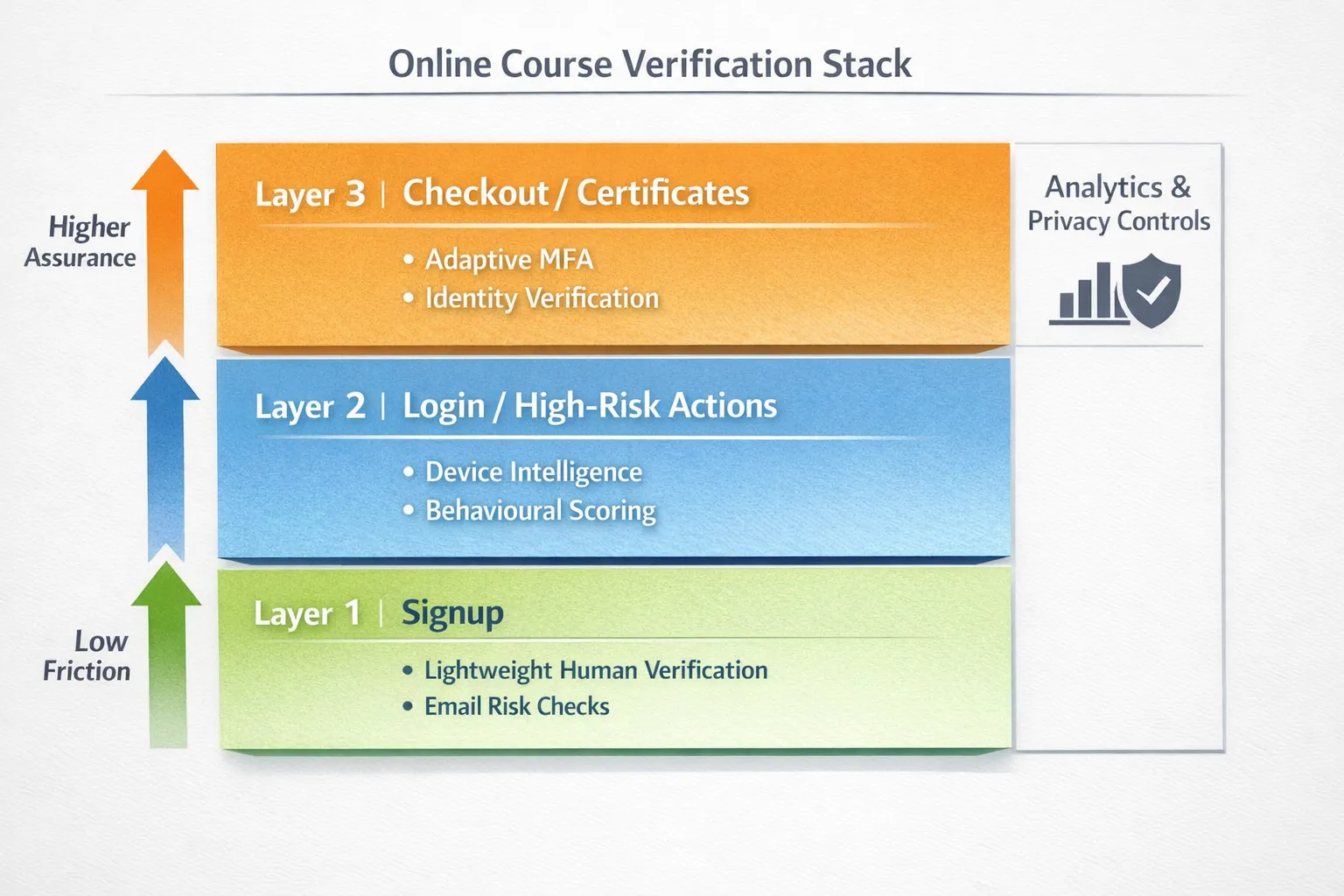
Where Bot Verification fits in
If you need a lightweight first gate that confirms users are not robots before granting access, Bot Verification provides a simple verification step with user authentication and access control that you can place at high‑risk points. It is a pragmatic starting layer for course creators who want quick protection without heavy engineering. When you need deeper controls, you can add behaviour and identity checks behind it.
Explore practical playbooks for course security and evaluation on AI Tool Shed:
- Best AI Tools to Stop Spam Signups
- AI Assistant Strategies for Frictionless Verification
- AI to Human Verification: Tools Course Creators Should Test
Final decision framework
- Start with risk and friction budgets per action, not with a vendor list.
- Shortlist two or three AI companies that match your highest‑value outcomes.
- Score them against the criteria table, then run a time‑boxed pilot with a holdout.
- Document accessibility, privacy and support evidence alongside KPI results.
- Choose the provider that reduces abuse the most for the least friction, at a total cost you can justify.
When in doubt, keep it simple. A layered, privacy‑conscious approach will outlast point solutions, and the right AI company will help you prove value within a single quarter.






