
ChatGPT for Course Creators: The 5 Prompts That Replace Hours of Planning

That’s exactly what ChatGPT can do when you know the right prompts to use. This guide provides you with five powerful, ready-to-use prompts that handle the heavy lifting of course planning—freeing you to focus on what truly matters: your unique knowledge and teaching style.
Why ChatGPT Is a Course Creator’s Secret Weapon
Before diving into the specific prompts, let’s understand why ChatGPT is particularly valuable for course creators:
What ChatGPT Does Well
- Generates structured outlines based on your expertise
- Expands bullet points into comprehensive scripts
- Creates varied examples and scenarios to illustrate concepts
- Develops knowledge-check questions at different difficulty levels
- Drafts persuasive marketing copy that highlights benefits
What You Still Need to Provide
- Your unique subject matter expertise
- Personal stories and case studies
- Specific methodologies and frameworks
- Your authentic teaching voice and style
- Quality control and factual verification
The key to success is using ChatGPT as a collaborative partner rather than expecting it to create your entire course. With the right prompts, you’ll maintain your authentic voice while dramatically accelerating your workflow.
Prompt 1: The Course Outline Generator
The foundation of any successful course is a well-structured outline. This prompt helps you create a comprehensive course structure that flows logically and covers all necessary topics.
I’m creating a course about [TOPIC]. My target audience is [DESCRIBE AUDIENCE: experience level, goals, pain points]. The main transformation I want to provide is [DESCRIBE OUTCOME].
Please create a detailed course outline with:
1. 5-7 main modules that follow a logical progression
2. 3-5 lessons under each module
3. Key learning objectives for each module
4. A brief description of what each lesson will cover
5. Suggested time allocation for each module
My unique approach or methodology includes [YOUR UNIQUE ANGLE]. Some topics that must be included are [MUST-HAVE TOPICS].
How to Use This Prompt Effectively
The more specific you are about your audience and desired outcomes, the better your outline will be. Don’t skip the “unique approach” section—this is where you inject your personal methodology and prevent generic results.
Example Output
When used for a course on “Email Marketing for Small Business Owners,” this prompt generates a structured outline with modules like “Building Your Email Foundation,” “Growing Your List Strategically,” and “Crafting Emails That Convert,” each with detailed lessons and clear learning objectives.
Refining Your Results
After receiving the initial outline, you can ask ChatGPT to:
- Reorder modules for better flow
- Expand a specific module that needs more detail
- Suggest potential activities or exercises for each module
- Recommend prerequisite knowledge for the course
Get All 5 Course Creation Prompts as Ready-to-Use Templates
Save these prompts as editable templates you can customise for any course topic. Just copy, paste, and fill in your details to start creating your course in minutes.
Prompt 2: The Lesson Script Developer
Once you have your outline, the next challenge is expanding each lesson into a full script or detailed talking points. This prompt helps you develop comprehensive lesson content that’s engaging and educational.
I need to create a script for Lesson [NUMBER]: “[LESSON TITLE]” in my course about [COURSE TOPIC]. This lesson belongs to Module [MODULE NUMBER]: “[MODULE TITLE]”.
The learning objectives for this lesson are:
1. [OBJECTIVE 1]
2. [OBJECTIVE 2]
3. [OBJECTIVE 3]
Please create a detailed lesson script with:
1. An engaging introduction that hooks the learner
2. Clear explanations of key concepts
3. Practical examples or demonstrations
4. A summary of main takeaways
5. A transition to the next lesson
My teaching style is [DESCRIBE: conversational, formal, story-based, etc.]. Please write this in a [TONE: friendly, authoritative, enthusiastic] voice. The lesson should be approximately [LENGTH: 10-15 minutes, 1500-2000 words, etc.].
How to Use This Prompt Effectively
The key to getting a script that sounds like you is clearly describing your teaching style and preferred tone. For video scripts, specify whether you need teleprompter-ready content or just talking points.
Example Output
For a lesson on “Creating Effective Email Subject Lines,” this prompt generates a complete script with an attention-grabbing introduction, explanation of subject line psychology, examples of successful and unsuccessful subject lines, and practical formulas to follow.
Refining Your Results
After receiving the initial script, you can ask ChatGPT to:
- Add more examples or case studies
- Simplify complex explanations
- Format the script for teleprompter reading
- Create slide content to accompany the script
Prompt 3: The Example and Case Study Generator
Great courses bring concepts to life through relevant examples and case studies. This prompt helps you create diverse, realistic examples that illustrate your teaching points and engage learners.
I need to create [NUMBER] examples/case studies for my lesson on [LESSON TOPIC] in my [COURSE TITLE] course.
My audience consists of [AUDIENCE DESCRIPTION]. The key concept I’m trying to illustrate is [CONCEPT].
For each example/case study, please provide:
1. A realistic scenario with context
2. The specific problem or challenge faced
3. How does the concept from my lesson applies
4. The solution or outcome
5. 1-2 key takeaways for students
Please create diverse examples that would resonate with different segments of my audience. Make the examples detailed enough to be believable but concise enough to use in a lesson.
How to Use This Prompt Effectively
Specify the industry, skill level, and context that would be most relevant to your audience. If you have a specific format in mind (like “before and after” examples), include that in your prompt.
Example Output
For a lesson on “Customer Segmentation Strategies,” this prompt generates diverse case studies featuring businesses of different sizes and industries, each showing how segmentation solved a specific marketing challenge.
Refining Your Results
After receiving the initial examples, you can ask ChatGPT to:
- Make examples more relevant to a specific industry
- Add quantifiable results to case studies
- Create “what not to do” examples
- Develop step-by-step breakdowns of each example
Never Run Out of Engaging Examples Again
Get our expanded Example Generator Pack with 15 specialised prompts for creating different types of examples—from case studies to analogies to “day in the life” scenarios.
Prompt 4: The Quiz and Assessment Creator
Effective assessments reinforce learning and help students gauge their progress. This prompt helps you create varied quiz questions and assessments that test comprehension at different levels.
I need to create assessment questions for my lesson on [LESSON TOPIC] in my [COURSE TITLE] course.
The main learning objectives for this lesson are:
1. [OBJECTIVE 1]
2. [OBJECTIVE 2]
3. [OBJECTIVE 3]
Please create:
1. [NUMBER] multiple-choice questions (with 4 options each and one correct answer)
2. [NUMBER] true/false questions
3. [NUMBER] short-answer questions
4. [NUMBER] application/scenario-based questions
Include a mix of difficulty levels (basic recall, understanding, application, and analysis). For each question, please provide the correct answer and a brief explanation of why it’s correct.
How to Use This Prompt Effectively
Be specific about the concepts you want to test and the cognitive levels you want to target (from basic recall to complex application). If you’re using a specific learning management system, mention any formatting requirements.
Example Output
For a lesson on “Basic HTML for Beginners,” this prompt generates a variety of questions ranging from simple tag identification to scenario-based problems where students must identify the correct code to achieve a specific result.
Refining Your Results
After receiving the initial questions, you can ask ChatGPT to:
- Make questions easier or more challenging
- Create more questions focused on a specific concept
- Develop a practical assignment instead of quiz questions
- Format questions for import into your learning platform
Prompt 5: The Course Marketing Copy Generator
Even the best course needs effective marketing to reach students. This prompt helps you create compelling copy for emails, social media, and landing pages that highlight your course’s value.
I need marketing copy for my new course titled “[COURSE TITLE]” about [COURSE TOPIC].
My target audience is [AUDIENCE DESCRIPTION]. Their main pain points are [PAIN POINTS], and they want to achieve [DESIRED OUTCOMES].
The unique benefits of my course include:
1. [BENEFIT 1]
2. [BENEFIT 2]
3. [BENEFIT 3]
Please create:
1. A compelling course description (250-300 words)
2. 5 email subject lines for a launch sequence
3. The body for an introductory email (300-400 words)
4. 3 social media posts for [PLATFORM: Instagram, Facebook, LinkedIn]
5. 3 testimonial templates I can customise with student results
The tone should be [TONE: conversational, professional, enthusiastic] and should emphasise transformation rather than just features.
How to Use This Prompt Effectively
Focus on clearly articulating your course’s unique value proposition and the specific transformation it provides. Include any special offers, bonuses, or urgency factors if applicable.
Example Output
For a “Productivity System for Creative Professionals” course, this prompt generates a compelling course description that highlights the unique methodology, email subject lines that spark curiosity, and social media posts that address specific pain points of creative professionals.
Refining Your Results
After receiving the initial marketing copy, you can ask ChatGPT to:
- Adjust the tone to better match your brand voice
- Create copy for specific marketing channels
- Develop an FAQ section for your landing page
- Write follow-up emails for different segments
Launch Your Course with Confidence
Get our complete Course Marketing Blueprint with 20+ prompts for creating your entire launch sequence—from teaser content to closing emails.
How to Avoid Generic Output: The Guardrails
The biggest risk when using ChatGPT for course creation is ending up with generic content that sounds like every other AI-generated course. Here are proven guardrails to ensure your course maintains your unique voice and expertise:
Before Generating Content
- Provide specific context – Include details about your background, methodology, and unique approach
- Share your voice – Give examples of your writing or speaking style
- Define your audience precisely – The more specific, the less generic the output
- Include proprietary frameworks – Mention your unique models or systems
- Reference your existing content – Link to or paste examples of your work
After Generating Content
- Inject personal stories – Add your own experiences and case studies
- Verify all facts and figures – AI can “hallucinate” data
- Add your unique insights – Include perspectives only you can provide
- Refine through iteration – Ask ChatGPT to revise based on feedback
- Humanise the language – Edit for your natural speech patterns
The “Personal Touch” Prompt Add-On
Add this text to any of the five core prompts to dramatically improve personalisation:
Make this content uniquely mine by incorporating these elements:
1. My background includes [YOUR EXPERIENCE/CREDENTIALS]
2. My teaching style is [DESCRIBE YOUR APPROACH]
3. I often use [SPECIFIC METAPHORS/EXAMPLES] to explain concepts
4. My unique perspective on this topic is [YOUR UNIQUE ANGLE]
5. Please avoid [CLICHÉS OR APPROACHES YOU DISLIKE]
Example of Generic vs. Personalised Output
Generic Output
“In this module, we’ll explore email marketing best practices. You’ll learn how to create effective campaigns that drive results. First, we’ll cover list building, then email design, and finally analytics.”
Personalized Output
“Drawing from my 8 years running campaigns for SaaS startups, I’ll show you my ‘Response Triad’ approach to email marketing. Unlike the standard ‘spray and pray’ method you’ve probably heard about, we’ll focus on the psychology behind high-converting emails—the same approach that helped my clients see a 34% average increase in open rates.”
Your 15-Minute Course Creation Workflow
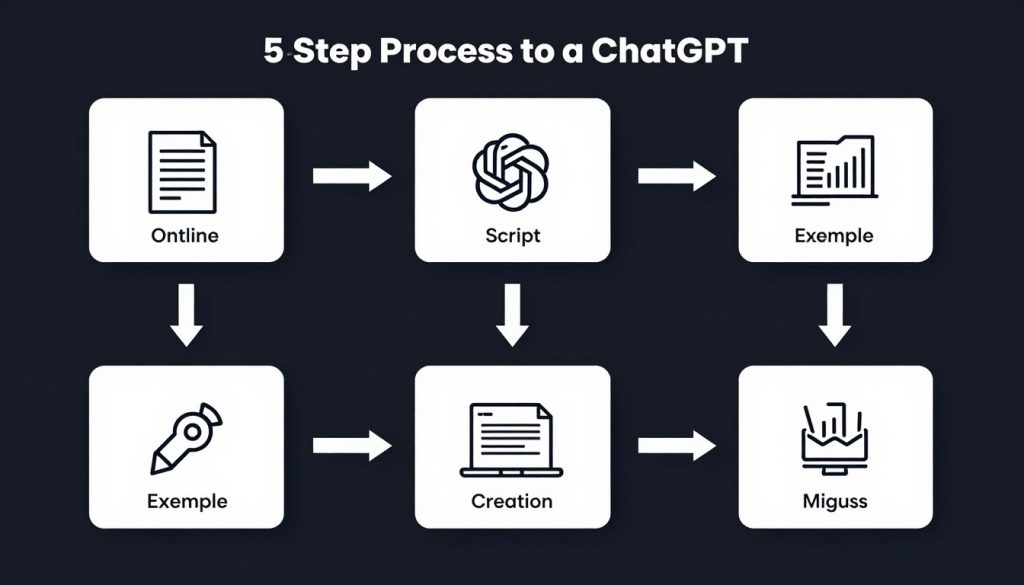
Here’s how to put these five prompts together into a streamlined course creation workflow:
- Generate your course outline (Prompt 1) – Create the structural framework
- Develop lesson scripts (Prompt 2) – Flesh out each module with detailed content
- Create supporting examples (Prompt 3) – Illustrate concepts with relevant scenarios
- Build assessments (Prompt 4) – Develop quizzes and activities to reinforce learning
- Craft marketing materials (Prompt 5) – Prepare to promote your finished course
The beauty of this system is its flexibility. You can complete all five steps in sequence, or you can focus on one aspect of your course at a time. For example, you might generate all your quizzes at once, or develop marketing copy while you’re still finalizing content.
Time-Saving Tips
- Save your prompts as templates to reuse for future courses
- Use ChatGPT to expand on your own rough drafts rather than starting from scratch
- Generate content in batches (all scripts, all quizzes, etc.) for consistency
- Create a “course style guide” prompt that you can paste at the beginning of each session
Get the Complete ChatGPT Course Creation System
Download our comprehensive guide with all 5 core prompts plus 25 specialised prompts for every aspect of course creation—from student personas to interactive activities.
From Hours to Minutes: Transform Your Course Creation Process
The five prompts in this guide aren’t just time-savers—they’re transformation tools that change how you approach course creation. By leveraging ChatGPT strategically, you can:
- Reduce planning time from days to hours (or even minutes)
- Overcome creative blocks and “blank page syndrome”
- Create more comprehensive, well-structured courses
- Develop better supporting materials and assessments
- Launch your course with professional marketing materials
Remember that ChatGPT is your assistant, not your replacement. Your expertise, experience, and unique teaching style remain the heart of your course. These prompts simply help you express that value more efficiently and effectively.
Start with just one prompt today. See how it transforms your workflow, then gradually incorporate the others. Before long, you’ll wonder how you ever created courses without this powerful AI assistant by your side.
Your students are waiting for your knowledge. Now you can deliver it faster, better, and with less stress than ever before.
Ready to Create Your Next Course in Record Time?
Get instant access to all 5 prompts as editable templates, plus our bonus guide “Beyond the Basics: Advanced ChatGPT Techniques for Course Creators.”
Frequently Asked Questions
Will my course sound like it was written by AI if I use these prompts?
Not if you follow the guardrails provided in this guide. The key is to use ChatGPT for structure and initial drafts, then infuse your unique voice, examples, and expertise. Always review and personalise the output before using it in your course. The most successful course creators use these prompts as starting points, not final products.
How can I ensure the content ChatGPT generates is accurate?
Always fact-check information provided by ChatGPT, especially statistics, dates, and specific claims. ChatGPT can occasionally “hallucinate” or generate incorrect information. For technical or specialised topics, review the content against reliable sources or your own expertise. Remember that you’re responsible for the accuracy of your course content.
Can ChatGPT help update or improve an existing course?
Absolutely! Provide ChatGPT with your current course outline or content and ask it to suggest improvements. You can request updated examples, additional quiz questions, or ideas for new modules. ChatGPT can also help identify gaps in your current curriculum or suggest ways to make complex topics more accessible.
Do I need the paid version of ChatGPT to use these prompts?
While the free version of ChatGPT can handle these prompts, ChatGPT Plus (the paid version) offers several advantages for course creators: faster response times, priority access during peak times, and access to GPT-4, which generally produces higher quality, more nuanced content. If you’re creating courses regularly, the subscription is worth considering.
How do I handle writer’s block when creating course content?
ChatGPT is excellent for overcoming writer’s block. Start by describing what you’re stuck on, and ask for 3-5 different approaches or starting points. You can also use the “continue this” technique—write the first few sentences yourself, then ask ChatGPT to continue in your style. This often triggers your own creativity while giving you material to build upon.