AI to Human Verification: Tools Course Creators Should Test

AI is transforming how online courses are built, marketed and delivered. It is also changing how fraudsters behave. Between bot sign ups that bloat your email list, coupon abuse, shared logins and AI-assisted exam cheating, course creators now need practical guardrails that keep the learning experience open and accessible while preserving trust.
This guide explains AI to human verification for course businesses and the tools worth testing in 2025. You will find a short list of vetted options, where they fit in a typical course funnel and how to pilot them without killing conversion.
What “AI to human verification” really means in 2025
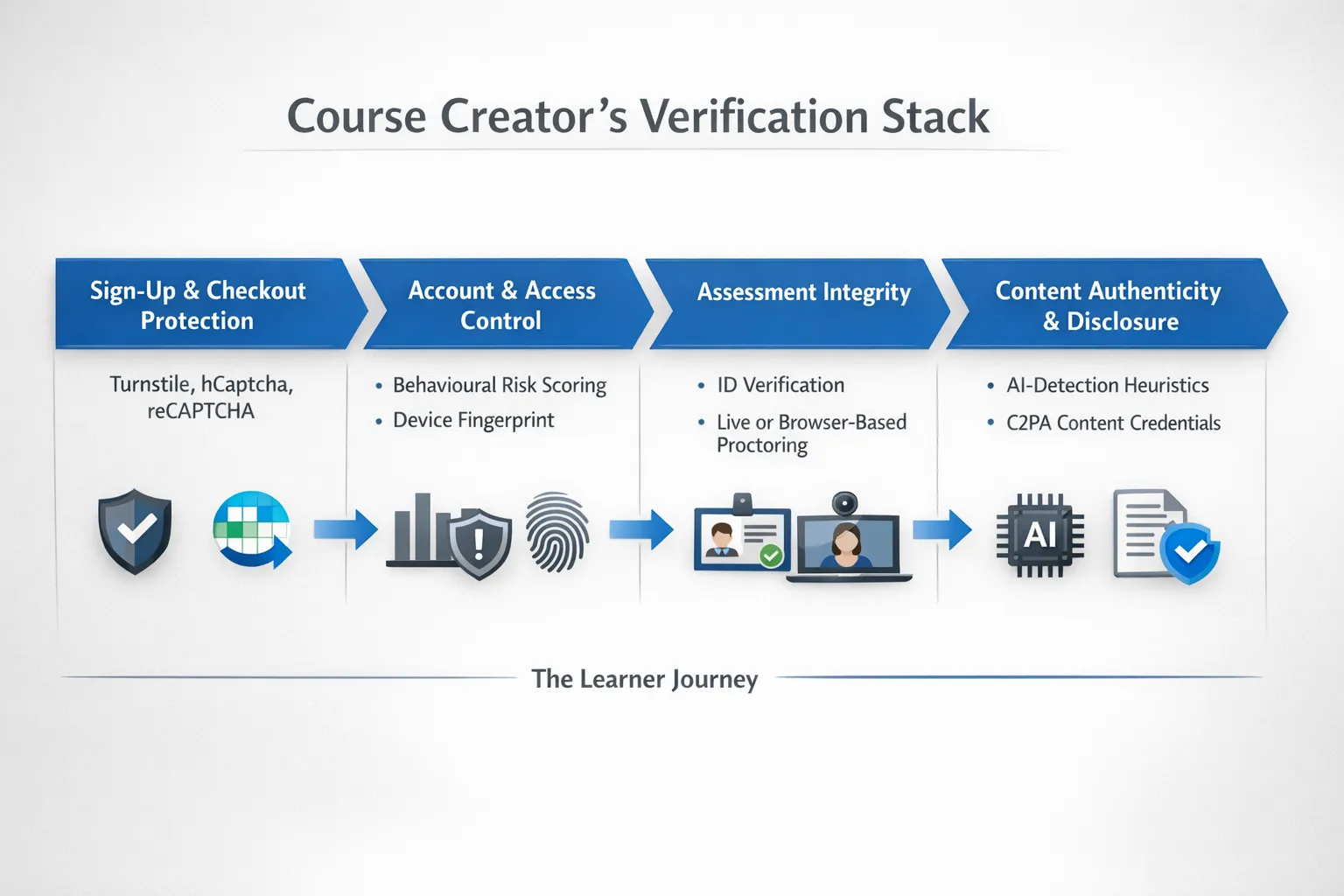
AI to human verification spans three practical needs for course creators:
- Prove a user is a human, not a bot, during sign up, freebies and checkout.
- Verify that a real person completes gated learning or assessments, especially for certificates.
- Be transparent about AI-assisted content and check for obvious AI misuse without relying entirely on unreliable detectors.
The goal is balance. You want enough friction to deter abuse, not so much that you lose genuine students or run into accessibility barriers.
Tools to test by job-to-be-done
1) Keep bots out of sign ups and checkouts
- Cloudflare Turnstile, privacy-first CAPTCHA alternative that uses non-intrusive checks and challenges only when needed. It reduces frustration compared with image puzzles. Learn more.
- hCaptcha, drop-in widget that protects forms and logins with accessible challenges and enterprise policies. Learn more.
- Google reCAPTCHA v3 or v2, v3 provides a risk score you can use to silently block or flag, v2 shows explicit challenges. Overview.
When testing, start with the least intrusive option and only escalate to puzzles if you see abuse. Many platforms let you add multiple providers and fail over.
2) Strengthen account and access control
- Fingerprint, device fingerprinting and bot detection to reduce shared accounts and scripted abuse. Useful for high-value programmes or community areas. Website.
- Cloudflare Bot Management or Arkose Labs, heavier-duty anti-abuse for sites with sustained attacks or reseller fraud. These are typically overkill for smaller course sites.
Use behavioural signals to flag risky sessions for extra checks rather than blocking everyone by default.
3) Verify identity and protect assessments
- Persona or Onfido, user-friendly ID verification and KYC flows you can trigger for high-stakes exams or credential issuance. Persona and Onfido.
- Proctorio or Honorlock, proctoring solutions that monitor during exams, with options for automated and human review. Proctorio and Honorlock.
- Respondus LockDown Browser, locks the testing environment and blocks copy paste or switching apps. Respondus.
Keep in mind that not every course needs proctoring. Consider it for certifications, graded exams or corporate compliance training. Always offer reasonable accommodations and be transparent about what is recorded.
4) Check content authenticity and disclose AI use
- Originality.ai and GPTZero, detectors that provide probabilistic signals about AI-written text. They can be useful as a heuristic, not a verdict. Originality.ai and GPTZero.
- C2PA and Content Credentials, cryptographic content credentials that let you attach provenance data to media and disclose AI assistance. Increasingly supported by creative tools. C2PA and Content Credentials.
Detectors alone should not be used to penalise learners or contractors, because false positives and domain bias exist. Use them to prompt a conversation or an extra review step.
5) Humanise AI-assisted writing without gaming detectors
For sales pages, lesson summaries and help docs, AI is great for first drafts. To make the output sound like you and maintain EEAT, use editing tools that improve clarity and tone, then add lived experience, examples and brand voice. Our guide to the space covers reliable options and workflows, see Best AI Writing Tools for Bloggers: Complete 2025 Guide. If your aim is only to fool detectors, rethink the goal. Focus on quality, transparency and audience trust instead.
Quick comparison at a glance
| Category | Tools to try | Best for | Key strengths | Trade offs |
|---|---|---|---|---|
| Bot gate on forms | Cloudflare Turnstile, hCaptcha, reCAPTCHA | Freebies, waitlists, checkout | Low friction, easy to add, protects funnels | Can reduce conversion if over-aggressive |
| Account abuse control | Fingerprint | Shared logins, coupon abuse | Behavioural signals and device insights | Requires careful privacy review |
| Exam integrity | Persona, Onfido, Proctorio, Honorlock, Respondus | High-stakes tests, certifications | Verifies identity, deters cheating | Accessibility, privacy and support overhead |
| Content authenticity | Originality.ai, GPTZero | Contractor QA, scholarship essays, forum posts | Fast heuristics for AI-written text | Not definitive, risk of false positives |
| Transparency | C2PA, Content Credentials | Lesson media, downloadable assets | Clear disclosure and provenance | Requires compatible tools and publishing workflow |
How to choose with minimal friction
- Map risk to value. Use light-touch checks for free downloads and stronger checks for exams, certificates and high-ticket cohorts.
- Start with one tool per layer. CAPTCHA at sign up, optional device risk for suspicious sessions, ID verification for assessments.
- Prioritise accessibility. Choose providers with keyboard navigation, audio options and WCAG-compliant widgets. Offer alternative verification routes when needed.
- Respect privacy and local law. Proctoring and biometrics have strict obligations under GDPR and other laws. Provide clear notices, retention timelines, and a contact point for questions.
- Monitor the right metrics. Watch conversion rate, false positive rate, support tickets, and student satisfaction alongside abuse reduction.
Pilot plan you can run in two weeks
- Instrument baseline metrics, capture current conversion at sign up and checkout, support ticket volume and any abuse indicators.
- Add Turnstile or hCaptcha to your highest-traffic form. Run an A or B test for seven days.
- Add ID verification only to the assessment or certificate that carries the most value. Keep the rest unchanged for now.
- Use an AI detector as a heuristic in your content QA checklist, not a gate. Require reviewers to cite specific passages and feedback.
- Publish an AI and privacy policy page. Declare where you use AI assistance in content, what you collect during verification and how learners can opt for accommodations.
If you automate parts of this rollout, see our hands-on walkthrough, Zapier Review: Ultimate Automation Tool for AI Workflows, and connect form events to alerts or moderation queues.
Implementation notes for popular course stacks
- Hosted platforms, many hosted platforms like Kajabi, Teachable and Thinkific allow you to enable CAPTCHA on forms or inject a snippet. If you cannot access templates, use a landing page builder that supports it and pass approved leads into your LMS.
- Custom or headless sites, place Turnstile or hCaptcha at registration and key API endpoints, and send risk scores to your backend to rate limit or require extra steps.
- Communities and cohorts, use behavioural signals to flag unusual login patterns before locking accounts. Apply stronger verification only to the flagged users.
- Certification workflows, trigger Persona or Onfido only at the point of issuing a certificate, not for routine quizzes. Store verification proofs securely with strict retention limits.
Practical guardrails for fairness and trust
- Accessibility by design, test challenges with keyboard only, screen readers and low-vision modes. Provide non-visual alternatives for image-based puzzles.
- Privacy impact assessment, document data flows for any vendor that captures biometrics, video or device fingerprints. Offer a contact email for data requests.
- Transparency over punishment, for content checks, share your policy, avoid auto-fails based solely on detectors and give learners a way to appeal.
- Human in the loop, assign a reviewer for edge cases, high-value orders and escalated exam sessions. Humans should make final decisions about sanctions.
For a deeper look at when to use AI versus human talent in your content operations, see AI vs Human Writers: When to Use Each for Your Content.
Example setups by objective
- Launching a new cohort with early-bird pricing, Turnstile on landing page forms, reCAPTCHA v3 risk scoring on checkout with a fallback challenge only for high-risk scores.
- Issuing verifiable certificates, ID check via Persona at certificate claim, Respondus for the capstone exam and a clear policy page that describes data handling.
- Running a scholarship application, submissions go through a light plagiarism and AI-suspect scan in Originality.ai or GPTZero, then human review with a rubric.
Common pitfalls to avoid
- Using AI detectors as final judgement, treat outputs as signals to review, not evidence. Combine with writing samples, interviews or live presentations if stakes are high.
- Turning on maximum friction everywhere, high friction depresses conversions and disadvantages legitimate learners. Escalate only where value or risk justifies it.
- Forgetting mobile users, test all verification flows on low-end Android devices and varying network conditions.
- Ignoring post-launch support, verification adds edge cases. Prepare help articles and macros for common issues like failed challenges or ID mismatch.

FAQ
Are AI text detectors reliable enough to grade or penalise students? No. They provide probabilistic signals and can be wrong, especially with non-native English writing or short passages. Use them to triage and inform human review, not as the sole basis for penalties.
Which CAPTCHA should I start with for my course site? Start with Cloudflare Turnstile because it is low friction. If abuse persists, test hCaptcha or reCAPTCHA v2 challenges as a fallback for high-risk traffic.
Do I need full proctoring for every quiz? Probably not. Reserve it for high-stakes assessments that grant certificates or compliance credit. Offer alternatives and be clear about what is recorded and why.
How can I prove my content was human-authored? Keep drafts and version history, add lived examples and references, and use Content Credentials or C2PA metadata for media. For writing, publish an authorship and AI assistance statement to set expectations.
What is an ethical use of “AI to human” tools? Use AI to draft and structure, then humanise by editing for clarity, voice and originality. Do not use tools whose sole purpose is to evade detection without adding value.
Ready to add a light, effective layer of protection to your course funnels? If you need a simple step that verifies users are not robots before granting access, try our bot verification. It slots into sign up or download flows and helps you keep real learners in and automated abuse out. Learn more at Bot Verification on AIToolshed.