
AI Freeware: Best Free Bot Verification Tools

If you sell courses, “free traffic” can get expensive fast. Bot signups bloat your email list, fake enrolments skew your analytics, and automated scraping can leak paid materials. The good news is that AI freeware (free-to-use, AI-assisted bot verification) has improved a lot in the last couple of years, and you can now add credible protection without paying enterprise prices.
This review covers the best free bot verification tools course creators can deploy in 2026, what they’re actually good at, and where they can quietly fail.
What “free bot verification” really means (and what it doesn’t)
Most “free” bot verification products fall into one of these buckets:
- Free core product: the vendor provides bot checks at no cost (common with modern CAPTCHA replacements).
- Free tier: you get limited volume, limited features, or no SLA, then you pay as you scale.
- Free building blocks: open-source bot detection libraries that can help you identify automation, but you still need to design your own enforcement (block, challenge, step-up verification).
For course creators, that last point matters: detection without enforcement can reduce abuse in your logs, but it won’t always stop a bot from taking your free download or hammering your login page.
How we evaluated these free tools (course-creator criteria)
This is a MOFU buyer’s guide. The goal is not “most advanced security on Earth”, it’s maximum protection per minute of setup, without damaging conversions.
Key criteria
Friction and conversion impact: Your lead magnet form and checkout are not the place for endless picture puzzles.
Accessibility: Traditional CAPTCHAs can be punishing for users with visual, cognitive, or motor impairments. WCAG-aligned UX is not optional if you want a broad audience.
Privacy and UK GDPR fit: If your students are in the UK/EU, you need to understand what data is processed, where, and under what legal basis.
Integration reality: Many course businesses run on WordPress + LMS plugins, hosted platforms (Teachable, Thinkific, Kajabi), or custom landing pages. A “great API” is only helpful if you can actually deploy it.
Bot threats that matter to creators:
- Spam signups and fake leads
- Credential stuffing on student logins
- Checkout abuse (card testing, coupon brute forcing)
- Content scraping (lesson pages, resource downloads)
Best AI freeware bot verification tools (2026 reviews)
1) Cloudflare Turnstile (best overall “free and low-friction”)
What it is: Cloudflare Turnstile is a CAPTCHA alternative designed to verify humans with minimal user interaction. In many cases, students won’t see a challenge at all.
Why it’s strong for course creators:
- Very low friction, which is ideal for opt-in forms, login, and checkout.
- Free to use for typical implementations, making it one of the clearest examples of true “AI freeware” in this category.
- Works well as a “default gate” before you add heavier controls (rate limiting, step-up auth, device intelligence).
Watch-outs:
- You still need to place it correctly. If you only put verification on signup, bots may switch to abusing password reset, login, or coupon fields.
- If you rely on lots of third-party embeds (LMS widgets, custom JS tracking), test thoroughly to avoid conflicts.
Best use cases in a course funnel:
- Newsletter/lead magnet forms
- Account registration
- Login and password reset
- Checkout “create account” flows
Docs: Cloudflare Turnstile documentation.
2) Google reCAPTCHA (best for plugin coverage and “it just works”)
What it is: Google’s reCAPTCHA (commonly v2 checkbox or v3 score-based) is still everywhere because it’s widely supported by forms, WordPress plugins, and hosted tools.
Why it’s strong for course creators:
- Excellent ecosystem support: many LMS and form builders support reCAPTCHA with minimal setup.
- Flexible modes: you can run an interactive checkbox challenge (v2) or a behind-the-scenes scoring approach (v3) and enforce thresholds server-side.
Watch-outs:
- Privacy and consent considerations: reCAPTCHA can involve cross-site signals and third-party processing. For UK/EU audiences, you may need to review your cookie/consent approach with care.
- User experience can degrade if a student is flagged and forced into repeated challenges, especially on mobile.
Best use cases in a course funnel:
- WordPress contact forms and checkout forms where you need maximum compatibility
- Situations where your stack already supports reCAPTCHA out of the box
Docs: Google reCAPTCHA guide.
3) hCaptcha (best “privacy-forward” alternative with a usable free tier)
What it is: hCaptcha is a widely used CAPTCHA alternative that focuses on bot detection and challenge-based verification. It’s often chosen when teams want an alternative to Google’s ecosystem.
Why it’s strong for course creators:
- Common choice for creators who are privacy-sensitive or who want a non-Google verification layer.
- Widely supported by web stacks and can be implemented quickly.
- Offers a free tier suitable for many smaller sites, with paid plans for higher volume and additional needs.
Watch-outs:
- Challenge-based systems can still add friction. If your audience skews mobile-heavy, older, or less technical, you should A/B test carefully.
- Like any CAPTCHA, it can create accessibility issues if not configured thoughtfully.
Best use cases in a course funnel:
- Registration and login protection where you want a non-Google option
- High-abuse endpoints (password reset, repeated failed logins)
Docs: hCaptcha developer documentation.
4) FingerprintJS BotD (best free “bot detection signal”, not a full verification step)
What it is: FingerprintJS BotD is an open-source bot detection library. It identifies likely automation based on browser/device signals.
Why it’s useful for course creators:
- It’s a free building block you can add when you want extra bot signals without paying for a full enterprise bot management suite.
- It can help you decide when to step up to a stricter verification action (show a challenge, require email verification, throttle requests).
Watch-outs:
- By itself, it’s not a complete verification tool. You must decide what to do with the signal.
- Any device intelligence approach needs a careful privacy review (data minimisation, retention, transparency).
Best use cases in a course funnel:
- Detecting scripted abuse on login and password reset
- Triggering adaptive controls (rate limits, step-up verification)
Project: FingerprintJS BotD on GitHub.
Comparison table (quick decision help)
| Tool | Free option | Typical friction | Best for course creators | Main caveat |
|---|---|---|---|---|
| Cloudflare Turnstile | Yes (widely used as free) | Low | Most funnels, especially opt-ins and checkout | Requires careful placement across endpoints |
| Google reCAPTCHA | Yes (core versions) | Medium to low (depends on version/config) | Plugin-heavy stacks and quick deployments | Privacy/consent and occasional user frustration |
| hCaptcha | Yes (free tier available) | Medium | Privacy-forward alternative to reCAPTCHA | Challenge friction and accessibility considerations |
| FingerprintJS BotD | Yes (open source) | None to user | Extra bot signal to trigger step-up controls | Detection only, you must implement enforcement |
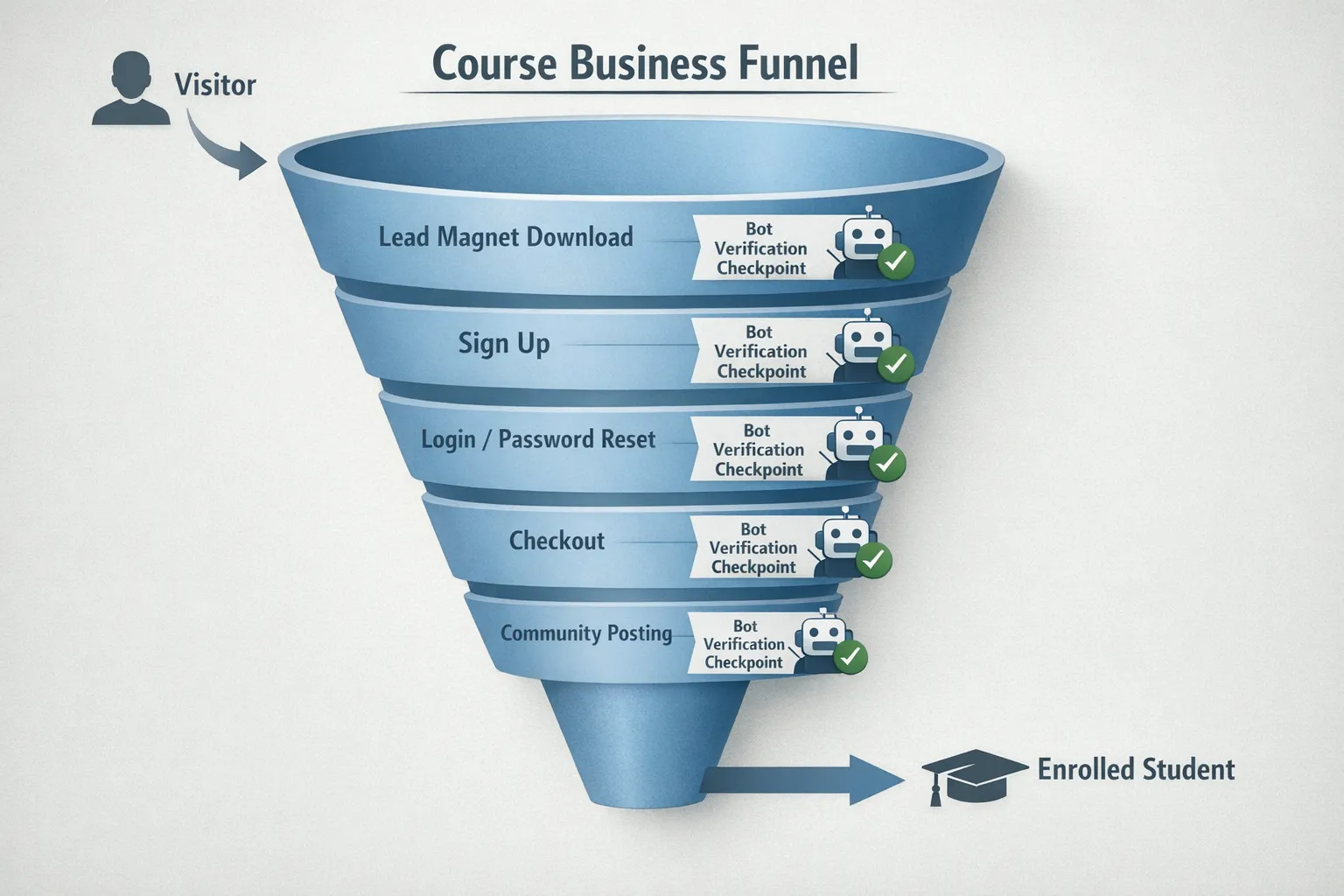
Where to place bot verification in a course business (the “minimum effective” map)
Most creators add verification to a single form and call it done. Bots rarely cooperate.
A more reliable approach is to gate actions, not browsing:
- Lead magnet download: verify before generating a download link (or email the link after verification).
- Signup and login: verify on registration, and also protect login and password reset.
- Checkout: verify when a new account is created, when coupons are applied repeatedly, or when payment attempts spike.
- Community and directories: verify actions like posting, voting, inviting, or creating listings.
If you run any public-facing directory or community feature, the same logic applies beyond education. For example, server listing sites often need anti-bot controls to prevent fake votes and spam. A concrete example is this French Minecraft server directory that surfaces ranked listings and voting, which are common bot targets.
Practical recommendations (pick the right freeware tool fast)
If you want the simplest “set it and forget it” free option
Choose Cloudflare Turnstile for most creators. It’s typically the lowest-friction way to add a human check to forms and authentication flows.
If your stack is WordPress-heavy and you need maximum plugin compatibility
Choose Google reCAPTCHA first, then measure friction. It’s often the fastest path to “working protection” because so many plugins support it.
If you want an alternative to Google for privacy or policy reasons
Choose hCaptcha, then test it on mobile and track drop-off.
If you’re technical and want an extra layer without adding friction
Add FingerprintJS BotD as a signal to trigger step-up controls, such as showing a challenge only when bot probability is high.
Implementation tips that prevent 80% of mistakes
Track outcomes, not feelings. Put basic KPIs in place before and after you deploy:
- Form conversion rate (per device)
- Signup-to-email-confirmation rate
- Failed login rate and password reset attempts
- Support tickets that mention login issues
Avoid “always challenge” defaults. If you can use a low-friction check first (or a behind-the-scenes score), do that. Escalate only when behaviour looks suspicious.
Don’t forget accessibility. At minimum, test:
- Mobile Safari and Chrome
- Screen reader flows (where relevant)
- Low bandwidth conditions
Keep a fallback route. For example: if verification fails repeatedly, offer a manual support link or email verification step, otherwise you risk blocking legitimate students.
Frequently Asked Questions
Are free bot verification tools good enough for selling online courses? Yes for many creators, especially for stopping basic spam and automated signups. If you face targeted abuse (credential stuffing, card testing, scraping at scale), you may need to layer additional controls like rate limiting, adaptive authentication, or device intelligence.
Which free bot verification tool has the lowest friction? In most real-world course funnels, Cloudflare Turnstile tends to be the lowest-friction option because many users never see an interactive challenge.
Will a free CAPTCHA stop content scraping? Not by itself. CAPTCHAs help at key “entry points” (signup, login, downloads), but scraping often requires additional measures like authenticated access, signed URLs for downloads, and rate limits.
Do these tools work on hosted course platforms like Teachable or Kajabi? Sometimes, but it depends on what the platform allows. Many hosted platforms limit custom code on sensitive pages (like checkout). In those cases, you may need to protect upstream pages (lead capture, registration) and use platform-native security controls.
Add a simple bot check before you scale traffic
If you want a straightforward verification step to confirm users are not robots before granting access, you can also explore Bot Verification on AIToolShed. It’s designed around the core needs course creators care about, robot verification, user authentication, and access control, without overcomplicating the setup.
The smartest next step is to pick one freeware tool from this list, place it on your highest-risk endpoint (usually signup or lead magnet delivery), and measure conversion and abuse metrics for two weeks. Then expand to login and password reset once the first checkpoint is stable.