
AI Tools for Content Creation with Built-In Verification

AI content tools can help course creators publish faster, repurpose lessons into multiple formats, and keep a consistent cadence without burning out. But there’s a downside most people only notice once they scale: the more content you publish (and the more lead magnets, free previews, templates, and downloads you offer), the more you attract automated abuse.
That abuse is not hypothetical. In Imperva’s Bad Bot Report, automated traffic has recently accounted for roughly half of all internet traffic, with “bad bots” a significant share of the total. That’s why “verification” is becoming part of the content stack, not just the security stack.
This review breaks down AI tools for content creation with built-in verification (or verification-like controls), specifically through the lens of course creators who need both speed and trust.
What “built-in verification” should mean in a course creator’s content stack
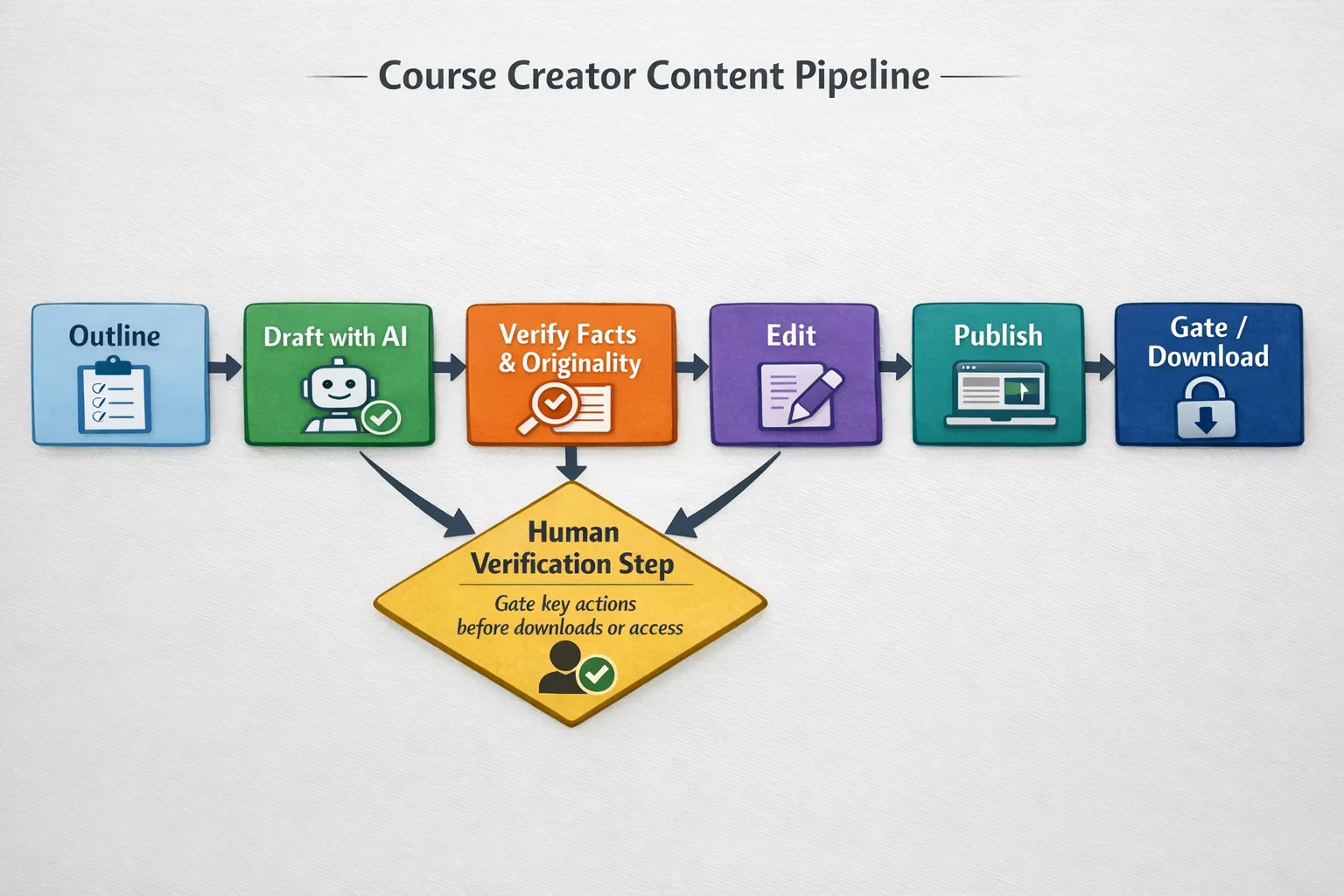
When creators hear verification, they usually think “CAPTCHA”. For content operations, it’s broader and more useful to think in three layers:
1) Content verification (Is the output trustworthy?)
This is about reducing the risks of publishing:
- Incorrect claims in lessons or marketing pages
- Uncited statements that weaken credibility
- Plagiarised or duplicate copy that can harm brand trust (and sometimes SEO)
Look for features like citations, fact-checking workflows, and plagiarism/originality checks.
2) Workflow verification (Can you prove what changed and why?)
As soon as you collaborate (VA, co-instructor, editor), you need controls like version history, attribution, and review steps. These are “verification” features because they let you audit and validate changes.
3) Human verification (Are your users real?)
This is where bot checks and access control matter. If a bot can scrape your free mini-course, brute-force student logins, or mass-download templates, your content workflow becomes an attack surface.
A good stack verifies both the content and the people interacting with it.
How I’m reviewing these tools (so you can compare fairly)
For course creators, the best tools are not the ones with the most AI features. They’re the ones that reduce risk without adding a ton of friction. Here are the criteria used in the reviews below:
- Verification type: facts, sources/citations, originality, workflow auditability, or human checks
- Where it fits: lessons, blog content, scripts, support docs, student comms
- Risk trade-offs: what it helps prevent, and what it doesn’t
- Creator practicality: how well it supports a repeatable publishing process
Tool reviews: AI content creation with verification built in
1) LongShot AI (content drafting with built-in fact-checking workflow)
What it is: LongShot AI positions itself as a content creation platform with an emphasis on accuracy, including its FactGPT capability.
Verification angle: Instead of treating verification as a separate step you do “later”, LongShot bakes it into the writing workflow by focusing on fact-checking and reducing unsupported claims.
Where it fits for course creators:
Use it when you produce content where accuracy is part of your brand promise, for example:
- Thought-leadership posts that support your course topic
- High-stakes sales pages (claims, outcomes, comparisons)
- Lesson notes where you reference research, regulations, or technical details
Watch-outs: Fact-checking tools reduce mistakes, but they don’t replace judgement. You still need a final pass for nuance, context, and “is this what I actually teach?”.
Verdict: A strong pick when you want AI speed and a workflow that pushes you toward verifiable writing.
2) CustomGPT.ai (source-cited outputs for course knowledge bases)
What it is: A platform for building a custom GPT-style assistant trained on your business/course content, designed to answer questions with lower hallucination risk.
Verification angle: It’s specifically positioned around anti-hallucination behaviour with citations. For creators, citations are “verification UX”: they give you and your students a way to validate the answer quickly.
Where it fits for course creators:
- Student support bots that answer “Where do I find X?” or “What does this term mean in your framework?”
- Internal “course ops” assistants for your team (SOPs, policies, content guidelines)
Watch-outs: Your verification strength depends on your inputs. If you train it on messy, outdated docs, you get confidently wrong answers with citations to outdated docs.
Verdict: One of the most practical ways to add verification to AI-driven student support because citations create built-in accountability.
3) WriterZen (SEO content workflow with originality checks)
What it is: An all-in-one SEO content workflow tool combining topic discovery, keyword research, AI-assisted writing, and plagiarism checking.
Verification angle: The standout “verification” feature here is plagiarism checking, which helps validate that what you’re about to publish is original (or at least not unintentionally duplicative).
Where it fits for course creators:
- SEO articles that bring qualified learners into your funnel
- Content briefs for writers or assistants
- Updating older posts without accidentally duplicating competitor phrasing
Watch-outs: Plagiarism checks are not the same as “quality checks”. Original content can still be weak, inaccurate, or off-brand.
Verdict: A solid choice if organic traffic is part of your growth plan and you want originality verification inside the same workflow.
4) ProWritingAid (quality control plus optional plagiarism checks)
What it is: A writing assistant known for deep style reports, long-document analysis, and editing support.
Verification angle: Its “verification” value is about consistency and quality control (and, depending on setup/plan, plagiarism checking as an add-on). For course creators, consistency is not cosmetic, it’s trust.
Where it fits for course creators:
- Long-form lessons, course guides, and workbooks
- Email sequences where tone matters
- Editing AI drafts to sound like a real instructor
Watch-outs: Editing tools can over-standardise your voice if you accept every suggestion. Your teaching voice should remain yours.
Verdict: Best as the final quality gate before publishing lessons or sending student comms at scale.
5) Otter.ai (transcription with speaker identification for auditable lesson assets)
What it is: A transcription and meeting-notes platform that can generate summaries, searchable transcripts, and speaker identification.
Verification angle: For creators, the “verification” isn’t about bots, it’s about attribution and auditability. If you record lessons, coaching calls, or cohort Q&A sessions, a good transcript with speaker labelling helps verify what was said, when, and by whom.
Where it fits for course creators:
- Turning workshops into structured modules
- Creating lesson notes and searchable archives for students
- Building a “source of truth” before you generate AI summaries, clips, or posts
Watch-outs: Always get consent where required and be careful with sensitive student data in recordings. Verification should not come at the cost of privacy.
Verdict: A strong operational tool for creators who teach live and want reliable source material to repurpose.
6) Bot Verification (human verification before access)
What it is: A simple verification step to confirm users are not robots before granting access, focused on robot verification, user authentication, and access control.
Verification angle: This is the missing piece in many “AI content stacks”. You can verify facts and originality perfectly, then lose the benefit if bots:
- Hammer your signup forms
- Mass-download lead magnets
- Attempt credential stuffing on student logins
- Scrape public lesson previews or resource libraries
Where it fits for course creators:
- Before downloads (PDFs, templates, swipe files)
- Before free previews (sample module access)
- Before account creation or login attempts
Watch-outs: Any human check can introduce friction. The goal is a lightweight gate that protects the highest-risk actions while keeping legitimate learners moving.
Verdict: If your content creation is working (traffic is rising), this type of human verification becomes less “nice to have” and more “protect the funnel”.
Comparison table: which verification problem each tool solves
| Tool | Primary content job | Built-in verification focus | Best used when… |
|---|---|---|---|
| LongShot AI | Draft long-form content | Fact-checking workflow | Accuracy matters to credibility and conversions |
| CustomGPT.ai | Create AI support assistant | Citations and lower-hallucination behaviour | You want support answers tied to your own sources |
| WriterZen | SEO planning and writing | Plagiarism checking | You publish SEO content regularly and want originality checks |
| ProWritingAid | Editing and style control | Consistency (plus optional plagiarism checks) | You need cleaner long docs and a consistent instructor voice |
| Otter.ai | Transcribe lessons/calls | Attribution via speaker identification | You teach live and want auditable source material |
| Bot Verification | Gate access actions | Human verification and access control | Bots target your signup, downloads, or previews |
Practical stacks for course creators (choose one based on your stage)
Solo creator publishing weekly
A simple, low-overhead stack is usually enough: one drafting tool with verification for accuracy or originality, plus a human verification gate on the highest-risk conversion points.
Example approach: draft with a fact-check oriented writer, polish with an editing tool, then add human verification before your lead magnet download.
Cohort-based course with live calls and heavy repurposing
Here, verification is about traceability. Start with high-quality transcripts so you can always point back to the original lesson, then generate derivative assets (summaries, articles, social posts) from that source.
Example approach: transcribe and summarise sessions, then create derivative content with citations and internal references. Gate replay access and downloadable resources to reduce scraping.
Growing academy with a small team
At this stage, tool choice matters less than repeatable implementation.
- Put a citation-led assistant in front of your knowledge base
- Add workflow controls (review steps, versioning) around lesson updates
- Protect sensitive actions (downloads, signups, login endpoints) with lightweight bot verification
If you need help implementing verification and access control reliably across cloud infrastructure and deployment pipelines, a specialist team like Tasrie IT Services (DevOps, cloud-native, automation) can be useful when you want it done properly without turning your course business into an engineering project.

A quick way to evaluate “verification quality” before you commit
Before paying for a new AI tool (or rolling it into your student experience), run a short test that forces the tool to prove its verification value:
- Accuracy test: Ask it to write a lesson segment that includes 5 to 10 factual claims. Check whether it can support them with clear sources (or whether it invents specifics).
- Originality test: Generate two drafts for similar topics. See if it repeats the same phrasing or produces meaningfully different structures.
- Workflow test: Make intentional edits over two days. Confirm you can track what changed and revert or review reliably (especially if you have collaborators).
- Abuse test: Identify your most abused endpoint (download, signup, coupon, login). Add a lightweight human verification step and watch conversion rate versus spam reduction.
The point is not to chase “perfect” verification. It’s to build a content engine that’s fast, credible, and resilient once your audience grows.






