
The Course Creator’s AI Toolkit for Access Control

High value courses deserve smooth, safe access. Yet in 2025, credential stuffing, scripted signups and automated scraping can quietly erode revenue and trust long before you see obvious red flags. This guide gives course creators a practical AI toolkit for access control, so you can welcome genuine learners while keeping bots and bad actors out without adding needless friction.
Why an AI toolkit, not just a CAPTCHA?
Traditional visual challenges often hurt mobile conversions and exclude users with disabilities. The W3C has long documented accessibility problems with CAPTCHAs, recommending alternatives that rely less on vision or audio alone, and more on behavioural or risk-based checks. See the W3C note “Inaccessibility of CAPTCHA” for background and best practices on inclusivity and alternatives to visual puzzles W3C.
Modern access control needs layered, context-aware defences. AI helps by scoring risk in real time, so low-risk learners sail through, while high-risk events trigger targeted friction like email verification or step-up MFA.
The access control stack for course creators
Think of access control as a set of modular layers you can deploy where they deliver the most value and the least friction.
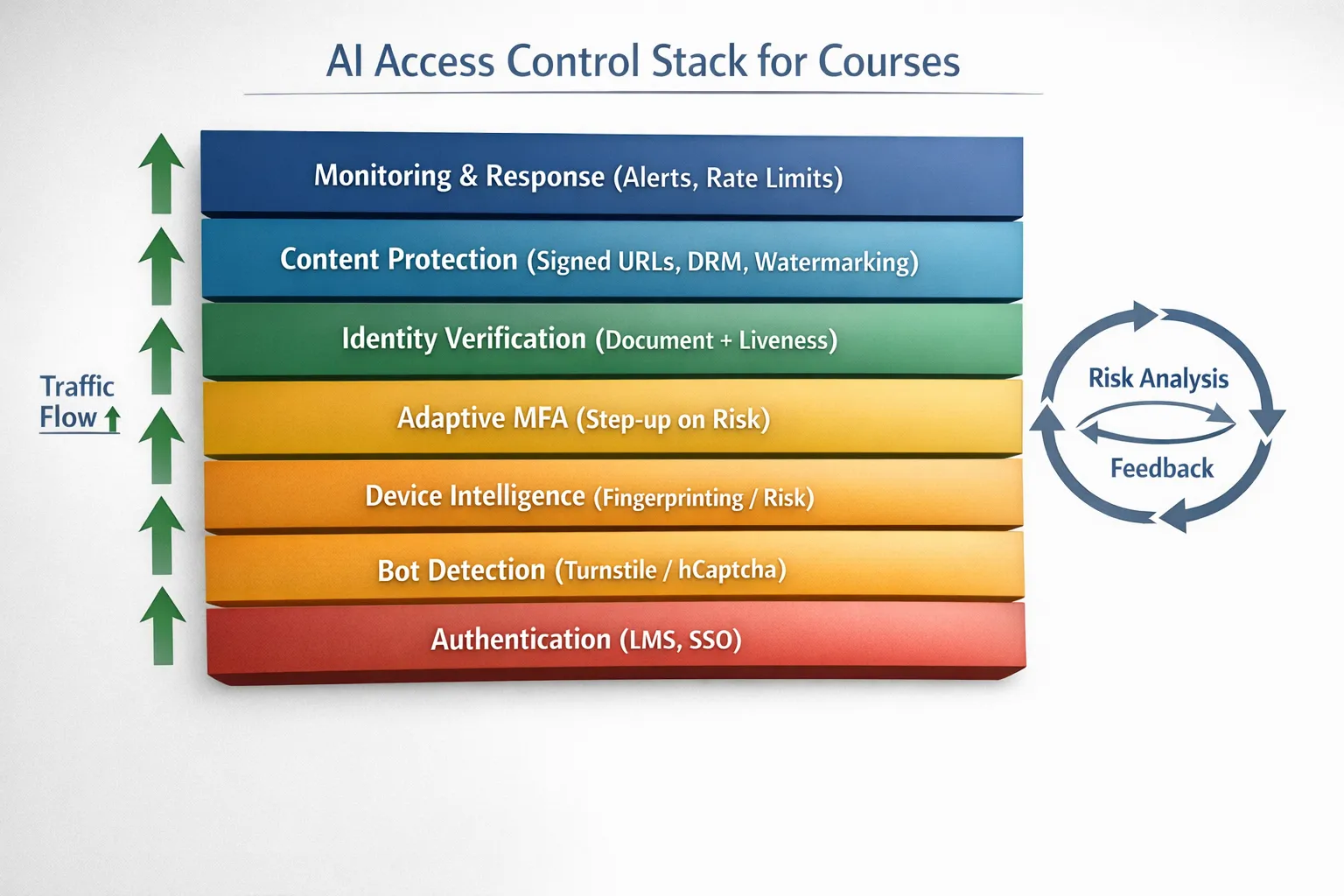
| Layer | Primary job | When to apply | Example tools |
|---|---|---|---|
| Bot and automation detection | Block scripts early | Public endpoints like signup, login and contact forms | Cloudflare Turnstile, hCaptcha Enterprise, Friendly Captcha |
| Device intelligence | Recognise returning devices and risky setups | Prevent account sharing, throttle coupon abuse | Fingerprint Pro, SEON Device Fingerprinting |
| Adaptive authentication (MFA) | Step up only when risk is high | Suspicious logins, new devices, sensitive actions | Auth0 Adaptive MFA, Okta Risk-Based Authentication |
| Identity verification | Prove a person’s identity when stakes are high | High-value cohorts, exam access, flagged anomalies | Stripe Identity, Persona, Onfido |
| Content protection | Make paid content hard to copy or redistribute | Video lessons, downloadable workbooks | VdoCipher DRM, PallyCon DRM, signed URLs |
| Exam integrity | Protect high-stakes assessments | Closed-book or proctored exams | Honorlock, Proctorio |
| Monitoring and response | Detect drift, tune controls | Continuous improvement across the stack | Rate limiting, anomaly alerts, audit logs |
Note, the above vendor examples are illustrative. Choose tools based on your LMS, privacy requirements and budget.
Mini reviews: the AI toolkit categories that matter
1) Bot and automation detection
If you only add one layer, make it this. Lightweight challenges plus behavioural analysis will stop most scripted abuse before it hits your LMS.
- Cloudflare Turnstile, privacy-friendly, behind-the-scenes checks with minimal user interaction. It suits course landing pages and login forms where you want near-zero friction.
- hCaptcha Enterprise, more tuning controls and reputation signals, with an accessibility-first approach and robust privacy documentation.
- Friendly Captcha, puzzle based using cryptographic proof-of-work, tilts heavily toward accessibility and GDPR alignment.
Best for: stopping spam signups, credential stuffing retries and form spam at scale without squeezing conversions.
Trade-offs: full protection often requires tuning allowlists and rate limits, plus occasional fallbacks for edge cases.
2) Device intelligence and risk scoring
Fingerprinting assigns a stable ID to devices, helping you spot account sharing, velocity attacks and coupon abuse. Combined with AI risk models, you can quietly throttle or challenge risky sessions.
- Fingerprint Pro, industry-leading identification, excellent accuracy and privacy tooling for legitimate users.
- SEON Device Fingerprinting, integrated with email/IP reputation and velocity rules for a broader fraud picture.
Best for: enforcing fair-use policies and preventing churn from shared logins.
Trade-offs: you must document use of device signals, honour local regulations and provide appeal paths. Pair with transparent privacy notices from the start. The UK ICO’s guidance on data minimisation and consent is a useful reference ICO.
3) Adaptive authentication and step-up MFA
NIST recommends multi-factor authentication that resists phishing, and applying it adaptively rather than everywhere improves user experience. Risk-based triggers include new device, unusual location or access to high-value modules.
- Auth0 Adaptive MFA, rich policies and signals, easy to add to custom portals and popular stacks.
- Okta Risk-Based Authentication, enterprise-grade controls with strong auditing.
Best for: protecting instructor dashboards, payment profiles and certificate issuance.
Trade-offs: may require a proxy or custom middleware for some off-the-shelf LMS platforms. Keep backup codes available for accessibility.
4) Identity verification for high-stakes moments
For scholarships, offline exam centres or enterprise cohorts, step up to document and liveness checks. Apply only when risk justifies it, not for every enrolment.
- Stripe Identity, quick setup for global ID types, developer friendly.
- Persona, highly configurable flows and strong case management.
- Onfido, mature document and liveness stack with broad compliance footprints.
Best for: scholarship disbursements, certificate-with-licensing pathways, B2B training with contractual identity requirements.
Trade-offs: adds friction and cost, so limit to defined triggers. Provide manual review for false rejects.
5) Content protection, DRM and watermarking
Protect the assets you worked hard to produce. DRM and signed delivery limit casual piracy while watermarking deters screen capture and unauthorised redistribution.
- VdoCipher DRM, secure video streaming with dynamic watermarking and wide LMS support.
- PallyCon, multi-DRM service for premium catalogues across devices, including Widevine and FairPlay.
- Signed URLs, available in services like AWS CloudFront and Vimeo, an essential baseline control.
Best for: high-value video libraries and downloadable PDFs or datasets.
Trade-offs: DRM is not a silver bullet. Pair with access analytics and takedown workflows.
6) Exam integrity and assessment controls
Only apply proctoring where it is necessary and proportionate. Opt for transparent policies, alternative assessments and clear consent.
- Honorlock, flexible proctoring with AI flags and live review.
- Proctorio, automated monitoring with configurable restrictions and detailed logs.
Best for: certification exams or industry-compliance programmes.
Trade-offs: accessibility and privacy considerations are paramount. Offer alternatives where possible.
Three stack recipes you can copy
A) Solo creator or small cohort (fastest rollout)
- Front door, add a low-friction bot challenge to signup and login.
- Content delivery, use signed URLs for videos and downloads.
- Monitoring, set rate limits on sensitive endpoints.
Why it works: cuts 80 percent of low-effort abuse with minimal setup time.
B) Growing school with coupons and community
- Add device intelligence to curb account sharing and coupon cycling.
- Enable adaptive MFA on risky logins or payment profile changes.
- Watermark videos and sensitive PDFs to deter leaks.
Why it works: balances revenue protection with student experience.
C) Enterprise training provider or certification body
- Combine bot detection, device intelligence and adaptive MFA across the learner journey.
- Require identity verification for exam access or credential issuance.
- Use DRM-backed streaming and detailed access analytics for audits.
Why it works: meets procurement, compliance and audit requirements with a layered, measurable approach.
Implementation blueprint (2 weeks, part time)
- Define risk triggers, list the exact events that should lead to a challenge, for example first login from a new device or downloads over a daily threshold.
- Start at the edge, deploy bot detection to signup and login. Measure baseline conversion and failures.
- Add device intelligence, enforce rate limits and soft blocks for clear abuse. Tweak thresholds with real data.
- Introduce adaptive MFA, turn it on only for elevated risk.
- Protect content, switch to signed URLs and optional DRM for premium modules.
- Review and train, publish a simple student-facing policy, add appeal routes, and train your support team on new flows.
What to monitor after launch
- Conversion rate on signup and login.
- Spam signups per day and per campaign.
- Credential stuffing attempts blocked versus logins completed.
- Support tickets mentioning access problems.
- Video access anomalies such as simultaneous sessions from distant geographies.
- False positive rate for risk-based challenges.
Set thresholds and adjust. The goal is to maximise genuine access while minimising friction.
Accessibility and privacy guardrails
- Prefer risk scores and silent checks first. Challenge only when necessary and provide multiple verification options.
- Publish a clear notice that explains why you verify and what data signals are processed.
- Practise data minimisation. Collect the least amount of data needed to make a decision and respect data retention limits as guided by GDPR ICO.
- Provide accessible alternatives to visual puzzles, following the spirit of the W3C recommendations W3C.
Tool fit by learner journey stage
| Journey stage | Likely risk | Recommended layers |
|---|---|---|
| Lead magnets and previews | Scripted scraping, throwaway emails | Bot detection, lightweight email verification, rate limits |
| Signup and onboarding | Automated signups, coupon abuse | Bot detection, device intelligence, velocity rules |
| Login and session | Credential stuffing, account sharing | Device intelligence, adaptive MFA, IP reputation |
| Content access | Link sharing, screen capture | Signed URLs, DRM, dynamic watermarking |
| Assessments | Collusion, impersonation | Identity verification and optional proctoring |
| Support and community | Bot spam, phishing | Bot detection on forms and chat, moderation rules |
Product quick picks for 2025
- Easiest win for most creators, add Cloudflare Turnstile to signup and login.
- Best for account sharing, pair your LMS with Fingerprint Pro and soft-limit simultaneous sessions.
- For sensitive actions, layer Auth0 Adaptive MFA on your portal or custom SSO.
- For premium video libraries, secure with VdoCipher and signed delivery.
- When identity truly matters, use Stripe Identity or Persona only at high-risk moments.
Internal resources to go deeper
- Learn tactics to keep verification frictionless in our guide to AI assistant strategies for verification.
- Compare platforms for course protection in Top AI tools for gated course protection.
- Target spambots before they hit your LMS with Best AI tools to stop spam signups.

Frequently asked questions
Will adding verification hurt my conversions? If you use adaptive checks and silent risk signals first, most genuine learners will not see a challenge. Start with low-friction bot detection, then step up only when risk rises.
Do I need identity verification for every student? No. Reserve document and liveness checks for high-stakes moments such as exam access or B2B compliance. For most journeys, bot detection, device intelligence and adaptive MFA are sufficient.
Can I keep verification accessible? Yes. Prefer invisible or behaviour-based checks where possible and provide non-visual alternatives if you must present a challenge. Follow W3C guidance and test on mobile and assistive tech.
What about GDPR? Be transparent, minimise data, and provide an appeal or review process for automated decisions. Choose vendors with strong documentation on data processing and residency.
Will this work with my LMS? Most layers sit at the edge, in front of your LMS, or integrate via SSO. For hosted platforms like Teachable or Thinkific, you can still add verification to public forms, custom domains and content delivery.
How quickly can I get results? Many creators see immediate drops in spam and abuse after adding bot detection to signup and login. Device intelligence and adaptive MFA usually follow within a week of configuration and testing.
Is DRM necessary? Not always. Use signed URLs as a baseline. Add DRM and watermarking for flagship courses or when contractual protection is required.
Ready to assemble your toolkit?
You do not need to overhaul your entire stack to see a difference. Start at the front door with a lightweight challenge, then add device intelligence and step-up checks where they matter. When risks justify it, add identity verification and content protection for premium modules.
Try a simple, privacy-friendly verification step with Bot Verification and see how quickly it improves both safety and student experience. Get started at Bot Verification.






