
Content Creation with AI, Securely Shared with Students

AI now handles a big share of the heavy lifting for course creators, from outlines and lesson scripts to slides, videos and quizzes. The challenge in 2025 is not only creating great learning experiences with AI, it is securely sharing those materials with the right students while keeping bots and scrapers out.
Below is a practical guide to content creation with AI for courses, paired with a secure delivery blueprint you can implement today. You will see recommended tools, a simple architecture for access control, and where a lightweight human verification step fits to reduce automated abuse.
What modern content creation with AI looks like for courses
Content creation with AI should accelerate quality, not just volume. A typical course build now uses AI at distinct stages:
- Curriculum design and lesson sequencing
- Research synthesis, lesson scripts and reading summaries
- Slide generation, visuals and diagrams
- Video editing, screen captures and voiceovers
- Quizzes, worksheets and formative checks
Keep your pedagogy in the loop. Define learning outcomes, align assessments to outcomes, then use AI to draft materials you refine. Always fact check, cite sources where appropriate and ensure accessibility (captions, transcripts, alt text).
Security first, because sharing is where risk begins
Once lessons go live, the biggest risks are automated scraping, credential sharing and public link leaks. Three core layers protect you:
- Authentication, confirm who the user is
- Authorisation, decide what they can access
- Bot verification, confirm a real person is interacting before you grant access
The UK National Cyber Security Centre recommends strong authentication, including multifactor, for online services. See the NCSC guidance on multi-factor authentication. For understanding automated abuse patterns, the OWASP Automated Threats project is a solid reference, and the annual Imperva Bad Bot Report tracks the rise of scraping and credential stuffing.
Essential controls for course content
| Control | What it does | Where to apply | Notes |
|---|---|---|---|
| Bot verification | Confirms a human is present before access is granted | Public previews, sign up, sensitive resource links | Reduces scraping and scripted downloads |
| Authentication | Proves identity | Account login, single sign on | Add MFA for admin and instructor accounts |
| Access control | Enforces who can see what | Course, cohort and lesson level | Time limits, seats, bundles and prerequisites |
| Rate limiting | Caps request bursts | API, file delivery, video playback | Slows automated harvesting |
| Signed URLs and tokenised streaming | Prevents hotlinking and sharing of raw file links | Video, PDFs and downloads | Expiring tokens reduce link leakage |
| Watermarking | Deters redistribution and helps trace leaks | Video and PDFs | Dynamic watermarks with user ID are most effective |
| Download restrictions | Stops easy local copies | Video and files | Offer controlled offline access only if needed |
| Anomaly alerts | Flags unusual access patterns | Analytics and logs | Sudden spikes, new geographies, repeated failures |
Recommended AI tools for course creators in 2025
This is a concise, practitioner-focused view. Pick one in each category to avoid tool sprawl.
Writing, research and lesson scripting
- ChatGPT and Claude, excellent for outlines, lesson scripts and Socratic prompts. Provide your syllabus and rubrics for grounded output.
- Jasper, helpful when you want brand voice controls and templates across modules and marketing assets. See our deep dive on the best AI writing tools for bloggers for strengths and trade offs that also apply to course content.
Tips: give models your glossary, level descriptors and examples of acceptable answers. Ask for multiple variants and select the clearest.
Slides, images and diagrams
- Canva, fast slide creation with templates and AI-assisted design, useful for branding consistency.
- Beautiful.ai, slide automation that keeps layouts tidy for long decks.
- For images and charts, keep alt text in your workflow so materials remain accessible.
Video editing, screen capture and assembly
- Descript, great for editing by transcript, quick removals of filler words and simple screen recordings. Its text-based approach speeds iteration.
- For more complex edits, pair Descript with a traditional NLE when needed.
Voice and narration
- If you prefer synthetic narration, tools in our roundup of AI voice and TTS tools help you balance quality, languages and cost. Always check licensing for commercial education use and clearly disclose synthetic voices to learners if appropriate.
Quizzes, worksheets and checks for understanding
- Start with question generation from your lessons, then review for accuracy and alignment. Host quiz logic inside your LMS or a forms tool that supports scoring and item analysis.
Platforms to host and share securely with students
Choose an LMS that matches your stage and security needs, then layer controls.
- Teachable, quick to launch and straightforward for solo creators. Focus on course access management and a clean student experience.
- Thinkific, flexible course structures with broad creator adoption and a marketplace of extensions.
- Kajabi, all in one platform that combines courses with marketing and membership tools.
- Moodle, open source and widely used in education, extensible with plugins and available as hosted offerings. Explore the official project at Moodle.org.
Whichever you choose, confirm you can disable file downloads for protected media, issue expiring links, segment access by cohort, and export logs for monitoring.
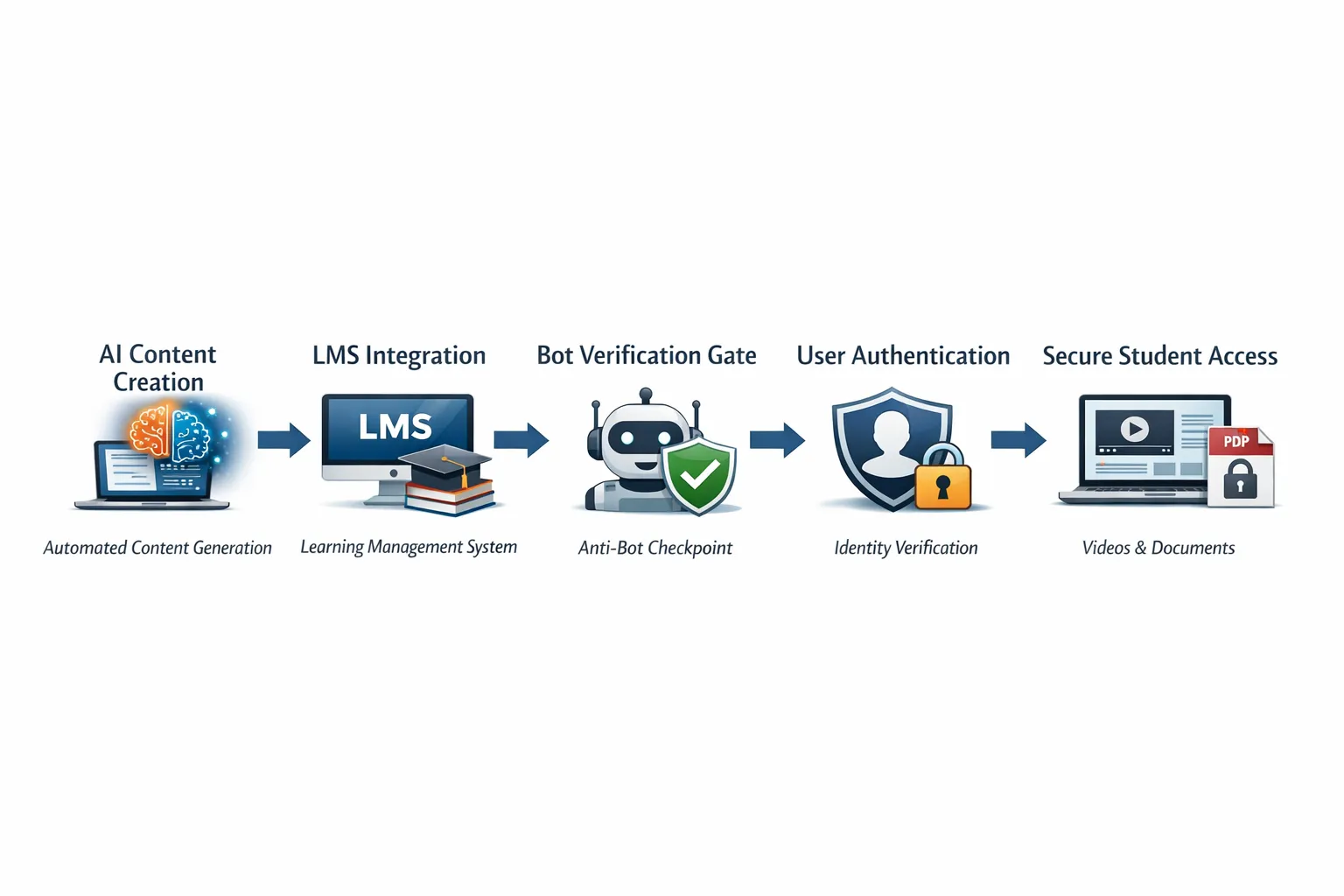
A secure, end to end workflow you can implement this week
- Define learning outcomes and assessment rubrics. Keep these visible during production.
- Draft modules with AI. Use your syllabus as context, include reading lists and examples to shape outputs. Fact check and edit for clarity and tone.
- Build assets. Generate slides, record or assemble videos, create worksheets and accessible transcripts.
- Upload to your LMS. Organise modules, set prerequisites and time limits, and disable raw file downloads where possible.
- Add a human verification gate to public or semi public touchpoints. Place bot verification on sign up pages, lead magnets and any unauthenticated preview lessons. This reduces scraping before users ever reach your login form.
- Automate enrolment and provisioning. When a payment completes or a student is approved, auto enrol them in the correct course and cohort. If you are connecting multiple tools, our Zapier review for AI workflows and the comparison of Make vs Zapier can help you choose a dependable automation layer.
- Monitor and improve. Track completion, time on task and quiz performance. Set alerts for unusual traffic, repeated failed logins and sudden spikes in asset requests.

Where bot verification fits in your stack
Bot verification adds a lightweight check that a visitor is a real person before you grant access. It is useful for:
- Public or pre login pages that preview lessons or host lead magnets
- Download gates for worksheets or bonus files
- Embeds of videos or PDFs on landing pages
Compared with full authentication, bot verification is faster to deploy and adds minimal friction for legitimate users, yet it filters many automated scripts. It complements, rather than replaces, your login, payment and authorisation layers. Privacy minded options exist, for example Cloudflare Turnstile as a CAPTCHA alternative that runs a background browser challenge.
If you publish unlisted resources or run open challenges, placing a human check before the link helps cut down scraping and mass downloads. For enrolled students, keep verification behind the scenes and rely on your LMS authentication so the experience stays smooth.
Practical prompts that improve learning materials
- Ask AI to write multiple choice questions with one correct answer and three plausible distractors that target a specific learning outcome.
- Request real world scenarios at beginner, intermediate and advanced levels, then align each to assessment criteria.
- Generate a concise glossary and a one page cheat sheet per module, then review for accuracy and relevance.
Metrics that matter for both learning and security
- Learning effectiveness, completion rate, quiz scores, time on task and rewatch rates
- Engagement health, discussion posts per learner, assignment submissions and feedback cycles
- Security signals, failed login spikes, unusual geographies, repeated asset requests and blocked verification attempts
Compliance and ethics checklist
- Avoid exposing personal data to AI tools unless you have consent and a data processing basis under UK GDPR.
- Cite sources and avoid generating misleading or unsubstantiated claims.
- Provide accessible formats, captions, transcripts and alt text for images.
- Disclose when a voiceover is synthetic if that matters to your learners’ context.
Frequently Asked Questions
Do I still need authentication if I add bot verification? Yes, bot verification reduces automated abuse before access, but it does not replace login and authorisation. Use both.
Will bot verification annoy legitimate students? When placed on public pages or downloads, modern verification can feel nearly invisible. Keep the student area behind standard login for a smooth experience.
What is the quickest secure setup for a solo creator? Use a hosted LMS, disable raw downloads for protected media, add a human verification gate to your lead magnets and previews, and monitor access logs weekly.
Which AI tool should I pick for lesson writing? Start with a general model like ChatGPT or Claude and augment with your syllabus, examples and rubrics. If you need brand templates across modules and marketing, consider Jasper.
How do I stop students sharing files publicly? There is no perfect prevention, however you can use tokenised streaming, watermarks with user identifiers, short lived links and clear terms of use. Monitor for leaks and act promptly.
Can I automate enrolment from my checkout? Yes. Use your LMS’s native integrations where possible, or connect your checkout and LMS with an automation tool. Our guide to Zapier for AI workflows explains a reliable pattern.
Is synthetic voice allowed in paid courses? Usually yes with the right licence. Check your TTS provider’s commercial terms and any platform policies, then disclose usage if appropriate.
Bring it together, securely
AI lets you build better courses in less time. Secure sharing keeps your work sustainable. Combine authentication and authorisation in your LMS with a simple human verification step on public touchpoints. You will reduce scraping, protect your assets and keep the path to learning smooth for real students.
If you want a lightweight way to confirm users are not robots before granting access, add a bot verification gate to your course previews and download pages. When you are ready to implement, get in touch via aitoolshed.co and we will help you layer verification, authentication and access control in a way that fits your stack.






