
Business AI Tools That Safeguard Online Courses

If you sell online courses, you are running a digital business that depends on trust. Bots, fake sign‑ups, credential sharing and piracy quietly erode margins, inflate support costs and skew your analytics. The good news is that modern business AI tools can safeguard your courses without turning the student journey into a maze of hurdles.
This guide explains how to layer the right tools for each risk, then reviews leading options through a course‑creator lens. You will find practical stack patterns, decision criteria and deployment tips you can ship quickly.
What safeguarding means for a course business in 2025
Safeguarding is not just stopping obvious spam. It is a revenue and reputation strategy that should:
- Reduce automated abuse at high‑risk points like free trials, coupon use, contact forms and checkout.
- Prevent account takeovers and credential stuffing while keeping legitimate learners moving.
- Protect videos, downloads and assessments from scraping and redistribution.
- Keep support, refund and chargeback rates under control.
- Respect privacy, accessibility and fairness so you do not lose conversions or exclude users.
If you are new to bot defence, read our practical overview on low‑friction verification options in AI Assistant Strategies for Frictionless Verification at AI Tool Shed. For a deep dive into sign‑up defence tools, see Best AI Tools to Stop Spam Signups at AI Tool Shed.
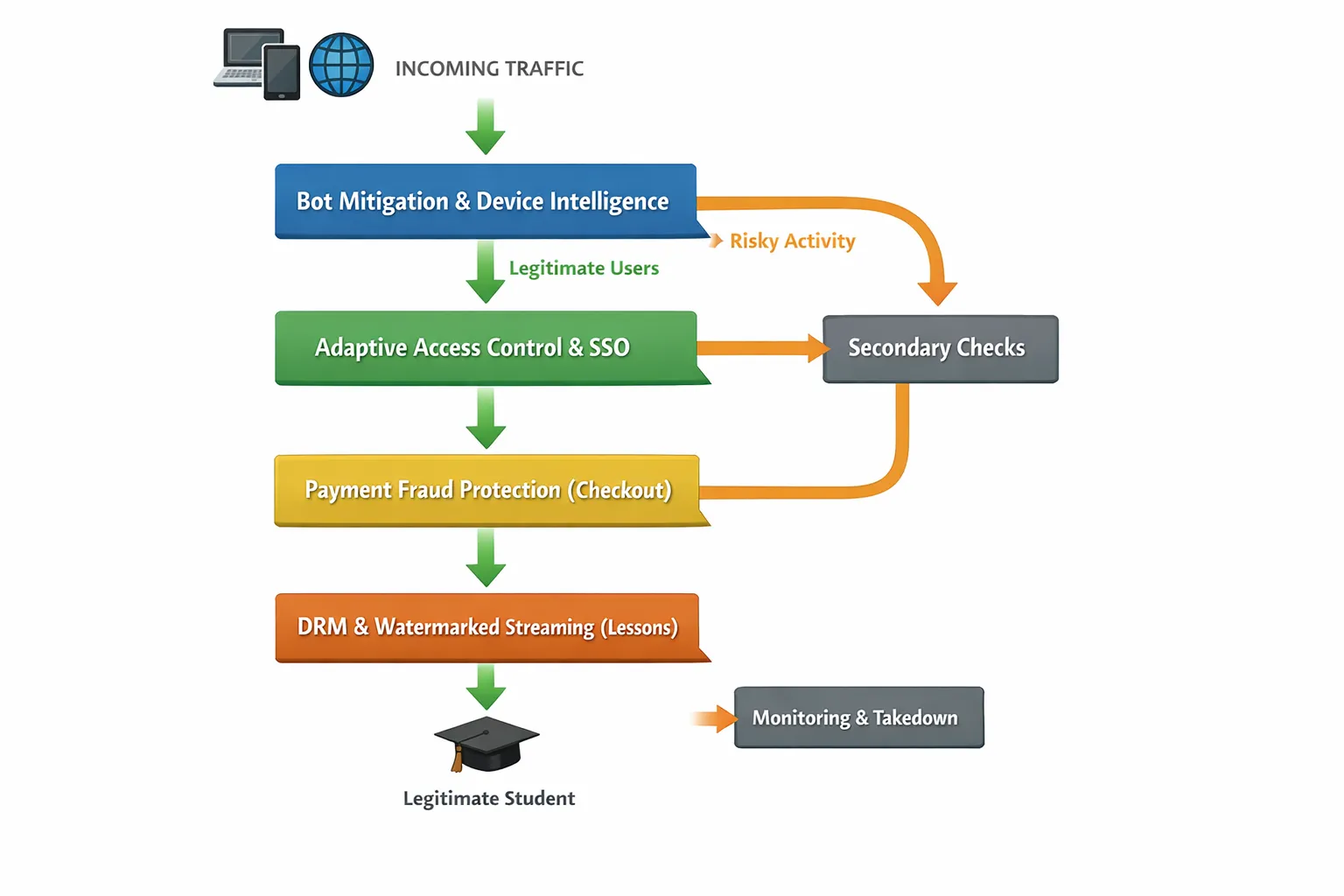
The five categories of business AI tools that safeguard courses
| Category | Primary risks addressed | Best fit | Typical effort | Friction for students | Example tools |
|---|---|---|---|---|---|
| Bot mitigation and device intelligence | Automated sign‑ups, credential stuffing, scraping, card testing | Any course site with open forms or free trials | Low to medium | Low if adaptive | Cloudflare Turnstile, DataDome, Fingerprint Pro, hCaptcha Enterprise |
| Identity and adaptive access | Account sharing, risky logins, new device anomalies | Courses with SSO, teams, or higher‑value content | Medium | Low to medium when risk is high | Auth0 Adaptive MFA, Okta Risk Engine, passkeys |
| Payment and revenue protection | Stolen cards, refund fraud, coupon abuse | Any paid course or membership | Low to medium | Low | Stripe Radar, SEON |
| Content and stream protection | Piracy, sharing, ripping of videos and PDFs | Courses with premium video assets | Medium | None to low | VdoCipher, PallyCon forensic watermarking |
| Monitoring and takedown | Reposts, mirrors, link farms | Courses suffering ongoing piracy | Medium | None | Red Points, in‑house crawlers |
Tip: Start where the money leaks. For many course businesses, that is sign‑ups and checkout. Then move to streaming and assessment protection.
For a broader roundup that compares tool categories, see Top AI Tools for Gated Course Protection at AI Tool Shed.
Product‑style reviews of business AI tools for course protection
The tools below are evaluated for their fit with course funnels, not just generic websites. Where possible, we highlight friction impact and quick wins.
Cloudflare Turnstile
Cloudflare Turnstile is a privacy‑first, CAPTCHA‑free challenge that uses signals and lightweight checks to decide whether to allow, silently challenge or block.
- Best for: Replacing intrusive CAPTCHAs on sign‑up, contact and password reset forms without hurting conversion.
- Why course creators like it: It is quick to add, respectful of accessibility, and adapts its challenges to risk, which keeps legitimate students moving.
- Where it fits: Public lead magnets, free trial forms, login flows with unusual traffic patterns.
- Watch‑outs: You still need layered controls for sophisticated bots and device farms.
Learn more at Cloudflare Turnstile.
Fingerprint Pro Bot Detection
Fingerprint Pro combines device intelligence with behaviour signals to identify returning devices, detect automation and flag suspicious sessions.
- Best for: Stopping repeat abusers who rotate emails and IPs to farm trials, coupons or team seats.
- Why course creators like it: It gives durable device insights that are hard for attackers to reset, so you can cap concurrent logins, protect free trials and rate‑limit risky devices.
- Where it fits: Login, enrolment, coupon redemption, API endpoints that power your mobile or desktop apps.
- Watch‑outs: Handle device identity transparently and follow data minimisation principles.
Explore features at Fingerprint Pro Bot Detection.
DataDome
DataDome is an AI‑driven bot management platform tuned for high‑volume traffic and complex bot campaigns. It scores requests in real time and can hard‑block, soft‑challenge or silently observe.
- Best for: Larger course marketplaces or academies that attract scraping, credential stuffing and card testing.
- Why course creators like it: Strong detection for evolving automation and good coverage across web, mobile and APIs.
- Where it fits: Site‑wide edge protection, checkout and login APIs, content endpoints.
- Watch‑outs: Requires tuning and ongoing ops for best results.
Auth0 Adaptive MFA
Auth0’s adaptive MFA adds risk‑based prompts to your authentication, such as only challenging on new devices or unusual locations.
- Best for: Course businesses that use SSO or want to centralise identity for multiple properties or brands.
- Why course creators like it: You can keep friction low for trustworthy students, but ask for step‑up when signals look risky.
- Where it fits: Login, new device detection, admin and instructor areas.
- Watch‑outs: Plan for recovery and support flows so genuine learners are not locked out.
For a broader pattern library on adaptive verification, see AI to Human Verification: Tools Course Creators Should Test at AI Tool Shed.
Stripe Radar
Stripe Radar uses network‑level and merchant‑specific machine learning to score and block high‑risk payments, with rules and reviews you can tailor.
- Best for: Reducing chargebacks, blocking card testing and stopping coupon or refund abuse linked to risky payments.
- Why course creators like it: Quick to enable, minimal developer lift, and you can pipe risk scores into your LMS or automation to hold fulfilment until a review passes.
- Where it fits: Checkout and subscription changes. Tie its signal to access delays for high‑risk buyers until manual review completes.
- Watch‑outs: Tune rules carefully around new launches and seasonal peaks to avoid false declines.
Details at Stripe Radar.
SEON
SEON enriches email, phone and IP signals to build a digital footprint. It is useful for flagging disposable email domains, mismatched geolocation and other signs of synthetic identities.
- Best for: Free‑trial and scholarship abuse, affiliate fraud and suspicious reseller behaviour.
- Why course creators like it: Valuable context for deciding when to ask for an extra verification step.
- Where it fits: Account creation, coupon redemption and partner programmes.
- Watch‑outs: Be transparent about profiling and provide appeals for edge cases.
VdoCipher
VdoCipher offers secure video streaming with DRM, dynamic watermarking and signed URLs to deter downloading and redistribution.
- Best for: Protecting high‑value lesson videos and paid masterclasses.
- Why course creators like it: Drop‑in players for common LMS platforms, granular access expiry and visible watermarks that discourage leaks.
- Where it fits: Lesson delivery, bonus content, certification videos.
- Watch‑outs: No DRM can stop screen‑recording entirely, so pair with watermarking and takedown workflows.
See features at VdoCipher.
PallyCon Forensic Watermarking
Forensic watermarking embeds a unique, invisible identifier per viewer into streams or downloads. If content leaks, you can trace the source account.
- Best for: Cohorts with sensitive IP, premium pricing or frequent re‑uploads.
- Why course creators like it: Strong deterrence without adding friction to legitimate learners.
- Where it fits: Video lessons, downloadable PDFs and slide decks.
- Watch‑outs: Plan a clear policy for consequences and appeals if a watermark trace identifies an account.
Note: For guidance on typical automated threats and how to map them to controls, the OWASP Automated Threats to Web Applications project is a useful reference at OWASP.
Three secure journeys you can deploy this quarter
Below are practical, low‑overhead patterns that turn the tools above into student‑friendly safeguards.
Journey 1, Free lead magnet to trial enrolment
- Gate public lead magnets with a low‑friction challenge and a lightweight human check if risk is elevated. Our simple Bot Verification step, which confirms users are not robots before granting access, is designed for exactly this.
- Add device intelligence to stop disposable‑email loops and form fills from the same device farm.
- Auto‑enrol trusted users into a short trial, but queue high‑risk users for a quick secondary check.
Result: Fewer junk leads, cleaner lists and email deliverability that does not degrade because of bot sign‑ups. For tactical options, see Using AI for Content Creation Without Inviting Bots at AI Tool Shed.
Journey 2, First purchase to onboarding
- Run payments through network‑level fraud scoring at checkout.
- If the score is high, hold access and trigger a short, human‑friendly verification. If the score is low, provision instantly.
- Link device reputation to account sharing controls. If concurrency spikes beyond policy, request step‑up verification.
Result: Fewer chargebacks and lower support load, with on‑time onboarding for genuine learners.
Journey 3, Lesson streaming and community access
- Serve lessons via DRM‑backed streaming with dynamic watermarking. Sign URLs and expire access sensibly.
- Scan for known bad automation on community endpoints and apply a conversational challenge only when behaviour looks off.
- Monitor reposts with periodic crawls and watermark traces, then send streamlined takedowns.
Result: Premium content stays behind the paywall and community spaces remain free of spam and impersonation.
For conversational defences that can escalate to a human without derailing the experience, see AI Chatbot Tactics for Course Access Security at AI Tool Shed.
Metrics that prove it is working
You cannot improve what you do not measure. Track these before and after each rollout:
- Challenge rate and pass rate at key endpoints.
- False positive rate for verification prompts.
- Conversion to trial and to paid, split by challenged versus auto‑passed cohorts.
- Chargebacks per 1,000 payments and proportion auto‑refunded.
- Concurrent login violations and coupon abuse attempts prevented.
- Piracy signals: takedowns sent, repeats per source, time to removal.
Aim for a net lift in paid conversion while reducing chargebacks and support tickets. If conversion dips, review your risk thresholds and ensure accessibility is not inadvertently blocked.
Governance, accessibility and fairness
- Privacy first: Collect the minimum necessary signals and disclose what you capture. Ensure a lawful basis under GDPR where applicable.
- Accessibility: Do not ship visual puzzles that exclude users. Prefer adaptive checks and passkeys. Test with assistive tech before launch.
- Fairness and bias: Evaluate performance across regions and device types. Provide a manual appeal path for genuine students flagged as risky.
- Incident handling: Document responses for compromised accounts, repeated piracy and suspected affiliate fraud. Keep logs necessary for audit but respect retention limits.
For a layered, risk‑based blueprint that balances UX with protection, see The Course Creator’s AI Toolkit for Access Control at AI Tool Shed.
A fast path to value
You do not need a six‑month security project to start protecting revenue.
- Add a low‑friction bot check to high‑risk public forms today. Our Bot Verification step confirms a visitor is human before granting access, which is ideal for free downloads and trial forms.
- Turn on payment risk scoring and route only the top‑risk transactions to manual review.
- Protect your highest‑value video module with DRM and watermarking while you phase in broader coverage.
When you are ready, expand to adaptive MFA and device intelligence for account sharing controls. Keep the experience friendly by only adding friction when risk is elevated.
If you want a hands‑on plan for your specific stack, start with our comparison of practical defences in Best AI Tools to Stop Spam Signups at AI Tool Shed, then layer in gated access guidance from Top AI Tools for Gated Course Protection at AI Tool Shed.
Final word
Business AI tools can safeguard your online courses without sacrificing student experience. Start with low‑friction bot verification, tie your checkout to risk‑based decisions and protect your content with DRM and watermarking. Measure what matters, tune thresholds and keep a human path open for edge cases. That is how you protect revenue, save your support team and keep genuine learners moving from enrolment to completion.
If you are ready to remove easy automation from your funnel, add a simple verification step with Bot Verification. It takes minutes to place a check that confirms a visitor is human before granting access, and it pairs well with the other tools in this guide.






