
Best AI Business Tools for Education Entrepreneurs

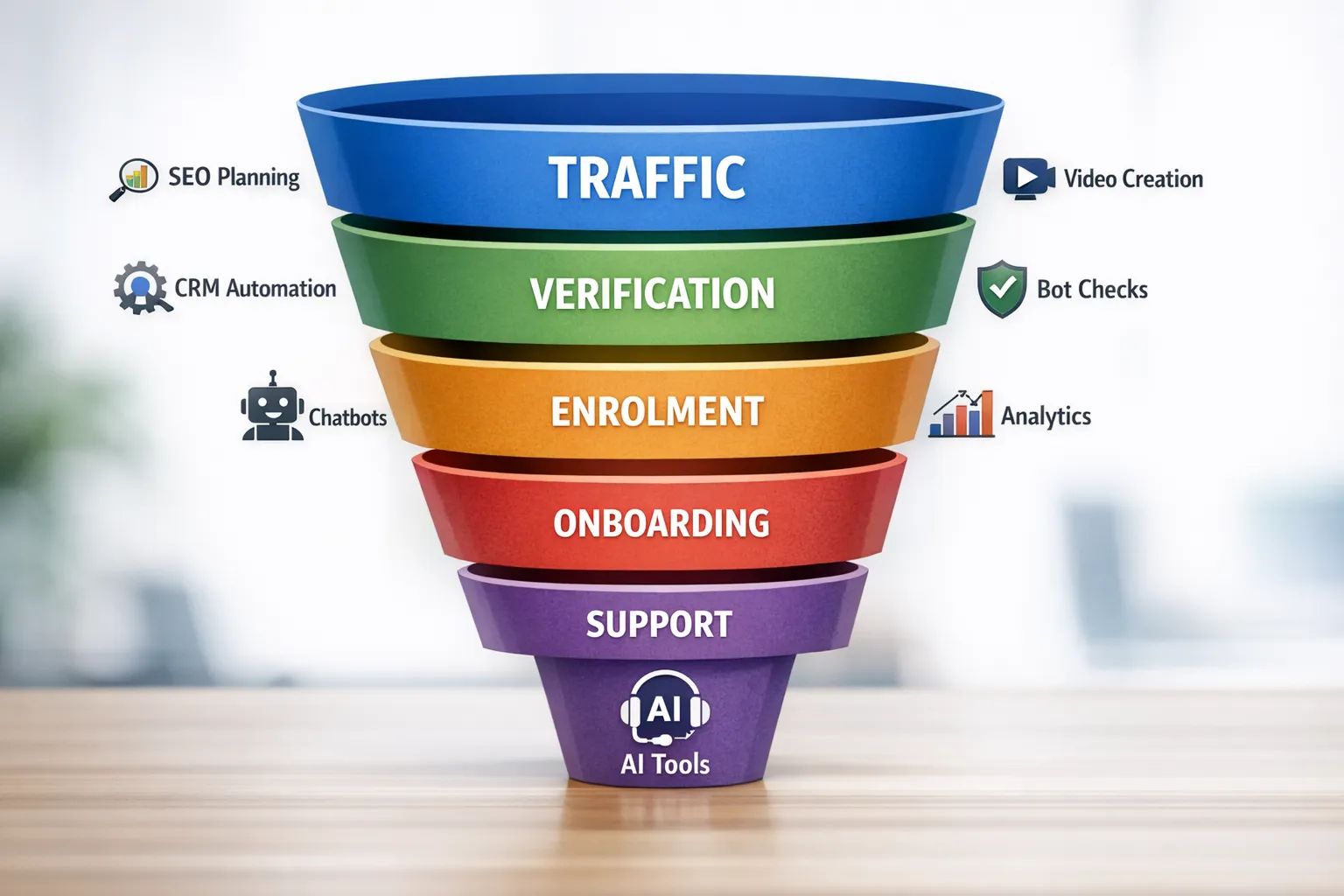
Education entrepreneurs have two non‑negotiables in 2026, ship valuable learning faster and protect revenue without hurting student experience. The best AI business tools make both happen, if you choose a stack that matches your stage, keeps data private, and integrates cleanly with your LMS and payments. This guide curates proven, education‑friendly picks across strategy, creation, marketing, automation, support and security, with quick ways to put them to work.

How we evaluated the best AI business tools for education entrepreneurs
Rather than listing every shiny app, we scored tools on jobs to be done, fit for education workflows, privacy and security basics, integration options with common LMS and checkout stacks, learning curve for small teams, and total cost of ownership as you scale. Where we have in‑depth hands‑on reviews, we link to them so you can validate details before a trial.
Quick picks by business job
| Job to be done | Recommended tool(s) | Why it matters | Good for |
|---|---|---|---|
| Topic and SEO planning | WriterZen, Semrush | Find demand, cluster topics, brief content that ranks | Solo creators to growing teams |
| Video and audio creation | Descript, plus our roundup of AI video tools | Produce lessons, edits and captions quickly | Course production, webinars, promos |
| Marketing automation | ActiveCampaign | Nurture leads, segment students, trigger journeys | Evergreen funnels, cohorts |
| CRM pipeline | HubSpot CRM | Track conversations, deals, trials and partnerships | Partnerships, B2B training |
| Automation and ops | Zapier | Connect LMS, payments, email, data, reduce manual work | Non‑technical teams |
| Secure student support | Shortlist in our guide to AI chatbots for secure support | Faster answers with guardrails for privacy | Live courses, academies |
| Behaviour analytics | See our comparison of Crazy Egg, Lucky Orange and Mouseflow | Spot friction, fix drop‑offs on landing and checkout | Conversion optimisation |
| Bot and fraud protection | Start with our picks of AI tools to stop spam signups | Protect coupons, logins and forms without friction | Every course site |
| Private knowledge assistants | CustomGPT.ai | On‑brand Q&A from your content library | Support, pre‑sales, onboarding |
Category deep dives and how to apply them
1) Plan smarter with AI content intelligence
If you publish consistently, content planning is a revenue lever. WriterZen speeds up topic discovery, keyword clustering and brief creation, so you produce content with a clear demand signal. Pair it with Semrush for competitor gaps, backlink prospects and performance tracking across markets.
Practical start: build a monthly content calendar from 3 to 5 topic clusters, then brief two cornerstone guides and two supporting posts. Track impressions and assisted conversions before scaling output.
2) Create faster with AI video and audio
Video is still the most efficient way to teach and sell. Descript’s text‑based editing, transcription and studio‑quality audio enhancement help you assemble modules, social cuts and course trailers quickly, especially for dialogue‑heavy lessons and interviews. For avatar or text‑to‑video modules, review our current favourites in the AI video roundup to match your use case.
- Learn more: deep dive into Descript and our tested picks in AI video tools.
Workflow tip: draft scripts, record in one pass, edit by deleting filler words and mistakes in Descript, export captions and burn‑in subtitles for accessibility.
3) Automate marketing with lifecycle journeys
ActiveCampaign brings email, basic CRM, site tracking and automation together, which is ideal for education funnels with trials, waitlists and drip sequences. Use tags for interests and milestones, then trigger content and offers based on behaviour, not guesses.
- Learn more: our field test of ActiveCampaign.
For tracking pipeline and conversations, HubSpot CRM gives you contact timelines, deals and meeting scheduling in a friendly UI. It is a solid hub for B2B training providers and partnership‑driven academies.
- Learn more: what to expect from the HubSpot CRM free tier and beyond.
4) Connect your stack with no‑code automation
Zapier is the fast path for non‑technical teams to link LMS events, payments, email and spreadsheets. Typical wins include auto‑enrolling students after successful payment, sending failed‑payment nudges, syncing webinar registrations to CRM, and logging quiz scores to a progress sheet.
- Learn more: build your first flows with our Zapier review and how‑to.
Scaling later, you can explore developer‑friendly or visual alternatives, but Zapier gets you momentum quickly without a rebuild.
5) Offer instant, secure student support
AI chatbots reduce ticket volume and response times, but they need education‑ready controls such as safeguards for personal data, clear escalation and audit trails. Start with our buyer’s guide to platforms that balance speed and security, then pilot on a limited set of FAQs and onboarding questions.
- Learn more: shortlist and checklists in Best AI Chatbot Tools for Secure Student Support.
6) See and fix conversion friction
Heatmaps, session replays and frustration signals make invisible problems obvious, from rage clicks on discount fields to mobile form errors. Our comparison of Crazy Egg, Lucky Orange and Mouseflow shows which tool fits content sites versus checkout‑heavy flows so you can prioritise fixes with the biggest conversion lift.
- Learn more: feature differences and use cases in AI‑Powered Analytics: Crazy Egg vs Lucky Orange vs Mouseflow.
7) Protect signups, coupons and logins without hurting UX
Modern bots bypass old CAPTCHAs, so education businesses are a target for spam enrolments, credential stuffing and coupon abuse. Layer lightweight verification at risky points, use device and behaviour intelligence, and keep challenges adaptive so genuine students breeze through.
- Learn more: platforms and patterns in Best AI Tools to Stop Spam Signups.
If you need a simple starting point, Bot Verification adds a human check before granting access. Keep it privacy‑conscious, accessible and fast for mobile users.
8) Reduce repetitive Q&A with a private, source‑aware assistant
When your documentation, lesson pages and policies are scattered, pre‑sales and student support both suffer. A retrieval‑augmented chatbot trained on your knowledge base can answer accurately with citations, bridging the gap between search and support.
- Learn more: hands‑on impressions in our CustomGPT.ai review.
Two pragmatic stack recipes
Solo creator launching a flagship course
- Strategy and briefs with WriterZen, build one cluster, one landing page and three supporting articles.
- Produce lessons in Descript, export captions, and cut three social teasers.
- Nurture with ActiveCampaign, trigger sequences from landing page and webinar signups.
- Connect everything in Zapier, enrol students post‑payment and tag based on progress.
- Add Bot Verification at signup and coupon fields to keep forms clean.
Result, fewer moving parts, repeatable launches, less manual admin.
Growing academy with cohorts and partnerships
- Demand capture with Semrush audits and content updates.
- Mixed media production using Descript for lectures and an avatar tool for multilingual explainers.
- CRM in HubSpot for partner deals and enterprise training contracts.
- Marketing automation in ActiveCampaign tied to cohort calendars and onboarding milestones.
- Behaviour analytics across landing, webinar and checkout pages to guide experiments.
- Verification on signup, login and high‑risk endpoints to protect margins at scale.
What to measure to prove impact
| Area | Metric to track | Why it matters |
|---|---|---|
| Content | Organic clicks to course pages, assisted conversions | Validates topic selection and brief quality |
| Video | Average watch time, caption usage, click‑through from CTAs | Gauges lesson clarity and promo effectiveness |
| Automation | Manual hours saved per week, error rate of critical workflows | Frees focus for creative and teaching work |
| Marketing | Lead to enrolment rate, unsubscribe and spam rates | Measures relevance and list health |
| Support | First response time, deflection rate, CSAT | Keeps students progressing without bottlenecks |
| Security | Spam signup rate, coupon abuse rate, account takeover attempts | Protects revenue and trust |
Privacy, accessibility and trust
Education data is sensitive. Bake in privacy by design, minimise data collection, offer explicit consent, and keep verification challenges inclusive for screen readers and mobile users. The UK’s ICO provides practical guidance on data protection by design and default. Align your stack with these principles before you scale.
Getting started this week
- Pick one growth job and one protection job, for example, automate your welcome series and add verification at signup.
- Pilot with a small slice of traffic or a single cohort, then measure impact after two weeks.
- Document workflows, template what works, and only then add another tool.
Frequently Asked Questions
How many AI tools do I really need to run an education business? Start with four to six that cover planning, creation, marketing, automation, analytics and verification, then add selectively when a clear need appears.
Will AI content hurt my search rankings? Quality and usefulness matter more than authorship. Use AI for research, outlines and drafts, then edit for accuracy, originality and student outcomes.
Which tool should I upgrade first if I am on free plans? Prioritise the system that drives revenue bottlenecks, usually email automation or video production if content is slow to ship.
How do I avoid lock‑in across my stack? Choose tools with open exports, APIs and standard formats, and keep critical student data in your CRM or LMS of record.
What is a low‑friction way to stop spam signups? Add a lightweight human verification step on forms and checkout, and monitor impact on conversion and spam rates.
Do chatbots replace human tutors or support agents? No, they triage and handle repeat questions. Keep clear escalation to humans for nuanced or sensitive issues.
How long should I run a pilot before rolling out broadly? Two to six weeks is enough to measure conversion, support and quality metrics, provided you have a baseline.
Your next step
If you only act on one thing this week, protect your funnel while you build it. Add a simple verification step to your high‑risk forms, then ship one new piece of content powered by your chosen tools. When you are ready to harden access without harming student experience, explore our guides and try Bot Verification to keep bots out and real learners in. Visit AI Tool Shed to continue with reviews, comparisons and step‑by‑step playbooks tailored to education entrepreneurs.






