
AI Voice Tools to Authenticate Live Class Participants

If you run live cohorts, workshops, or certification classes, you have likely felt the pain of ghost attendees, seat sharing, and automated bots slipping through your join links. AI voice tools offer something text codes and CAPTCHAs struggle to deliver in real time, a fast check that the person joining is human and the right participant. This guide reviews the leading options, what to look for, and how to implement voice-based authentication without tanking your show-up rates.
What “voice authentication” actually means in 2025
Voice authentication in this context is not about transcribing speech. It is about verifying a speaker. Modern systems build a voiceprint during enrolment, then compare a fresh sample at join time and return a risk score. Key concepts:
- Speaker verification, a 1 to 1 match, does this voice match the enrolled student?
- Speaker identification, a 1 to many lookup, who among the enrolled roster does this voice match?
- Text dependent vs text independent, passphrase prompts versus free speech samples, each has different UX and anti spoof trade offs.
- Presentation attack detection (PAD), liveness checks that aim to spot replays, synthetic voices and other spoofs. Many vendors reference external benchmarks such as ASVspoof, although implementation quality varies.
For compliance in the UK and EU, remember biometric voiceprints are special category data, which normally require explicit consent and strong safeguards under GDPR. The ICO has clear guidance for organisations handling biometrics, see the ICO’s biometrics guidance.
When to use voice to authenticate live class participants
Not every class needs voice authentication. It shines when identity truly matters and when you need a lightweight, fast check in the flow of joining. Good fits include:
- Cohorts with capped seats or revenue risk from credential sharing
- Compliance or CPD sessions where attendance must be attributed to a specific person
- High touch workshops where coaching quality depends on who is actually in the room
- Exam prep or graded live assessments where proxy attendance is a risk
For general community events or open webinars, a behaviour based bot check may be enough. For premium cohorts, add voice on top of low friction bot verification for layered defence.
Buying criteria course creators should prioritise
Before you shortlist vendors, align on the essentials you care about. For most course operations teams, these matter most:
- Accuracy at your noise level, ask for false rejection rate at your expected environment, laptop mics, mobile mics, typical home background noise.
- Anti spoofing depth, confirm if the vendor offers voice liveness and how it is measured, and whether it detects TTS or replay attacks. Ask for results on recent ASVspoof rounds where available.
- On device and privacy options, check where voiceprints are stored, how long, whether you can purge after a cohort ends, and if EU or UK data residency is supported.
- UX and latency, total time from prompt to decision should be under five seconds from a decent connection, with clear fallbacks if someone fails.
- Integration pathway, SDKs for web and mobile, WebRTC support, REST callbacks, and basic recipes for Zoom or Teams waiting room flows through your LMS or join portal.
- Accessibility and fairness, offer alternative methods for participants with speech impairments or strong accents that may affect scores, and provide transparent consent copy before capture.
The best AI voice tools for authenticating live class participants
Below are well established voice biometrics vendors and cloud AI services that course teams use to verify attendees. Each option notes where it tends to fit and practical considerations for a live class workflow.
Microsoft Azure AI Speech, Speaker Recognition
Azure’s Speaker Recognition provides cloud APIs and SDKs for speaker verification and identification with solid documentation and support across major languages and platforms. It is a pragmatic choice if your stack already sits on Azure or if you want a managed service with enterprise controls.
- Best for, teams that prefer hyperscaler services and straightforward SDKs
- Strengths, strong docs, global availability, standard verification flows, sensible pricing models for scale
- Considerations, combine with a PAD or liveness layer from another vendor when spoof resistance is essential
- Learn more, Azure Speaker Recognition overview
VoiceIt
VoiceIt offers developer friendly voice and face biometrics APIs that are quick to trial and integrate. It is popular with teams that want to get a prototype live in days rather than weeks.
- Best for, fast pilots and smaller teams that value simple REST APIs and sample apps
- Strengths, straightforward enrolment and verification flows, multi factor options with face plus voice
- Considerations, review documentation for your specific PAD and compliance requirements
- Learn more, VoiceIt
ID R&D (IDVoice and IDLive Voice)
ID R&D provides high accuracy voice biometrics and a dedicated voice liveness product designed to detect replays and synthetic voices. It is well suited to higher risk environments that demand robust spoof detection.
- Best for, cohorts where proxy risk and synthetic voice attacks are realistic threats
- Strengths, separate liveness module, research pedigree, flexible deployment options
- Considerations, expect deeper integration work to tune thresholds and UX
- Learn more, ID R&D voice biometrics
Phonexia Voice Verify
Phonexia is an established vendor with text independent voice verification and on premises options, which can simplify GDPR and data residency discussions for European providers.
- Best for, organisations that want EU friendly deployment and flexible hosting
- Strengths, text independent workflows and language agnostic approach, enterprise support
- Considerations, plan time to design enrolment prompts and noise handling for home setups
- Learn more, Phonexia Voice Verify
Aculab VoiSentry
Aculab’s VoiSentry is a UK based voice biometrics engine with REST APIs and on premises deployment. It is a strong choice when you need tight data control and a vendor familiar with UK privacy expectations.
- Best for, UK and EU cohorts with strict data governance
- Strengths, deployment flexibility, vendor support in the same jurisdiction for many British providers
- Considerations, expect a more technical setup than a fully managed cloud service
- Learn more, Aculab VoiSentry
Veridas Voice Biometrics
Veridas focuses on friction light voice biometrics with API first integration patterns. It is frequently shortlisted when teams want short utterances and a modern developer experience.
- Best for, product teams prioritising a smooth enrolment and fast verification
- Strengths, developer friendly approach and partner ecosystem
- Considerations, confirm PAD options and published benchmarks that match your risk profile
- Learn more, Veridas Voice Biometrics
Snapshot comparison for course creators
| Tool | Best for | Deployment | Notes |
|---|---|---|---|
| Azure Speaker Recognition | Cloud managed verification with broad SDK support | Cloud API (Azure) | Pair with a liveness layer for stronger spoof resistance |
| VoiceIt | Rapid pilots and simple REST integrations | Cloud API | Straightforward flows, multi factor with face optional |
| ID R&D | High risk cohorts needing strong spoof detection | Cloud and on premises options | Separate voice liveness product available |
| Phonexia Voice Verify | EU friendly hosting and text independent flows | Cloud or on premises | Suits privacy sensitive programmes |
| Aculab VoiSentry | UK data governance and full control | On premises and private cloud | Technical setup, strong jurisdictional fit |
| Veridas | Fast enrolment and verification UX | Cloud API | Developer centric approach, check PAD options |
Designing a low friction voice check for Zoom, Teams and Meet
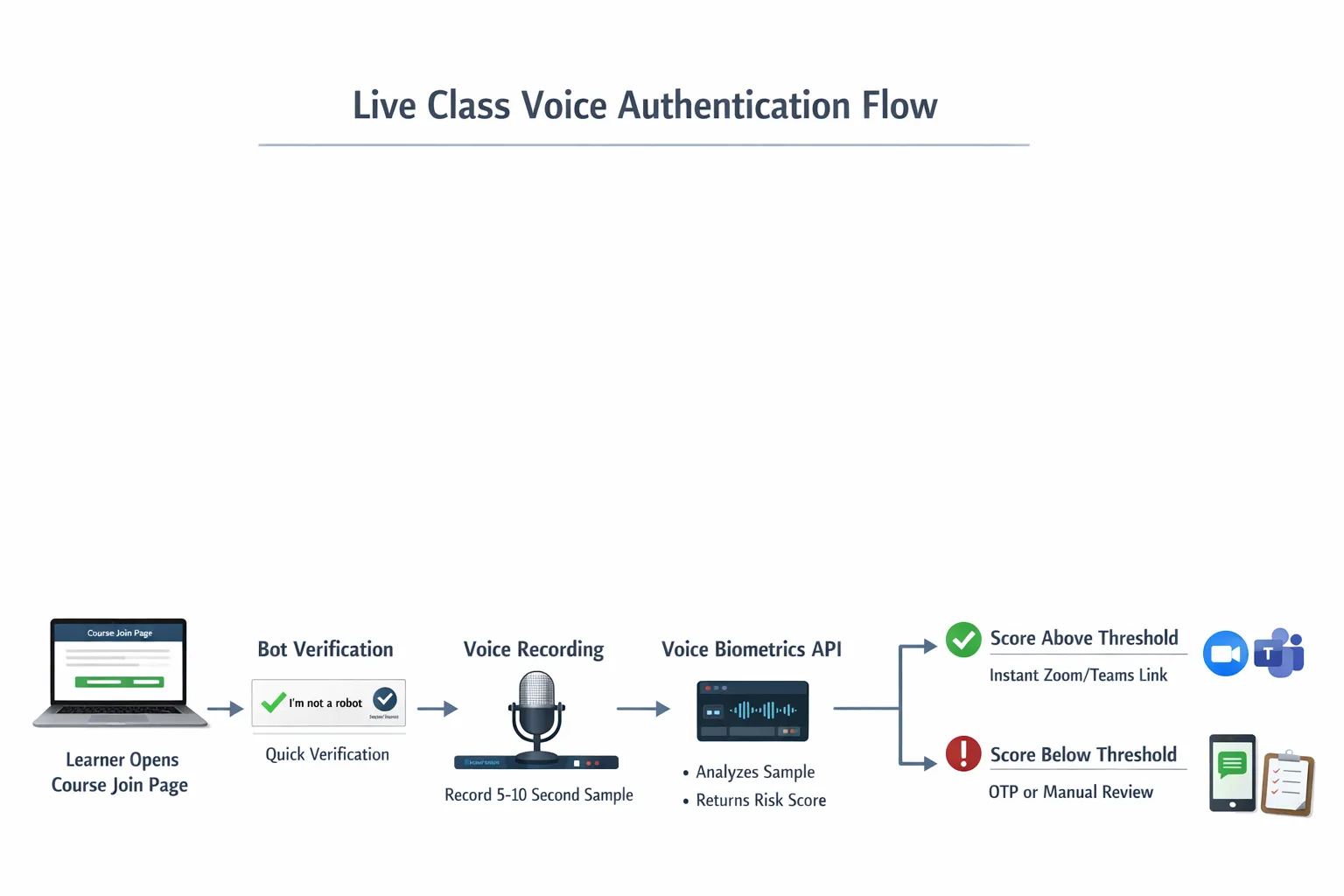
You do not need to modify the conferencing platform. The most reliable approach is to run authentication on your own join page, then release the meeting link or short lived token once verified.
- Pre enrolment, invite learners to record a short voice sample inside your LMS or portal, ideally five to ten seconds in quiet conditions. Provide clear consent text that explains what you store, for how long, and how to opt out.
- Pre join lobby, on the day, present a brief voice prompt, either a random phrase or short free speech instruction. Capture the sample via the browser and send it to your chosen vendor for verification.
- Decision and fallback, if the score is above your threshold, release the join link. If not, offer alternatives, SMS or email OTP, knowledge based check, human review for high value cases.
- During class, for sensitive sessions, consider a mid session spot check for a subset of attendees or passive background verification where your vendor supports it and your privacy notice allows it.
- After class, purge raw audio and voiceprints on a schedule aligned with your regulatory obligations and your published retention policy.
Accuracy, thresholds and fairness: how to tune without breaking attendance
- Start conservatively, choose a verification threshold that targets a low false rejection rate for the first pilot, and tighten only if proxy risk remains high.
- Design for real environments, assume laptop microphones, mobile phones, and background noise. Provide a one click retake if the first attempt fails.
- Provide equitable alternatives, publish a clear path for participants with speech impairments or strong accent challenges so they are not disadvantaged.
- Measure what matters, track completion rate of the join flow, average verification latency, number of fallbacks, and confirmed proxy attempts blocked.
A practical north star is to keep median verification under five seconds and flow completion above 98 percent for returning learners after enrolment.
Security and privacy guardrails you should not skip
- Consent and transparency, show a plain language notice before capture that explains why you collect voiceprints, where they are stored and for how long.
- Data minimisation, do not store raw audio longer than necessary, and purge templates after the cohort if you do not need ongoing verification.
- Regional controls, if you teach in the UK or EU, confirm hosting locations and sub processors, and document it in your data protection addendum.
- Spoof testing, include synthetic voices and replay attacks in your QA process. Ask your vendor for their approach to presentation attack detection and links to public benchmarks such as ASVspoof.
Layer voice with bot verification to keep UX smooth
Voice checks work best when you do not force everyone through them all the time. Start with a lightweight human versus bot screen that catches obvious automation, then escalate to voice only when risk is elevated, new device, unusual location, or policy threshold.
If you want a proven way to keep friction low, use a simple pre gate like our own Bot Verification to filter out automated joins, then invoke voice only for higher risk cases. For more tactics on building low friction checks, see our guide to AI assistant strategies for frictionless verification. If you are exploring spoken content too, our blueprint for AI voice generation for verified Q&A sessions pairs well with the same join flow.
Step by step pilot plan for a two week cohort
- Days 1 to 3, shortlist two vendors that meet your jurisdiction and SDK needs, set up a sandbox, and integrate the join flow in a staging portal.
- Days 4 to 6, enrol a small internal group, simulate noisy rooms, Bluetooth headsets, and mobile joins. Tweak prompts and thresholds.
- Days 7 to 10, run an A/B on a live session with 30 to 100 learners, half voice plus fallback, half bot check only. Measure completion, latency, and support tickets.
- Days 11 to 14, review results, choose your go forward stack, document consent and retention, and train your support team on fallbacks and appeals.
What success looks like for course creators
- Lower no show churn, fewer blocked legitimate joins, more reliable attendance attribution
- Reduced seat sharing, measurable drop in simultaneous logins per licence and coupon abuse
- Faster roll calls, automated attendance logs tied to verified identities
- Better audit trails, clearer compliance evidence for CPD and certification bodies
Final take
Voice based authentication has matured to the point where course creators can use it to secure high value live classes without hurting conversion. Start with the right problem, filter out bots first, then verify identity only where it matters. Choose a vendor that matches your privacy constraints and technical comfort, and pilot with clear metrics. When you combine a lightweight pre gate like Bot Verification with a modern voice biometrics API, you get strong protection with a learner experience that still feels effortless.






