
AI Tools for YouTube Course Access Control

If your course is delivered through YouTube (unlisted lessons, private playlists, live streams, or embedded videos in a member portal), “access control” can feel deceptively simple: hide the link, gate the page, done.
In practice, YouTube-based delivery creates a very specific security problem for course creators: your content is easy to stream, easy to share, and easy for bots to probe at scale. The goal is not to make piracy impossible (it rarely is), but to make unauthorised access and automated abuse expensive enough that it stops being worth it.
This review-style guide focuses on AI-assisted tools you can add around YouTube to keep enrolment, logins, and lesson access clean, without crushing conversion rates.
What “YouTube course access control” actually means (and where it breaks)
When creators say “I host my course on YouTube”, they typically mean one of these setups:
- Unlisted videos shared after payment (link in email or inside a course portal).
- Private videos or playlists (access controlled via specific Google accounts).
- Embedded YouTube videos inside an LMS, WordPress membership site, or community.
- YouTube Live for cohorts, workshops, or paid events.
The failure modes are consistent:
- Link sharing: unlisted URLs get reposted, forwarded, or scraped from a portal.
- Credential sharing: one buyer shares login details with friends, or sells access.
- Automated abuse: bots hammer signup forms, coupons, password resets, and login endpoints.
- Scraping and recon: bots crawl lesson pages, enumerate URLs, and test access patterns.
The strongest practical approach is a layered one: verify humans at high-risk moments, authenticate users reliably, and add device and behaviour signals to spot repeat abuse.
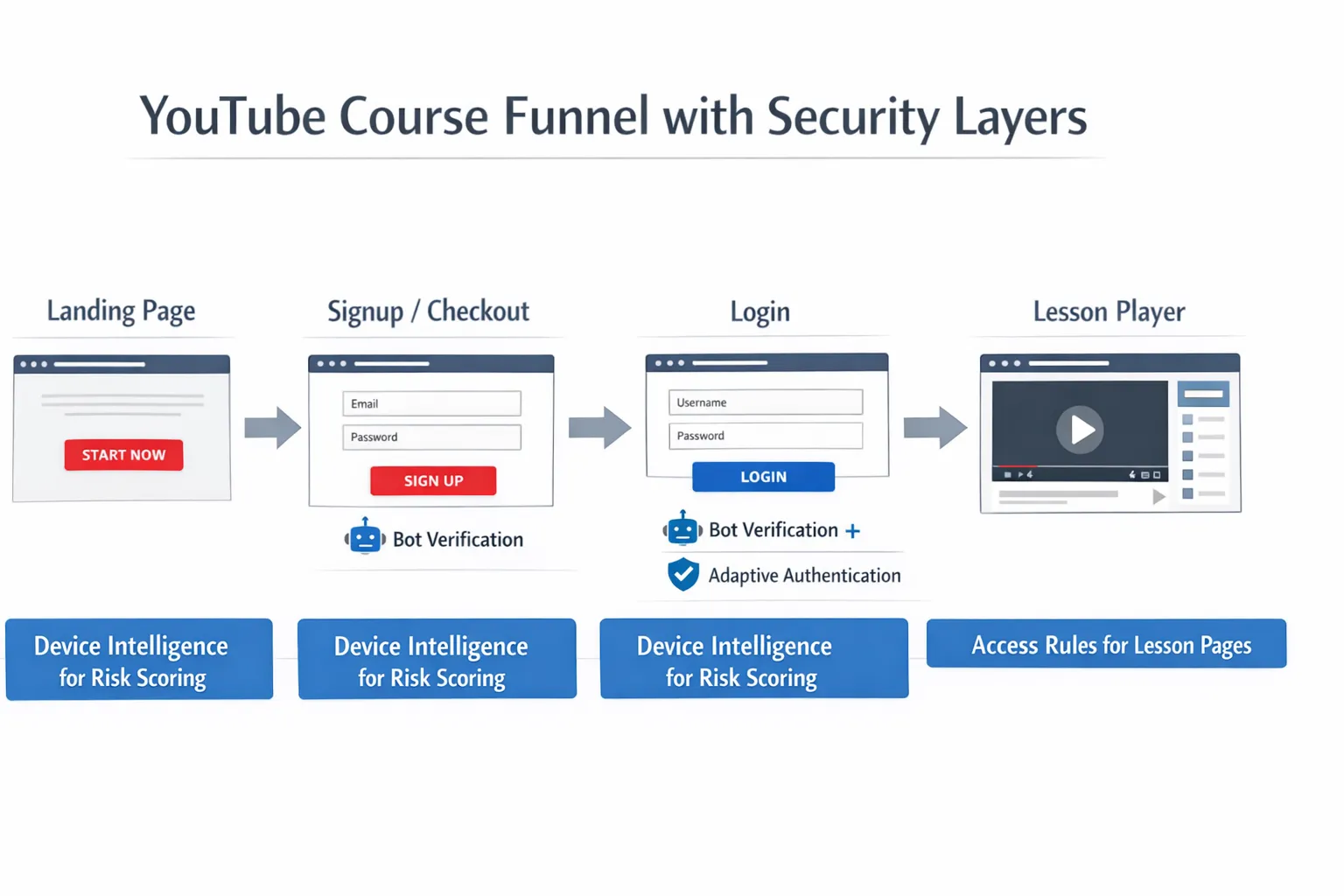
The tool categories that matter for YouTube course access control
Most course creators do not need “one mega security platform”. They need a small set of controls that map to where abuse happens.
1) Bot verification (stop automated traffic before it becomes support work)
Bot verification tools use behavioural signals and risk scoring to decide whether a visitor should be allowed to proceed (or be challenged). This is the fastest win for:
- Lead magnet downloads
- Free preview lessons
- Checkout attempts
- Login and password reset pages
2) Authentication and adaptive MFA (protect accounts without annoying real students)
If you sell access to embedded YouTube lessons, your real “content protection” is your login system. AI-assisted authentication products can apply risk-based step-ups (ask for MFA only when something looks wrong), which helps keep UX smooth.
3) Device intelligence / fingerprinting (catch repeat abusers and credential sharing)
Device signals help you answer questions like:
- Is this the same device creating 30 accounts?
- Did the same account just log in from two distant locations?
- Are we seeing scripted browsers (automation frameworks) instead of real users?
4) Access control policy (roles, rules, and limits)
This is not always “AI”, but it’s the foundation. Your course platform or membership layer should support basics like:
- restricting lesson pages to paid members
- limiting concurrent sessions (where possible)
- revoking access quickly when abuse is detected
Quick comparison: AI tools that fit YouTube course access control
This table is intentionally practical: it’s about where each tool sits in your funnel, and the trade-offs you’ll actually feel.
| Tool | Category | Best for in a YouTube course setup | Friction risk | Setup effort |
|---|---|---|---|---|
| Bot Verification | Bot verification | Blocking bots at signup, login, gated lesson entry points | Low (when used as a lightweight step) | Low |
| Cloudflare Turnstile | Bot verification | High-volume public pages, simple “human check” gates | Low | Low to medium |
| hCaptcha | Bot verification | More control over challenge behaviour and policy requirements | Medium (if challenges appear often) | Low to medium |
| Fingerprint (device intelligence) | Device intelligence | Catching credential sharing, repeat abusers, multi-account farms | Low (mostly invisible) | Medium |
| Auth0 (risk-based auth) | Authentication | Adaptive login security for course portals and communities | Low to medium | Medium |
Product review: Bot Verification (lightweight gatekeeping for course portals)
What it is: Bot Verification provides a simple verification step designed to confirm users are not robots before granting access.
Where it fits for YouTube courses: This is most useful when your YouTube content is embedded or linked from pages you control (LMS lessons, WordPress membership pages, community lesson hubs). You are not protecting YouTube itself, you are protecting the workflows that reveal links, load embedded players, or grant account access.
Best use cases (practical):
- Signup and enrolment pages: reduce fake account creation and spam lists.
- Login and password reset: protect the endpoints bots target for credential stuffing.
- High-value lesson entry points: add a low-friction check when traffic patterns look abnormal (for example, a sudden spike in lesson page hits).
Why it’s a good fit for creators: Most course businesses are not staffed like SaaS security teams. A “simple verification step” is often exactly what you need to reduce automated abuse without re-architecting your stack.
Watch-outs: Bot verification is not a replacement for authentication. If your lesson pages are publicly accessible (or your unlisted links are emailed in the clear), a bot check alone will not solve link sharing. You still need a proper member gate and sensible access rules.
If you want a broader view of how creators layer these defences, you can also reference the more general toolkit approach in The Course Creator’s AI Toolkit for Access Control.
Product review: Cloudflare Turnstile (low-friction bot checks for public entry points)
What it is: Cloudflare Turnstile is a CAPTCHA alternative designed to confirm a visitor is real, typically with fewer visual puzzles.
Where it fits for YouTube courses: Turnstile shines on top-of-funnel surfaces you cannot afford to make annoying:
- opt-in pages
- webinar registration
- free preview lesson pages
- checkout attempts (especially after repeated failures)
Why creators like it: It’s commonly chosen when the priority is “stop obvious bots, keep conversion high”. For many course creators, that’s the right default.
Watch-outs: Turnstile is primarily a bot gate. If you have ongoing credential sharing, you will still want device intelligence or adaptive authentication.
Product review: hCaptcha (more control, sometimes more friction)
What it is: hCaptcha is a bot verification tool that can present challenges when it’s less confident a user is human.
Where it fits for YouTube courses: hCaptcha can work well when you want stronger “proof of human” at specific choke points, like:
- creating an account
- applying coupons
- repeated login attempts
Strength: Compared to purely invisible approaches, challenge-based tools can be more explicit.
Trade-off: The more often real learners see puzzles, the more you pay in support tickets and abandoned signups, especially on mobile. If you’re deciding between tools, the deeper comparison in CAPTCHA vs hCaptcha for course sites can help frame the decision.
Product review: Fingerprint (device intelligence that catches repeat abuse)
What it is: Fingerprint-style device intelligence tools identify devices and detect automation patterns using a combination of signals.
Where it fits for YouTube courses: This is a strong add-on when the problem is not “random bots”, but the same people repeatedly abusing your access:
- credential sharing across many logins
- multi-account enrolments to exploit discounts
- suspicious patterns around high-value lesson modules
Why it matters for YouTube delivery: Once an unlisted link leaks, bots and scrapers can behave like “normal browsers”. Device and behaviour signals help you detect patterns that basic bot gates miss.
Watch-outs: Device intelligence can raise privacy and compliance questions. If you operate in the UK or EU, treat this like a governance decision, not a quick growth hack. Minimise data collection, document purpose, and align with your platform policies.
Product review: Auth0 (adaptive login security for member portals)
What it is: Auth0 is a customer identity and access management platform. In plain terms, it’s a way to run logins, MFA, and user rules without building everything yourself.
Where it fits for YouTube courses: If you run a custom portal (or a community with deeper access tiers), Auth0-style platforms let you add:
- adaptive MFA (step up only when risky)
- anomaly detection signals
- stronger control over sessions and login policies
Why it’s relevant to YouTube courses: Your YouTube player is not the security boundary, your login is. If your course is valuable, strengthening authentication is often a bigger lever than obsessing over unlisted links.
Watch-outs: Expect more setup than “drop-in verification”. This is a platform decision.
Implementation blueprint: where to place AI controls in a YouTube course funnel
Instead of thinking “which tool is best?”, map your funnel touchpoints and add protection where it pays back quickly.
| Funnel touchpoint | What attackers do | Recommended control | Why it works |
|---|---|---|---|
| Lead magnet / free lesson | Automated form submissions, scraping | Bot verification (lightweight) | Stops list pollution and bandwidth waste early |
| Signup / account creation | Fake accounts, referral abuse | Bot verification + rate limits | Blocks automation before accounts exist |
| Checkout | Card testing, coupon brute force | Bot verification on repeated failures | Adds friction only when behaviour looks wrong |
| Login | Credential stuffing | Bot verification + adaptive MFA | Protects accounts without making everyone do MFA |
| Lesson pages (embedded YouTube) | Link scraping, scripted viewing | Authenticated access + device intelligence for anomalies | Makes access depend on identity and patterns |
| Support flows (password reset) | Account takeover attempts | Bot verification + throttling | Removes the easiest attack route |
If you’re already using YouTube as your acquisition engine, remember that growth and security are coupled: bot traffic can destroy conversion data and inflate ad costs. For creators running paid acquisition at scale, working with a performance team that understands tracking and funnel quality (for example, Realisma digital marketing agency) can help you protect ROI while you harden access.
Decision guide: which stack should you choose?
Solo creator (fastest path to “good enough”)
Prioritise two outcomes: stop spam, and stop account takeovers.
- Use a lightweight bot verification step on signup, login, password reset.
- Keep lessons behind a proper member gate (even if the videos are unlisted on YouTube).
A useful next read for this stage is Best AI tools to stop spam signups.
Growing course business (protect revenue and reduce credential sharing)
At this stage, the hidden cost is support time: “I can’t log in”, “someone accessed my account”, “my coupon got abused”. Add intelligence that reduces repeat incidents.
- Bot verification at entry points
- Device intelligence to flag repeat abusers and suspicious concurrency
- Risk-based authentication for higher-value tiers
High-ticket programmes or cohorts (assume motivated attackers)
If your course is expensive or leads to certifications, you need stricter identity assurance.
- Bot verification everywhere it’s cheap
- Adaptive MFA and session controls
- Consider adding stronger identity checks where necessary (especially for assessments)
The YouTube reality check: what these tools can and cannot do
It’s important to set expectations clearly:
- These tools can protect your site, your portal, and your workflows. They reduce automated abuse, account takeover, and low-effort leakage.
- They cannot stop someone screen-recording a video. If that risk is existential, you may need a video hosting platform built for secure delivery rather than YouTube.
- They can meaningfully reduce link sharing damage by making the links harder to discover and less useful without a valid, verified session.
For most course creators, that’s the right definition of success: fewer fake signups, fewer compromised accounts, cleaner analytics, and less revenue leakage, while keeping the learner experience smooth.
If you want a related, creator-friendly overview of the wider security landscape, Using AI to secure your online course content connects the dots between verification, authentication, and content protection layers.






