
AI Tools for Productivity in Course Moderation

Course moderation is one of those “invisible jobs” that can quietly eat the best hours of your week. One spam wave in your comments, one heated thread in your community, or one live Q&A flooded with low-quality messages, and suddenly you are doing inbox triage instead of teaching.
The good news is that AI tools for productivity are now genuinely useful in course moderation, not as a replacement for human judgement, but as a way to:
- Auto-detect spam, abuse, and high-risk content
- Prioritise what needs a human response first
- Summarise long threads and extract action items
- Reduce bot-driven noise (the fastest “moderation win” for most creators)
Below is a practical, course-creator-friendly set of AI tool product reviews focused specifically on moderation workflows in 2026.
What “course moderation” actually covers (and why creators burn out)
For most course businesses, moderation happens across multiple surfaces:
- Public surfaces: blog comments, lead magnet pages, webinar registration pages, free previews
- Authenticated surfaces: course discussion boards, member communities, student profiles
- Real-time surfaces: webinar chat, live cohort sessions, office hours
- Support surfaces: your helpdesk inbox, DMs, refund and access requests
A human-only approach does not scale because the workload is spiky. Most of the week is calm, then you get a sudden influx from:
- Bots (spam signups, spam posts, scraping)
- Promotions and link drops
- Harassment, hate, or sexually explicit content
- “Assignment dumping” (low-effort posts that force you to read and redirect)
A modern moderation stack aims to keep the learner experience smooth while quietly reducing the junk your team ever has to see.
How to evaluate AI moderation tools (a quick buyer’s checklist)
Before you pick any tool, decide what you are optimising for.
Accuracy vs friction
If you run a paid cohort with strong identity signals, you can be stricter. If you run a top-of-funnel community, you need low friction so real learners are not blocked.
Integration path
Most course creators do not need a complex “Trust & Safety” platform. You need something that plugs into:
- Your community platform (Circle, Discourse, Discord, Facebook Groups, Kajabi Communities, Thinkific communities, and similar)
- Your forms and checkout flows
- Your helpdesk (or at least email)
Data handling (UK GDPR)
If student posts may include personal data, you should care about:
- What content is stored by the vendor
- Retention controls
- Whether the provider offers region controls or enterprise governance
(If you operate in the UK/EU, it is worth having a basic DPIA-style checklist for any tool that processes student content.)
Human-in-the-loop controls
The best productivity gains come from good queues, not “auto-delete everything”. Look for:
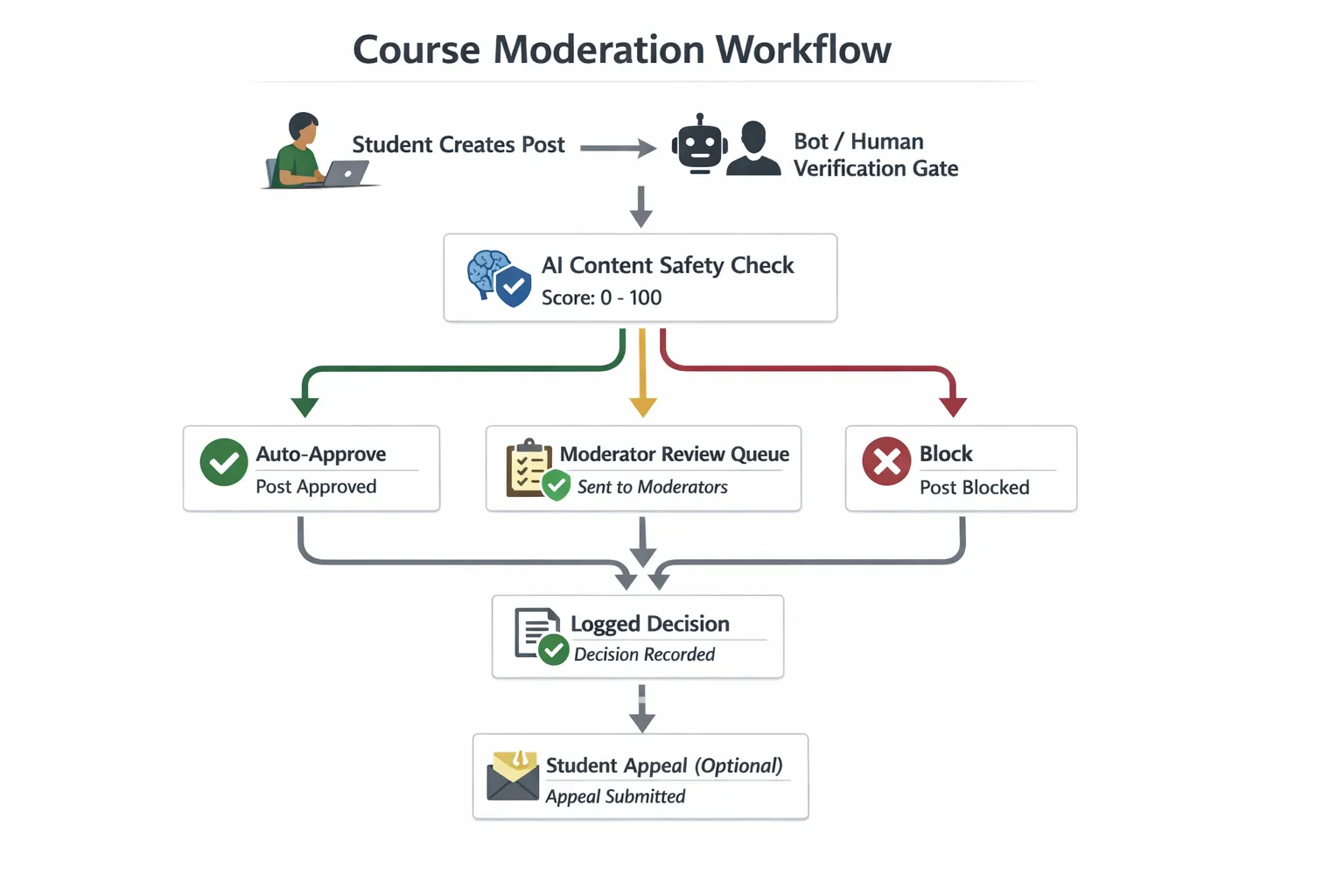
- Review queues with confidence scores
- Clear labels (spam, harassment, sexual content, self-harm, and similar)
- Audit trails, so you can explain decisions
Product reviews: AI tools that actually speed up course moderation
1) OpenAI Moderation API (best for fast, developer-friendly text safety)
What it is: An API that classifies text (and, depending on current capabilities in the documentation, potentially other modalities) into safety categories so you can flag, block, or route content for review.
Where it fits in course moderation:
Use it to pre-check student-generated text before it is published, for example:
- New community posts
- Comments under lessons
- Profile bios
- Live chat messages (especially in large webinars)
Why it boosts productivity:
You can stop obvious policy violations early and keep moderators focused on edge cases. It is especially useful if you want a simple “post allowed / needs review / block” triage.
Watch-outs:
You still need your own policy and escalation rules (for example, what to do with self-harm signals, or repeated harassment). Also, accuracy varies by context, slang, and niche jargon.
Best for: Course teams with a developer (or no-code middleware) who want a flexible moderation layer.
Link: OpenAI moderation documentation
2) Azure AI Content Safety (best for organisations standardised on Microsoft)
What it is: Microsoft’s content safety service designed to detect harmful content categories in text and images.
Where it fits:
- Moderating student posts and comments
- Moderating image uploads (profile images, community media)
- Adding safety checks to internal tools your team uses
Why it boosts productivity:
If your course business already runs on Microsoft 365/Azure, this is often a clean governance and procurement fit. Teams like it when they want a “managed service” approach and enterprise-style controls.
Watch-outs:
Like all classifiers, it can produce false positives. You need an appeal path for students, particularly if moderation decisions affect access.
Best for: Teams that want enterprise governance and are already in the Microsoft ecosystem.
Link: Azure AI Content Safety overview
3) Perspective API by Jigsaw (best for toxicity scoring in discussions)
What it is: A tool/API that scores the likelihood that a comment is toxic or disruptive (commonly used in community and publishing contexts).
Where it fits:
- Discussion boards
- Comment sections
- Peer feedback workflows
Why it boosts productivity:
Perspective-style scoring is useful when you do not want a simple “allowed or blocked” decision. Instead, you can:
- Send high-toxicity posts to a review queue
- Rate-limit users who repeatedly post borderline content
- Auto-hide content until a moderator approves it
Watch-outs:
Toxicity scoring can be sensitive to dialect and context. Use it as a prioritisation signal, not as the only decision-maker.
Best for: Communities where tone matters and conversations get heated.
Link: Perspective API documentation
4) Hive Moderation (best for multi-modal moderation at scale)
What it is: A content moderation platform that offers machine learning models for text, images, and video moderation use cases.
Where it fits:
- Courses with heavy community media uploads
- Creator communities where students share screenshots, images, or short clips
- Marketplaces or larger academies that need more than basic comment moderation
Why it boosts productivity:
It can reduce manual review for image and video content, which is often where moderation becomes slow and emotionally draining.
Watch-outs:
It may be more than a solo creator needs. Evaluate cost, integration effort, and whether your real problem is actually bots and spam rather than sophisticated harmful media.
Best for: Growing communities with meaningful media moderation needs.
Link: Hive Moderation
5) Akismet (best “set and forget” for comment spam)
What it is: A widely used spam filtering service, especially common in WordPress ecosystems.
Where it fits:
- Blog comments
- Contact forms
- Simple community areas that suffer from automated spam
Why it boosts productivity:
Spam is the most common moderation workload for creators, and a good filter can remove a large share of it with minimal configuration.
Watch-outs:
Akismet is excellent for spam patterns, but it is not a complete “community safety” tool. You still need a plan for harassment, impersonation, or account abuse.
Best for: WordPress-based course sites and creators who mainly need spam reduction.
Link: Akismet
6) Automation platforms (Zapier, Make, n8n) for moderation routing (best for saving human time)
What they are: Workflow automation platforms that connect your community/LMS/forms to queues, spreadsheets, Slack, email, or helpdesks.
Where they fit in moderation:
Automation is how you turn detection signals into real productivity. Examples:
- If a post is flagged by your moderation API, create a ticket in your support system
- If a user triggers repeated flags, notify a moderator channel
- If a live chat message contains certain patterns, auto-hide and log it
Why they boost productivity:
Most moderation time is wasted on switching contexts and manually copying links into “someone should look at this”. Automation removes that.
Watch-outs:
Be careful not to ship sensitive student content into too many tools. Route links and metadata where possible, not full message bodies.
Best for: Solo creators and lean teams who need a lightweight moderation “ops layer”.
If you are choosing between options, this comparison is relevant: n8n vs Make vs Zapier.
The quickest productivity win: stop bots before they create moderation work
Many creators try to “moderate better” when the real fix is preventing automated abuse at the source.
If bots can:
- Register accounts
- Post in public comments
- Drop links in community threads
- Flood webinar chat
…your moderation workload is guaranteed to grow.
That is where a lightweight gate helps.
Bot Verification (quick review)
What it is: A simple verification step that confirms users are not robots before granting access.
Where it fits in a moderation workflow:
- Before posting a comment
- Before joining a community space
- Before accessing a high-risk form (webinar signups, coupon pages, downloads)
Why it improves moderation productivity:
By reducing automated spam and scripted abuse, you lower the total volume that ever reaches your review queues.
What to be careful about:
Verification should be used strategically. If you place it in front of every action, you may reduce conversion or create accessibility issues. A practical approach is to add verification only to the actions bots target most.
You can also pair this with broader guidance from: Best AI tools to stop spam signups.
Recommended stacks (by course business stage)
To keep this practical, here are sensible combinations based on how most course creators operate.
| Course business stage | Typical moderation pain | A sensible AI moderation stack | Why this works |
|---|---|---|---|
| Solo creator | Spam, link drops, occasional conflict | Akismet + Bot Verification + simple automation routing | Removes the bulk of junk, keeps your time protected |
| Growing cohort/community | Heated threads, higher posting volume, support load | Perspective API (or OpenAI Moderation) + automation routing + Bot Verification at key actions | Prioritises what needs review and reduces spam volume |
| Larger academy | Media uploads, multi-channel community, higher abuse risk | Azure AI Content Safety or Hive Moderation + workflow automation + verification gates | Handles text and media at scale with clear queues |
Implementation tips that keep moderation effective (without annoying learners)
Write a “what happens when” policy first
Before tools, define:
- What gets blocked vs reviewed vs allowed
- How fast you respond to reports
- What happens on repeat offences
This prevents AI from becoming a random enforcement layer.
Use thresholds and queues, not constant hard-blocking
For most course communities, your best workflow is:
- Auto-approve low-risk content
- Queue medium-risk content
- Block obvious spam and policy violations
Measure productivity with the right metrics
Track outcomes that reflect both safety and UX:
- Moderator time per week
- Number of items reviewed per 1,000 students
- False positive rate (legitimate posts incorrectly flagged)
- Time to first response on reports
Frequently Asked Questions
Which AI tool is best for moderating course discussion boards? For discussion boards, tools that prioritise tone and toxicity often help most. Perspective API is strong for toxicity scoring, while OpenAI Moderation and Azure AI Content Safety are good general-purpose classifiers for routing posts into “approve / review / block”.
Will AI moderation tools accidentally censor my students? Yes, false positives happen, especially with sarcasm, reclaimed language, or niche terminology. The safest setup is to use AI to prioritise review, not to permanently block borderline content, and to provide a clear appeal path.
Do I need a developer to use AI tools for productivity in course moderation? Not always. Some tools are plug-and-play (for example, spam filtering services), and you can often connect APIs using automation platforms. If you want real-time checks inside your community platform, developer support helps.
How do I reduce spam without adding too much friction? Start by adding verification only at high-abuse actions (new account creation, first post, posting links, repeated failed logins). Then monitor conversion and challenge rates. The goal is to stop bots while legitimate learners barely notice.
Make moderation lighter: add a simple bot verification step
If moderation is draining your time, the fastest improvement is often reducing automated noise before it hits your community.
Bot Verification provides a simple verification step to confirm users are not robots before granting access. Used strategically (for example, before posting or joining key areas), it can cut down spam and bot-driven junk that would otherwise become manual moderation work.
Explore Bot Verification at aitoolshed.co.






