
AI Optimization for Smoother Student Login Flows

Students do not come to your site to wrestle with passwords, reset links and puzzles, they come to learn. The quickest way to improve completion rates and revenue is to make the front door effortless for real learners while quietly blocking automation and abuse. This is where AI optimisation of the login journey pays off, combining risk signals with adaptive challenges so that trusted users sail through and only suspicious traffic is stepped up.
Why student login flows feel fragile
Courses attract a mix of human learners, shared accounts and automated traffic. The same user can arrive from a school Chromebook at 09:00, then from a mobile on 3G at 23:45. Any hard‑coded login rule will feel too strict for one cohort and too lax for another. Add to that accessibility needs, mobile keyboards, and the reality that many students reuse weak passwords, and you have a perfect storm of friction and fraud risk.
AI helps because it can learn from contextual signals in real time and tune the amount of friction to the actual risk. The result is fewer CAPTCHAs for genuine students, faster first content paint after authentication, and a sharp drop in credential‑stuffing and scripted abuse.
What AI changes in the login stack
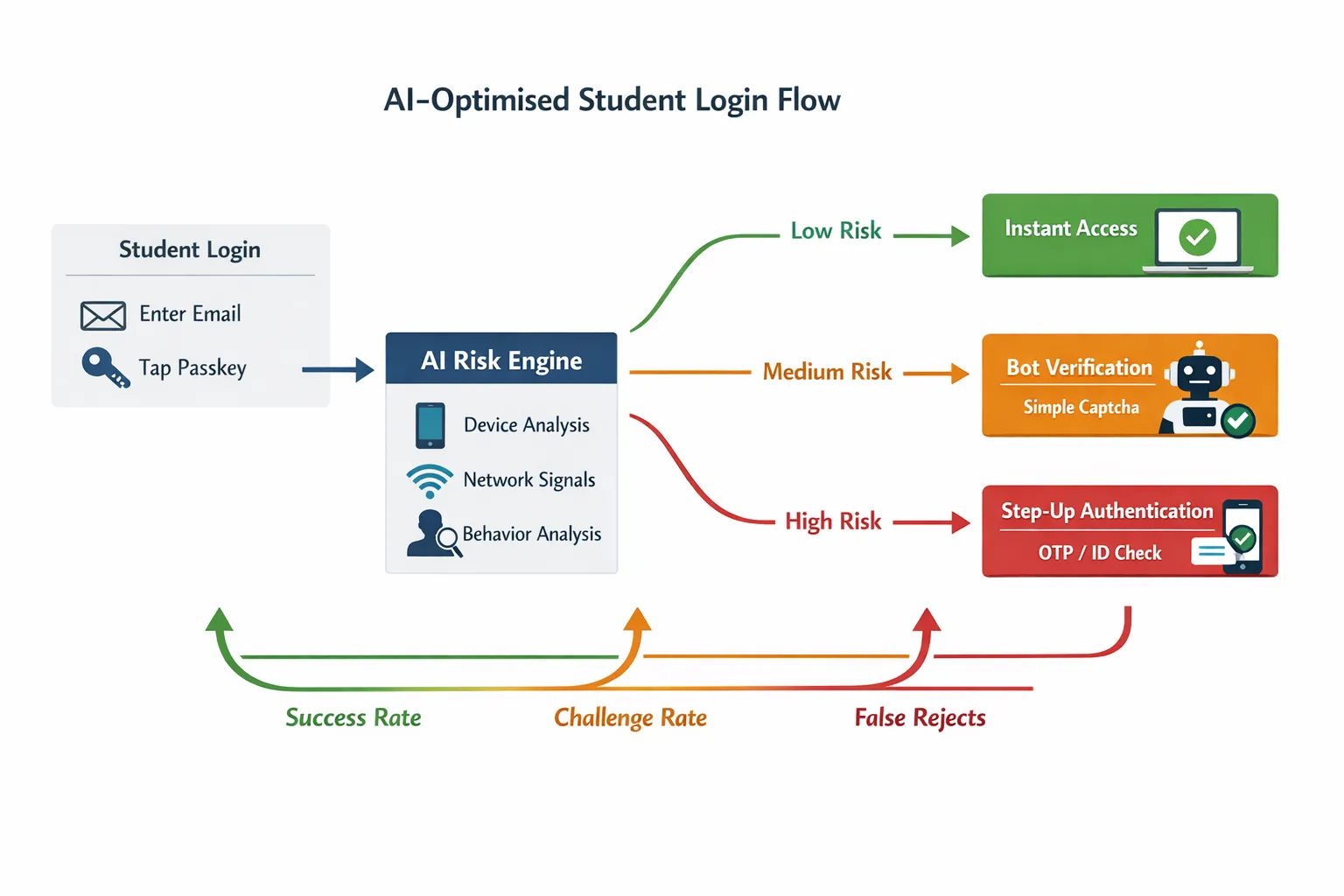
- Risk‑aware orchestration, not one‑size‑fits‑all. An AI model scores each attempt using features such as device familiarity, network reputation, velocity from the same IP, and on‑page behaviour. Low risk gets a fast path, medium risk gets a lightweight verification, high risk gets step‑up.
- Passwordless by default. Passkeys based on FIDO standards remove passwords entirely and are resistant to phishing. They are supported across major platforms and are accessible on mobile and desktop. See the FIDO Alliance primer on passkeys.
- Smarter bot checks. Modern verification can be context‑aware and privacy‑preserving. Cloudflare’s Turnstile is an example of a challenge that adapts without making users solve puzzles.
- Standards and governance baked in. Align to NIST’s guidance on digital identity assurance and authenticator choices for risk‑based flows, see NIST SP 800‑63B. Make accessibility a first‑class requirement with WCAG 2.2 accessible authentication and follow OWASP’s Authentication Cheat Sheet.
A reference blueprint for AI‑optimised student login
- Pre‑login context
- Normalise attempts. Rate limit by intent, not only by IP. Consider country, ASN reputation and recent enrolment history.
- Predict the best path. If a returning device has a bound passkey, show a one‑tap continue option. If the user’s email domain is school‑managed, surface single sign‑on first.
- Primary authentication
- Default to passkeys for known devices, fall back to magic link or one‑time code for new devices. Keep password entry as a last resort for legacy users.
- Provide privacy‑preserving device recognition. Use stable, consented identifiers and client hints rather than invasive fingerprinting.
- AI risk assessment in the loop
- Low risk (most traffic), skip challenges and log the score for auditing.
- Medium risk, interpose a lightweight human verification gate that proves “real person present” without hurting UX.
- High risk, require step‑up such as SMS or authenticator code. For truly anomalous attempts, block and invite support contact.
- Post‑login protection
- Bind sessions to device and risk score, set shorter lifetimes for risky sessions and longer for trusted devices.
- Re‑authenticate only on sensitive actions, for example payment method changes or certificate downloads, to avoid interrupting learning.
Where bot verification fits
Your bot defence should be invisible to genuine learners most of the time. The sweet spots to deploy a simple verification step are:
- First login on a new device
- After a burst of failed attempts from similar networks
- Before issuing session tokens when the risk score is borderline
A lightweight gate, like the Bot Verification step available on this site, confirms there is a human present before access is granted. It is an ideal complement to passwordless and adaptive MFA because it removes a large class of automated noise before you escalate friction.
Common friction points and how AI removes them
| Friction point | Why it happens | AI‑centred improvement | Verification layer |
|---|---|---|---|
| CAPTCHA fatigue on mobile | Static challenges fire for everyone, small screens make them slow | Risk‑score attempts, show challenges only for medium risk | Lightweight human check for borderline traffic |
| Password resets and lockouts | Users forget passwords and typo on phones | Default to passkeys and magic links, coach users to enrol a passkey during first successful login | Human check only when risk spikes |
| Long time to first content | Multiple redirects, slow email delivery for magic links | Predict best auth path, cache pre‑login assets, use one‑tap passkeys | None for low risk |
| False positives on shared networks | Labs, dorms and libraries look suspicious | Blend device familiarity and behaviour with network signals | Use verification to separate humans from scripts |
| Accessibility blockers | Vision or cognitive load from puzzles | Prefer accessible authentication patterns as per WCAG 2.2 | Avoid visual puzzles entirely |
Practical upgrades you can ship this month
- Turn on passkeys for returning devices. Offer passkey enrolment immediately after a successful legacy login, with a plain‑language explainer that it replaces passwords on that device.
- Make magic links dependable. Use short, single‑use tokens and pre‑fill the email field. Add a “resend link” that respects rate limits but gives users control.
- Add a risk‑based verification step. Place a human verification gate only when the risk score sits in the middle band. Keep it off for the trusted majority.
- Reduce redirects. Collapse SSO discovery, locale choice and captcha into one page where possible. Every extra hop adds seconds and drop‑off.
- Keep session lifetimes intelligent. Give longer sessions to passkey logins on private devices, shorter sessions to unknown or shared devices.
For deeper tactics on keeping verification friction low, see our guide to AI assistant strategies for frictionless verification.
Tooling map for course creators
The goal is not to buy every tool, it is to orchestrate the right amount of proof at the right time.
- Passwordless and passkeys, implement FIDO2/WebAuthn through your auth provider or platform. Read the FIDO Alliance overview of passkeys.
- Adaptive bot defence, consider privacy‑preserving, low‑friction challenges like Cloudflare Turnstile, or deploy a simple on‑page human verification step where your risk engine flags borderline traffic.
- Risk signals and device context, many identity providers and fraud tools expose device and IP risk as a score. Start simple by combining failed‑attempt velocity with device familiarity and geo‑distance.
- Conversational guardrails, for public enrolment or coupon abuse hotspots, a small AI chatbot can validate intent before creating an account. See our playbook on chatbot verification without friction.
If you are still choosing vendors, this buying guide explains what to ask for and how to pilot responsibly, How to choose an AI company for verification. For tools that reduce spam at the top of the funnel, start with our 2025 review of the best AI tools to stop spam signups.
Measure what matters, then iterate
You cannot optimise what you do not observe. Instrument these KPIs from day one and review weekly.
| KPI | What it tells you | How to measure | Aim for |
|---|---|---|---|
| Login success rate | Overall ease of access for humans | Unique users who reach dashboard divided by unique login attempts | Rising, with no drop in fraud |
| Time to first content | Speed from submit to first protected lesson loaded | Median seconds across devices | Under 3 seconds on broadband, under 6 seconds on mobile |
| Challenge rate | How often you interrupt users | Percentage of attempts that see a verification step | Below 10 percent for mature systems |
| False reject rate | Genuine users blocked | Support tickets tagged “login” divided by DAU, plus monitored denials with later success | Trending down |
| Attack containment | How well you absorb bursts | Percent of automated attempts blocked before password or OTP prompts | Trending up |
Use conversation logs, denial reasons and success paths to tune your thresholds. Adjust one control at a time, then let data stabilise before changing another.
Accessibility and privacy by design
- Prefer accessible authentication patterns over puzzle challenges. WCAG 2.2’s Accessible Authentication criterion is a practical checklist.
- Minimise personal data in the risk engine. Use aggregated, ephemeral signals and store only what is essential for security decisions. Align with NIST SP 800‑63B for authenticator strength and lifecycle.
- Explain what is happening. A short sentence such as “Quick check to confirm you are a person, this protects your account” reduces anxiety and support contacts.
Edge cases unique to education, and how to handle them
- Shared or managed devices. Treat school labs as medium risk by default, then lean on device familiarity and behaviour to avoid constant challenges.
- Low connectivity learners. Prefer passkeys and codes that work offline for a short period, and avoid image‑heavy challenges.
- Younger users without phones. Do not make phone possession a hard requirement. Offer email‑based links and platform SSO when available.
- Assistive technologies. Test login with screen readers and keyboard only. Avoid time‑boxed puzzles.
A 7‑day pilot plan that respects your students’ time
Day 1, instrument KPIs and map the current journey. Log decision points and reasons for denial.
Day 2, enable passkeys for returning devices and add a clear, optional enrolment prompt after successful login.
Day 3, place a lightweight human verification step behind a feature flag. Target only medium‑risk attempts as identified by simple rules, for example new device plus unusual network.
Day 4, remove static CAPTCHAs for low‑risk traffic. Monitor challenge rate and success rate closely.
Day 5, tune session lifetimes so trusted devices enjoy longer sessions and risky ones shorter.
Day 6, accessibility pass. Run through WCAG‑aligned checks, enlarge tap targets, ensure all flows work without a mouse.
Day 7, review metrics and support tickets. Keep the changes that helped, roll back anything that harmed legitimate access.
For a broader access‑control stack beyond login, see the Course Creator’s AI toolkit for access control.
Final thought and next step
AI optimisation, or AI optimization if you prefer the US spelling, should make the student experience calmer, not more complex. The winning pattern is simple, prove a person is present only when risk suggests you should, then let students learn without interruption. If you want a fast way to validate the approach, add a single, lightweight human verification step where your risk is highest and watch the challenge rate fall for everyone else.
If you would like to see how a simple “prove you are human” gate fits your stack, try the Bot Verification step on a staging login and measure the impact. Keep what helps, remove what does not, and let data guide the rest.






