
AI Comparison: CAPTCHA vs hCaptcha for Course Sites

Bots chip away at course revenue and trust, but the wrong verification can tank conversions. If you are deciding between Google’s reCAPTCHA and hCaptcha for your enrolment, login and checkout flows, this AI comparison focuses on what actually matters for course sites in 2026: security efficacy, mobile UX, accessibility, privacy and cost predictability.

What you are really choosing
In most conversations, “CAPTCHA” means Google reCAPTCHA. This guide compares Google reCAPTCHA (v2 checkbox, v2 invisible, v3 score-based, and Enterprise) with hCaptcha (free, Pro and Enterprise) from a course‑site perspective. Both are widely supported, actively maintained and powered by machine learning risk analysis with optional challenges.
For completeness, privacy‑first options like Cloudflare Turnstile also exist, but the decision most course creators face day to day is reCAPTCHA versus hCaptcha.
- reCAPTCHA documentation: Google Developers
- hCaptcha documentation: hCaptcha Docs
Decision criteria that matter for course sites
Course creators care about slightly different factors than generic SaaS sites. The high‑risk spots are new enrolments, free trials, coupon use, password resets and content downloads. The wrong friction here causes abandoned carts or support tickets.
The criteria that usually decide the winner are:
- Detection quality and tunability, how well the service reduces automated signups, credential stuffing and scraping without over‑challenging real learners.
- Mobile user experience, most enrolments happen on phones, so small‑screen challenge ergonomics and performance matter.
- Accessibility, compliance with WCAG 2.2 accessible authentication guidance and providing workable audio alternatives.
- Privacy and data governance, especially for UK/EU audiences under UK GDPR/GDPR. You will need to update your privacy and cookie notices, and in some cases obtain consent. See the UK ICO guidance on cookies and similar technologies.
- Ecosystem and LMS fit, availability of official or well‑supported plugins for WordPress LMSs and hosted platforms.
- Cost predictability, free tiers are fine at small scale, but budgets need predictability once you grow.
reCAPTCHA and hCaptcha at a glance
- Google reCAPTCHA, mature ecosystem, easy to drop into most platforms, excellent plugin support, and v3 enables largely invisible scoring with conditional escalation to challenges.
- hCaptcha, privacy‑forward positioning, drop‑in compatibility with many reCAPTCHA integrations, strong adoption across organisations that prefer to minimise data sharing with advertising platforms.
Both vendors ship enterprise editions with advanced risk signals and policy controls. Pricing and SLAs vary by usage and tier, so confirm the latest terms before committing.
Head‑to‑head for course sites
| Dimension | Google reCAPTCHA | hCaptcha | Practical implication for courses |
|---|---|---|---|
| Detection approach | Risk scoring plus challenges, v3 for score‑only, v2 for checkbox or invisible | Risk scoring plus challenges, checkbox and invisible options | Both can be run in a low‑friction mode, then escalate only when risk is high |
| Mobile UX | Familiar patterns and broad optimisation across sites using Google widgets | Modern widgets with strong mobile ergonomics | Either can be mobile‑friendly when configured, test on older Android/iOS devices |
| Accessibility | Audio alternatives and programmatic focus states available; requires careful theming and labelling | Audio alternatives and ARIA support; similar care needed | Build to WCAG 2.2 accessible authentication guidance, validate with keyboard‑only and screen reader tests |
| Privacy posture | Operated by Google; data processing, cookie behaviour and notices must be reviewed against your policy | Operated by hCaptcha; privacy‑centric marketing and controls | Many EU/UK institutions prefer hCaptcha, but both require DPIA and policy updates |
| Ecosystem support | Excellent plugin coverage across WordPress, WooCommerce, LearnDash, LifterLMS, MemberPress, and more | Broad support and often drop‑in for reCAPTCHA fields; dedicated plugins exist | Choose what your LMS supports natively to cut integration time |
| Challenge variety | Checkbox, image identification, and invisible triggers; v3 often reduces visible prompts | Checkbox, image identification, and invisible triggers | Target a low challenge rate, ideally below 5 percent of human sessions |
| Cost trajectory | Free options for basic usage; Enterprise is usage‑based | Free and paid options; Enterprise is usage‑based or contracted | Model total cost of ownership at your peak season volumes |
| Branding/legal | “Protected by reCAPTCHA”, Google terms and privacy links displayed | “Protected by hCaptcha”, vendor links displayed | The footer text is part of the widget and should remain visible |
Note, widget behaviours and challenge sets evolve, check vendor docs for current details before rollout.
Where each tends to fit best
- If you need the fastest path with maximum plugin coverage across popular LMS stacks, reCAPTCHA has a slight edge.
- If your audience includes privacy‑sensitive regions, institutions or clients who prefer minimising data sharing with large ad platforms, hCaptcha is often the safer default.
- If you run frequent promotions or free trials that attract scripted abuse, either vendor’s invisible or score‑based mode with strict rate‑limits can keep friction low for good users while blocking automation.
For a layered approach designed for course businesses, see our vendor‑agnostic guides: How to Choose an AI Company for Verification, AI Reviews: Top Bot Verification Tools for Course Creators, and AI Assistant Strategies for Frictionless Verification.
Accessibility and compliance, non‑negotiables in 2026
- Conform to WCAG 2.2 accessible authentication. Avoid memory‑dependent challenges for disabled users and offer an audio path that actually works in real conditions. A useful primer is W3C’s overview of what is new in WCAG 2.2.
- Update your privacy policy and cookie notice. Explain what verification you use, what data is sent to third parties and your legal basis for processing.
- Run a DPIA if you teach minors or process sensitive categories. Document the lawful basis, retention, and vendor contracts.
Implementation playbook by platform
WordPress LMS (LearnDash, LifterLMS, Tutor LMS, MemberPress)
- Choose a well‑maintained plugin for your chosen provider and your specific LMS or form builder. Avoid abandoned plugins.
- Add verification to signup, login, checkout, password reset, and any public “download” or “contact” forms.
- For v3 or invisible modes, wire server‑side verification to block on low scores only after corroborating with rate limits or IP reputation.
Hosted LMS (Teachable, Thinkific, Kajabi)
- Use native settings if available. If not, insert verification in custom code blocks on key forms, and validate tokens on the server via webhooks or middleware.
- If inserting verification is not possible at the form level, add it to a pre‑enrolment gate page and sign URLs to prevent direct asset access.
Payments and coupons
- Require verification on checkout attempts after the first failure, on suspicious coupon bursts and on retries coming from the same device fingerprint or IP range.
Content downloads and webinars
- Gate high‑value downloads with a verification interstitial. For live events, verify on registration and again on join if abuse is high.
For a broader security posture, including rate‑limits and behavioural signals, see Best AI Tools to Stop Spam Signups.
Tuning for low friction and high catch‑rate
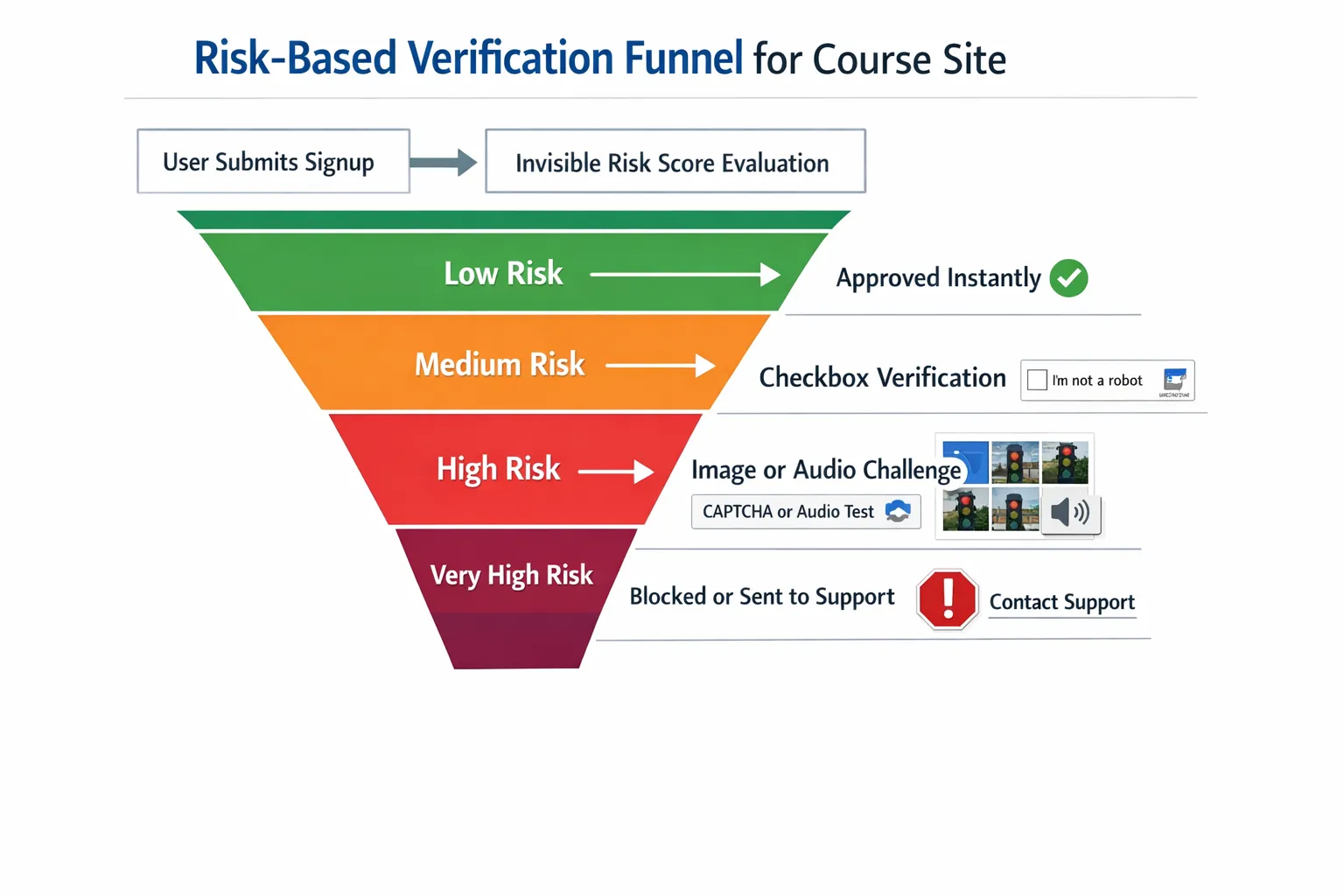
- Start invisible, escalate only when risky. Run reCAPTCHA v3 or hCaptcha invisible for everyone, prompt a visible challenge only when their risk score crosses your threshold.
- Target a visible challenge rate under 5 percent of human sessions. Spike thresholds temporarily during active attacks, then relax.
- Cache verifications briefly. If a learner passed a strong verification on signup, allow a grace window on the next step within the same session.
- Pair with basic controls, throttle password resets, rate‑limit signup attempts and protect download endpoints with signed URLs.
A simple two‑week bake‑off
Run an A/B between reCAPTCHA and hCaptcha on your highest‑risk form. Keep everything else identical.
Metrics to track:
- Challenge rate, percentage of sessions receiving a visible challenge.
- Human solve time, median seconds to complete a challenge.
- Abandonment after challenge, users who drop after seeing a prompt.
- Bot failure rate, detected automation attempts blocked server‑side.
- Downstream outcomes, refunds, chargebacks, support tickets on account lockouts.
How to run it:
- Randomise provider assignment in your form template or via a tag manager. Log the assigned provider with a session ID.
- Verify tokens server‑side and store scores, outcomes and timestamps for analysis.
- After seven days, switch variants to counter any weekday bias and run for another seven days.
- Choose the provider that balances lower abandonments with fewer bot successes at your real traffic mix.
Real‑world pitfalls to avoid
- Treating verification as a front‑end only control. Always verify tokens server‑side before creating accounts or granting access.
- Over‑challenging legitimate learners. A too‑aggressive threshold can generate support tickets and poor reviews.
- Ignoring accessibility. Audio challenges that are inaudible on mobile or lack captions are blockers for many users.
- Forgetting privacy and cookies. Some configurations set cookies or call third‑party domains, so document and consent where required.
The case for a layered approach
CAPTCHAs and their modern equivalents are necessary but not sufficient. Sophisticated attackers use human farms and solver APIs that defeat single‑layer defences. Consider:
- Behavioural analytics, flagging non‑human interaction patterns to decide when to escalate.
- Device intelligence, light fingerprinting to rate‑limit suspicious repeat attempts.
- Post‑login monitoring, detecting credential sharing and scraping.
These layers sit alongside your chosen verification widget and keep friction low for genuine learners.
Recommendation by scenario
- Privacy‑first or education clients in UK/EU, start with hCaptcha. It aligns with many institutions’ privacy expectations and is easy to swap in where reCAPTCHA would sit.
- Need the quickest integration across a messy WordPress stack, reCAPTCHA is often the least‑effort path because of plugin coverage and institutional familiarity.
- High mobile traffic with frequent promos, run an invisible mode on both providers in a bake‑off, pick the one with the lowest abandonments at your coupon and trial peaks.
If you have no strong constraints either way, choose the vendor your LMS plugins support best, run the two‑week test to confirm, and keep an eye on accessibility and privacy paperwork.
Final word
Both reCAPTCHA and hCaptcha can protect course sites effectively when tuned well. The best choice depends on your LMS ecosystem, privacy posture and audience mix. Start invisible, escalate only when needed, and measure relentlessly.
When you want a lightweight human check you can drop into your funnel quickly, try our simple Bot Verification step. It confirms users are not robots before granting access, and it slots neatly alongside whichever provider you choose for heavier lifting.
Further reading on AI‑powered verification for course businesses:
- AI Reviews: Top Bot Verification Tools for Course Creators
- AI Assistant Strategies for Frictionless Verification
- Cloudflare Turnstile overview, for context on privacy‑first widgets, Cloudflare Turnstile






