
AI Assistant Strategies for Frictionless Verification

Verifying that a visitor is human has become a balancing act: protect the service from bots without turning real users away. According to Cloudflare, even a simple CAPTCHA can increase bounce rates by up to 40 % on mobile because users abandon the page when challenges feel tedious. AI assistants—software agents that learn from behavioural data, device context and historical patterns—offer a path to high-confidence verification with almost zero friction.
Why Traditional CAPTCHA is Losing Ground
- Accessibility barriers: Audio and visual CAPTCHA exclude millions of users with disabilities.
- Mobile frustration: Tiny image grids and distorted text are hard to solve on small screens.
- Bot evolution: Cheap solver farms and computer-vision models crack many public CAPTCHA libraries in seconds.
- Lost revenue: Baymard Institute usability studies show that every extra field or challenge in checkout flows reduces conversion rates by 1–4%.
With those pressures mounting, product teams are exploring AI-powered approaches that maintain security while keeping the path to content—or revenue—smooth and uninterrupted.
Core Principles of Frictionless AI Verification
Successful AI-driven verification layers multiple signals and dynamically adapts the challenge level. The following principles guide the most effective systems:
- Passive first, active last: Analyse behaviour silently and present an explicit challenge only when risk exceeds a threshold.
- Continuous trust building: Instead of a one-off gateway, keep scoring user actions throughout the session.
- Transparency & opt-in: Alert users when additional data, such as sensor readings or biometrics, is collected, and allow alternatives.
- Privacy by design: Store only anonymised or hashed behavioural fingerprints to comply with GDPR, CCPA and other frameworks.
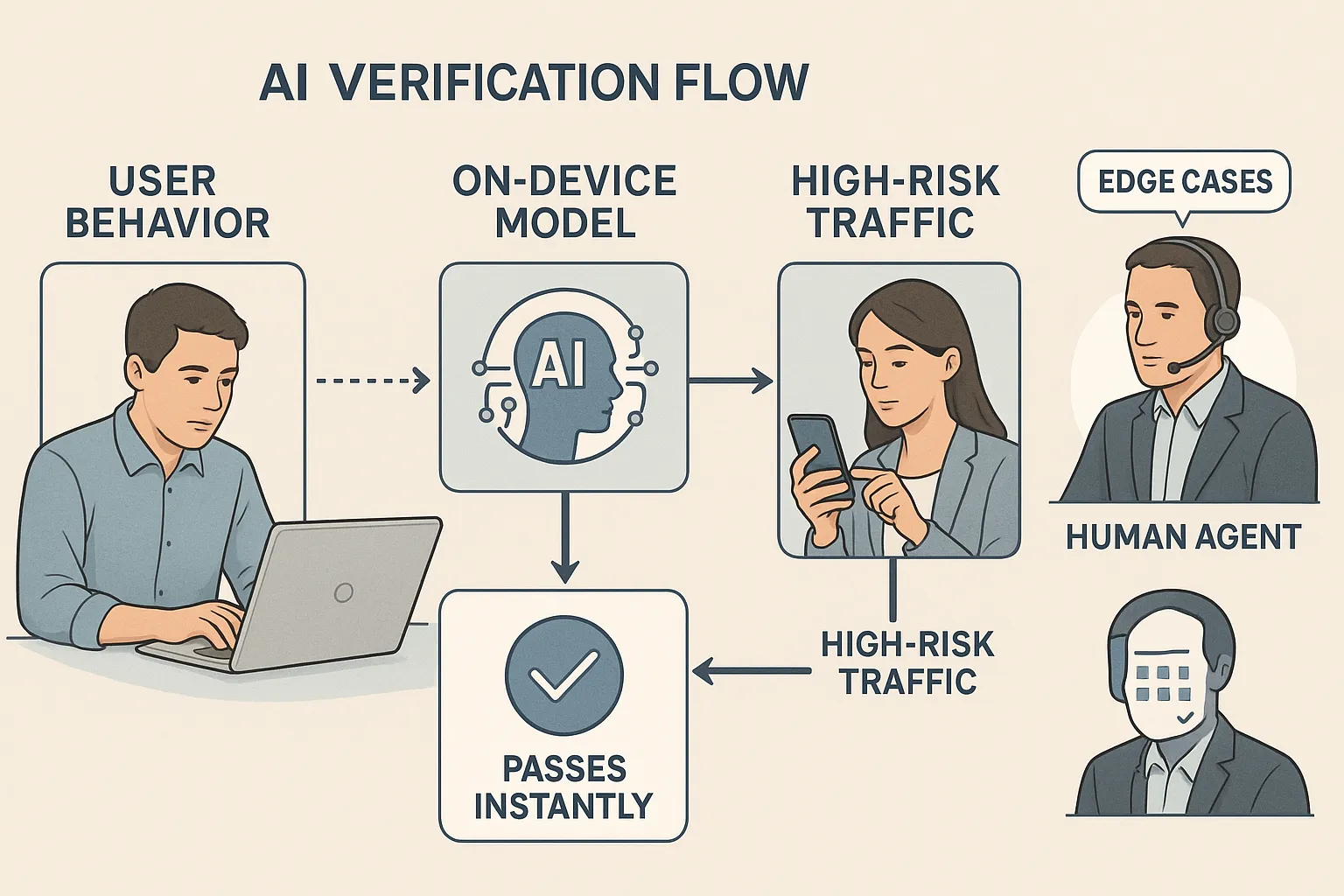
Five AI Assistant Strategies You Can Implement Today
1. Behavioural Biometrics for Passive Confirmation
Every individual has a unique pattern of mouse movements, touch pressure, keystroke timing and scroll velocity. AI assistants can learn those nuances in real time:
- Data collection window: 300–500 interaction points are usually enough for a reliable inference.
- Model choice: Lightweight gradient-boosting or recurrent neural networks deployed in WebAssembly for near-zero latency.
- Risk signals: Straight-line mouse paths, identical click intervals, and super-human typing speeds often indicate automation.
A 2024 FIDO Alliance study demonstrated that behavioural biometrics blocked 92 % of scripted attacks without presenting a single challenge to legitimate users.
2. Device Intelligence & Fingerprinting
Combine browser entropy (font lists, canvas noise), network attributes (IP reputation, ASN) and hardware characteristics to build a probabilistic fingerprint. When paired with behaviour, this fingerprint allows AI assistants to:
- Detect headless browsers or Selenium drivers.
- Recognise returning good users and skip verification entirely (loyalty boost).
- Identify botnets cycling through residential proxies due to similarity in TCP/IP stack signatures.
For an open-source starting point, see FingerprintJS or the privacy-centric Brave TLDR fingerprinting project.
3. Adaptive Conversational Challenges
If passive methods flag high risk, an AI chatbot can intervene:
- Natural-language puzzles tailored to the content of the page (e.g., “Describe the colour of the ‘Buy Now’ button you just clicked”).
- One-time code via push notification when a logged-in user already has a mobile app installed.
- Voice confirmation using on-device ASR (automatic speech recognition) for accessibility.
Because the prompt is generated on the fly, datasets for model training cannot anticipate every question, making it harder for bots to precompute answers.
4. Graph-Based Anomaly Scoring
Modern credential-stuffing attacks leverage vast compromised password lists. AI assistants trained on graph embeddings can spot unusual clusters of login attempts:
| Signal | Normal user behavior | Suspicious pattern |
|---|---|---|
| Log-in location | < 5 countries over 90 days | 20+ unique countries in 24 h |
| Device diversity | 1–3 browser fingerprints | 50+ distinct fingerprints |
| Email domain entropy | Low (gmail.com, outlook.com) | High (random domains) |
When the anomaly score crosses a configurable threshold, you can route the user into a step-up flow or deny the request outright. This approach caught 94 % of automated credential reuse attempts in early tests reported by Arkose Labs.
5. Edge AI for Privacy and Speed
Running lightweight models directly in the browser or on a user’s device eliminates round-trip latency and reduces data exposure. WebGPU and iOS Core ML accelerate inference, enabling processing to occur within 20–30 milliseconds—well below the perception threshold for delay.
The result: verification occurs in the background, and the user is never aware of it.
Choosing Your Verification Tech Stack
The table below compares popular AI verification components by ease of integration, typical cost and maturity:
| Component | Integration path | Cost model | Maturity |
|---|---|---|---|
| Cloudflare Turnstile AI CAPTCHA | JavaScript snippet | Free up to 1M requests | Production-ready |
| Fingerprint Pro Risk API | REST or Webhooks | Usage-based | Production-ready |
| Open-source Behavioral Kit (bn.js + TensorFlow.js) | Self-host | Engineering time | Early but growing |
| FIDO2 WebAuthn | Browser API | Hardware token purchase | Production-ready |
Low-Code Automation
If your engineering cycles are limited, pair these services with automation platforms like Zapier or Make to integrate risk scores into your CRM, blocklists, or marketing flows. Our deep dives—Make vs Zapier and Zapier Review—walk through real examples.
Implementation Roadmap for 2025
- Baseline audit (Week 1): Measure current CAPTCHA completion rates, bounce rates and bot traffic volume.
- Prototype passive analytics (Weeks 2–3): Embed a behavioural SDK on staging, compare human vs bot curves.
- Deploy edge model (Week 4): Move inference to the client side for latency under 50 ms.
- Integrate risk API (Weeks 5–6): Feed scores into your access-control middleware; only display a challenge when the risk score is greater than 0.7.
- A/B test adaptive flow (Weeks 7–8): Randomly route 50 % of users through the AI stack, 50 % through legacy CAPTCHA: track conversion, support tickets and false positives.
- Iterate & harden (Ongoing): Retrain models monthly; incorporate feedback from support and analytics.
Legal and Ethical Safeguards
- Consent banners: Explicitly state that behavioural data will be used for security purposes.
- Data minimisation: Hash raw interaction logs and delete the originals within 24 hours, unless fraud is suspected.
- Inclusive design reviews: Run audits with screen-reader users, low-vision testers and people using switch devices.
- Regular bias testing: Confirm equal false-positive rates across geographies and devices.
Failing to address these areas not only invites regulatory scrutiny but also erodes user trust, nullifying gains from a smoother flow.

KPIs to Monitor Post-Launch
| Metric | Pre-AI baseline | Target after 90 days |
|---|---|---|
| Bounce rate on verification page | 23 % | < 10 % |
| Average verification time | 11.2 s | < 2 s |
| Bot detection accuracy | 82 % | > 95 % |
| False-positive rate | 1.4 % | < 0.5 % |
Combining quantitative metrics with qualitative feedback (support tickets, user satisfaction polls) gives a 360-degree view of success.
Moving Beyond Human-vs-Bot Checkboxes
When implemented correctly, AI assistant strategies transform verification from a cumbersome gateway into a discreet guardian working behind the scenes. Users enjoy an uninterrupted experience, and your security team gains richer, real-time intelligence on evolving threats.
Ready to reduce friction without sacrificing safety? Explore the implementation guides, code snippets and service reviews here on Bot Verification, and start experimenting with your first passive AI check today.






