
Best AI Productivity Tools for Small Course Teams

Small course teams rarely have a “time problem”, they have a context-switching problem. One minute you’re polishing lesson materials, the next you’re chasing missing assets, replying to student emails, fixing a broken checkout link, and cleaning up spam sign-ups.
The best AI productivity tools for small course teams don’t just write faster or summarise meetings. They reduce the operational drag that slows down launches, learner support, and content updates.
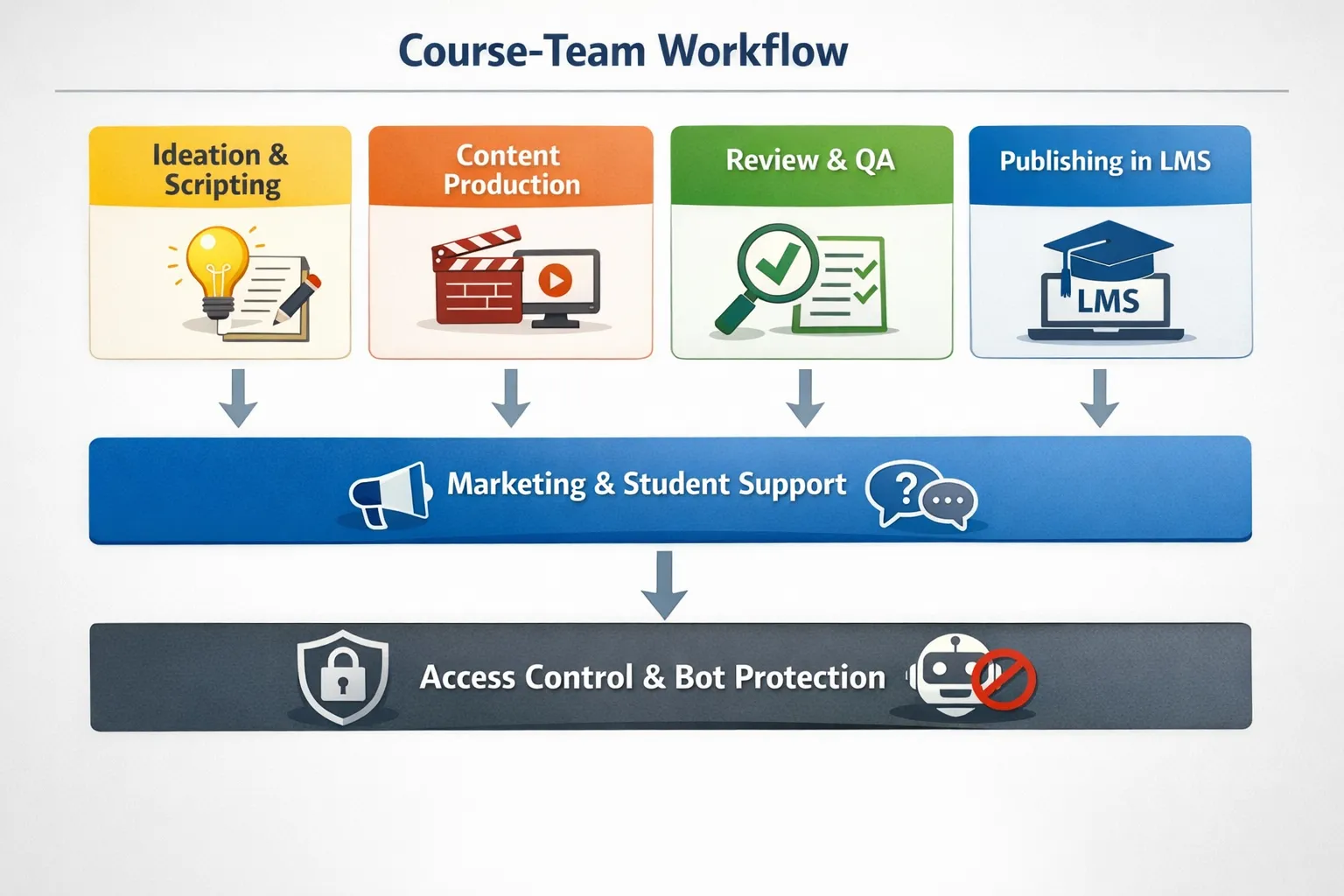
This guide reviews the best AI productivity tools for small course teams (think 1 to 10 people), with a practical focus on real course workflows: curriculum planning, asset production, approvals, marketing, support, and access control.
What “productivity” means for a small course team
In a course business, productivity is not “how many tasks you close”. It’s:
- How quickly you turn expertise into structured lessons
- How reliably you ship updates without breaking links, modules, or enrolment flows
- How little time your team spends on repetitive admin (support triage, reminders, meeting notes, basic edits)
- How well you protect focus time while still supporting learners
AI tools help most when they sit inside a system: a central knowledge base, a project hub, a repeatable content pipeline, and a few automations.
How we reviewed these AI tools
This is a course-team lens, not a generic “AI apps” list. Each pick is evaluated on:
- Workflow fit: does it map to lesson production, launch planning, student support, or ops?
- Collaboration: can a small team share context and maintain consistency?
- Friction: how much setup and upkeep does it take?
- Risk: what are the common mistakes (quality, privacy, reliability)?
Quick comparison: best AI productivity tools by job-to-be-done
| Tool | Best for in a course business | Why small teams like it | Watch-outs |
|---|---|---|---|
| Notion AI | SOPs, lesson outlines, internal wiki, lightweight planning | One place for docs + decisions | Needs clear structure or it becomes a dumping ground |
| ClickUp (with AI) | Production pipelines, launch checklists, approvals | Strong task views and templates for repeatable launches | Can feel “heavy” if you do not standardise workflows |
| ChatGPT (or Claude) | Drafting, rewriting, ideation, rubrics, FAQ seeds | Fast thinking partner across many tasks | Requires human review, especially for claims and policies |
| Google Workspace (Gemini) or Microsoft 365 Copilot | Email, docs, meeting recaps, team collaboration | AI in tools you already use | Avoid pasting sensitive student data without a policy |
| Fireflies.ai or Otter.ai | Meeting notes, learner interviews, searchable transcripts | Captures decisions and action items | Consent and recording rules matter, especially with students |
| Canva (Magic Studio) | Slides, workbooks, social assets, thumbnails | Non-designers can ship consistent visuals | Brand consistency needs templates and review |
| Descript | Editing course videos, podcasts, trailers, clips | Text-based editing saves hours | Quality still depends on good source audio/video |
| Zapier / Make / n8n | Automating ops: tagging, notifications, handoffs | Removes repetitive admin | Automations can break, document and monitor them |
| Bot Verification | Blocking bots before access is granted | Less spam, fewer fake sign-ups, less support overhead | Must be placed at the right “high abuse” steps |
1) Notion AI (best for a course team knowledge base that actually ships)
What it is: Notion is a workspace for docs, databases, and collaboration, with AI features that help draft, summarise, and transform content.
Where it helps course teams:
Notion works best when your course business needs a single “source of truth”, including:
- Course outlines, module specs, and update logs
- Standard operating procedures (SOPs) for publishing, QA, and student support
- Swipe files, positioning notes, and launch retrospectives
The AI layer is most useful for turning messy inputs into clean internal artefacts, for example:
- Converting a brain-dump into a structured lesson outline
- Summarising feedback from learner surveys into themes
- Generating a first draft SOP from a checklist you already run
Who it’s best for: teams that want to reduce repeated explanations, preserve decisions, and onboard contractors faster.
Limitations and watch-outs: Notion becomes unproductive when structure is unclear. Set a few non-negotiables (naming conventions, a course template, and where decisions live) before you add more pages.
2) ClickUp with AI (best for repeatable launches and content pipelines)
What it is: ClickUp is a project management platform with built-in AI features (writing assistance, summaries, and workflow support) designed to reduce admin around tasks and documentation.
Where it helps course teams:
If your main bottleneck is execution (not ideas), ClickUp tends to beat “docs-first” tools because it makes work visible:
- Editorial-style pipelines for lesson production (Script, Record, Edit, Upload, QA, Publish)
- Launch plans with dependencies (email sequence, sales page, webinar, checkout)
- Approval workflows so small teams stop shipping half-reviewed assets
The AI layer is most valuable inside the workflow, for example generating a draft task description, summarising a thread, or producing a quick progress recap for stakeholders.
Who it’s best for: small course teams that publish often, run cohorts, or do frequent content refreshes.
Limitations and watch-outs: The tool is powerful, but you pay for that power with setup decisions. Keep the workflow simple at first (one pipeline, one intake form, one weekly review) and expand only after it sticks.
If you want a deeper product-level view, see our existing ClickUp coverage on AI Tool Shed: ClickUp Review: Project Management with Built-in AI Features.
3) ChatGPT or Claude (best “generalist assistant” for a course team)
What it is: General-purpose AI assistants that can draft, rewrite, summarise, brainstorm, and create structured outputs from prompts.
Where it helps course teams:
Used responsibly, these tools are a force multiplier for:
- Drafting lesson scripts, then tightening them for clarity
- Generating quiz questions, rubrics, and scenario prompts (then reviewing them)
- Turning rough notes into learner-friendly explanations
- Producing support macros for common questions (refunds, access, “where do I find X?”)
The best way to use it in a small team: treat it like a junior assistant that is fast but needs supervision. Give it:
- Your target learner profile
- The promise of the module and the constraints (tone, length, allowed claims)
- Examples of “good” from your past lessons
Limitations and watch-outs:
- AI can sound confident while being wrong. You need a checking habit.
- Avoid feeding it personal data from students unless you have a clear policy and appropriate settings.
For a practical framework on when to use AI vs a human writer (and how to combine both), see: AI vs Human Writers: When to Use Each for Your Content.
4) Google Workspace (Gemini) or Microsoft 365 Copilot (best for “AI where work already happens”)
What it is: AI features embedded into email, documents, spreadsheets, and meetings.
Where it helps course teams:
Small teams live in their inbox. AI inside your productivity suite typically saves time through:
- Email thread summarisation and draft replies
- Turning meeting notes into structured action items
- Drafting docs from prompts (briefs, lesson plans, policy drafts)
Why it’s a strong choice: you reduce tool sprawl. Instead of buying separate writing, summarisation, and document tools, you consolidate.
Limitations and watch-outs: Suite-based AI is convenient, but you still need governance. Decide what is allowed (and not allowed) to paste into AI fields, especially anything student-related.
5) Fireflies.ai or Otter.ai (best for meetings you can actually use later)
What it is: AI meeting assistants that record, transcribe, summarise, and make conversations searchable.
Where it helps course teams:
Course creators underestimate how much time disappears into “talking about work”. A meeting assistant becomes valuable when it:
- Captures decisions (what you agreed, what you postponed, why)
- Extracts action items and owners
- Preserves learner language from interviews so your marketing and lessons stay aligned
If your team does calls with students (onboarding, coaching, office hours), transcripts can also become a goldmine for:
- FAQ updates
- Lesson clarifications
- New module ideas
Limitations and watch-outs: recording consent and data handling matters. Set a clear rule: what gets recorded, where it’s stored, and who can access it.
If you want a deeper breakdown of meeting assistant options, see: Grain vs Supernormal vs MeetGeek: AI Meeting Assistants Compared.
6) Canva (Magic Studio) (best for fast, consistent course visuals)
What it is: A design platform with AI-assisted features for generating layouts, assets, and variations.
Where it helps course teams:
Canva is often the difference between “we should make a workbook” and “the workbook exists”. It’s particularly helpful for:
- Lesson slides and worksheets
- Social posts, ad creatives, thumbnails
- Brand kits and templates so contractors stay consistent
The productivity win: you stop waiting on a designer for every iteration. Your team can ship version 1 quickly, then refine.
Limitations and watch-outs: AI speeds up output, but consistency comes from templates and a review pass. Create a small library of locked layouts (slide types, workbook pages, cover styles) to avoid “random design drift”.
7) Descript (best for editing lessons without becoming a full-time editor)
What it is: An audio and video editor that lets you edit by editing text, with AI features that help streamline post-production.
Where it helps course teams:
Descript is especially useful if your course business produces:
- Video lessons (screen recordings, talking head, demos)
- Podcast-style modules
- Marketing clips and trailers
Text-based editing can significantly cut editing time because you can remove mistakes by deleting words in the transcript, rather than hunting through a timeline.
Limitations and watch-outs: no editor can rescue poor source audio. Basic habits (a decent mic, quiet room, consistent settings) multiply the value of the software.
8) Zapier, Make, or n8n (best for removing repetitive admin)
What it is: Automation platforms that connect your apps and move information between them.
Where it helps course teams:
Automation is where small teams get real leverage. Common wins include:
- When a student buys, automatically tag them, send onboarding, and create internal tasks
- When someone submits a form, route it to the right place with context
- When a support request arrives, enrich it with plan type and last login (where possible)
Choosing between them (simple guidance):
- Zapier tends to be the quickest to start for non-technical teams
- Make tends to be strong for more complex scenarios and visual workflows
- n8n is often chosen by technical teams who want more control (including self-hosting)
If you want a current comparison for 2026 workflows, see: n8n vs Make vs Zapier: Choosing the Best Automation Platform for AI Workflows in 2026.
9) Bot Verification (best for protecting focus and preventing fake work)
What it is: Bot Verification provides a simple verification step to confirm users are not robots before granting access.
Why it belongs in a productivity stack: spam and bot traffic create invisible work. Small course teams pay for it through:
- Junk leads cluttering your CRM and email platform
- Fake sign-ups triggering automations and skewing metrics
- Support tickets from suspicious accounts
- Increased moderation and fraud checks
Adding a lightweight verification step at the right choke points can remove a surprising amount of operational noise.
Where to place verification for maximum impact:
- Lead magnet downloads (especially if they trigger email sequences)
- Free trial sign-ups
- High-risk forms (coupon requests, affiliate applications)
- Account creation and login flows when abuse spikes
Limitations and watch-outs: verification is not the same as authentication. It’s one layer. You still need sensible access control and monitoring, but verification is often the fastest first step to reduce bot-driven workload.
Cost control matters (because tool sprawl kills productivity)
It’s easy to “buy productivity” and accidentally create more overhead: logins, subscriptions, overlapping features, and endless notifications.
A simple rule for small course teams is to set a monthly tools budget and review it quarterly. If you are tightening spend while building resilience (especially if your goal is financial independence), it can help to follow personal finance frameworks that treat subscriptions as recurring liabilities. The FIYR blog has practical personal finance and FIRE-focused insights that can help you think more clearly about costs, savings rate, and long-term runway.
Recommended stacks for small course teams (by stage)
Solo creator (0 to 1 ops support)
A lean stack that covers most needs:
- Notion AI for knowledge, outlines, and SOPs
- ChatGPT or Claude for drafting and rewrites
- Canva for slides and marketing assets
- Descript for video editing
- Zapier or Make for a handful of key automations
- Bot Verification at the most abused entry points
Small team (2 to 5 people, shipping monthly)
When coordination becomes the bottleneck:
- ClickUp for pipelines, launches, and approvals
- Workspace AI (Google or Microsoft) for daily comms and docs
- Meeting assistant for weekly planning and learner interviews
- Automation platform for enrolment, tagging, and internal routing
- Bot Verification to keep sign-ups and access flows clean
Growing academy (5 to 10 people, higher volume, more risk)
At this stage, “productivity” includes risk reduction:
- Strong project hub (ClickUp or similar)
- Documented SOPs and QA checklists (Notion)
- Automation with monitoring and ownership
- Verification and access controls that reduce fraud and support load
A simple 14-day rollout plan (so you actually get value)
Most teams fail with AI tools because they adopt too many at once. A better approach is one bottleneck, one workflow, one metric.
Days 1 to 3: pick one workflow to fix. Examples: lesson production, launch planning, or support responses.
Days 4 to 7: build a template. A pipeline, an SOP, and a definition of done.
Days 8 to 12: add AI only where it removes a step. Drafting, summarising, and formatting, not replacing judgment.
Days 13 to 14: measure and lock it in. Track one metric such as cycle time (idea to published), support backlog, or hours spent in meetings.
Frequently Asked Questions
What are the best AI productivity tools for small course teams? The best AI productivity tools depend on your bottleneck, but most small course teams benefit from a project hub (ClickUp), a knowledge base (Notion AI), a general AI assistant (ChatGPT or Claude), a design tool (Canva), a media editor (Descript), an automation platform (Zapier/Make/n8n), and lightweight bot protection (Bot Verification) to reduce spam-driven busywork.
Do AI productivity tools reduce course quality? They can, if you use them to skip subject-matter review. Used well, AI removes low-value labour (formatting, first drafts, summaries) so you can spend more time on clarity, examples, and learner outcomes.
How do I choose between Notion AI and ClickUp? Choose Notion AI if your pain is documentation, knowledge sharing, and turning ideas into structured materials. Choose ClickUp if your pain is execution, handoffs, deadlines, and coordinating production across people.
What should we avoid putting into AI tools? Avoid pasting sensitive student data, private financial details, or anything you would not want stored or reviewed later. Create a simple internal policy that defines acceptable inputs and requires redaction for learner data.
How can bot verification improve team productivity? When bots can trigger sign-ups, downloads, and automations, your team wastes time cleaning data, investigating suspicious activity, and handling avoidable support issues. A lightweight “prove you’re human” step at high-abuse points reduces that noise so your team can focus on teaching and growth.
Reduce spam work so your team can ship
If your small course team is moving fast, bots and automated abuse can quietly steal hours through fake sign-ups, junk leads, and noisy access requests. Bot Verification adds a simple verification step to confirm users are not robots before granting access.
Explore Bot Verification on AI Tool Shed to keep your workflows clean, protect your time, and maintain reliable access control as you scale.






