
AI Productivity Tools for Faster Course Access Checks

Course creators rarely plan to spend their afternoons acting like a bouncer. Yet once you sell a paid programme, you inherit a constant stream of “Can’t log in”, “My coupon won’t apply”, “I bought it but it says locked”, and “I didn’t sign up for these emails” messages. Add bots hammering your checkout and signup forms, and the admin work can quietly become one of the biggest drags on growth.
This is where AI productivity tools earn their keep, not by doing “more work”, but by making course access checks faster, more consistent, and easier to scale. The goal is simple: let legitimate students through quickly, block obvious abuse automatically, and only escalate edge cases to you.
What “course access checks” really include (and why they get slow)
When a student tries to access your course, your systems typically need to answer four questions:
- Is this a real human? (bot prevention)
- Is this the right user? (authentication)
- Are they allowed in? (authorisation, entitlement, subscription state)
- Does this look risky? (anomaly detection, device intelligence, rate limiting)
Access checks get slow when any of the above is uncertain. That uncertainty creates:
- More support tickets (and longer back-and-forth)
- More manual “lookups” in Stripe, your LMS, your email platform, and your analytics
- More false positives (real students blocked) or false negatives (abuse slips through)
The productivity play is to automate the low-value decisions and standardise how the “maybe” cases are handled.
The fastest path to better access checks: a layered, low-friction stack
Most course businesses do not need enterprise-grade identity proofing for every login. They need a layered system that stays invisible for most users and becomes stricter only when risk rises.
A practical stack for faster access checks usually looks like this:
1) A lightweight bot gate at the highest-abuse entry points
These are the pages bots love:
- Signup and lead magnet forms
- Checkout and coupon fields
- Login and password reset
- Any “download” or “free preview” endpoints
Adding a quick verification step here can remove a surprising amount of noise before it becomes a ticket.
2) Risk-aware authentication instead of “everyone does everything”
If every student always hits the same friction (CAPTCHAs, MFA prompts, manual review), you will slow down your best customers to catch a small number of bad actors.
Modern auth tools increasingly support adaptive patterns, for example “only step up when the device or behaviour looks off”. That is both more secure and much faster operationally.
3) Automation that turns scattered signals into one decision
The bottleneck is often not detection, it’s coordination. Signals come from your LMS, payment processor, email provider, and bot protection layer.
Automation platforms can route events (failed logins, multiple coupon attempts, repeated password resets) into a consistent flow: allow, challenge, block, or escalate.
4) Support tooling that resolves access issues with fewer messages
AI in support is not just for drafting replies. The biggest speed win is:
- Summarising the user’s history
- Pulling the relevant context (order status, course entitlement, recent login attempts)
- Suggesting the next best action, or triggering it automatically
AI productivity tool reviews for faster course access checks
Below are tool categories that directly reduce the time you spend verifying access, plus specific products course creators commonly use. These are not the only options, but they cover the majority of “access check” pain.
Bot Verification (simple human verification gate)
What it is: Bot Verification provides a simple verification step to confirm users are not robots before granting access, supporting robot verification, user authentication, and access control.
Why it speeds up access checks: If you reduce bot-driven signups, password resets, and form spam, you reduce the follow-on work: cleaning lists, refund disputes, inbox clutter, and time wasted verifying “users” who were never real.
Where it fits best in a course funnel:
- Lead magnet downloads (so you do not send automation sequences to fake accounts)
- Signup forms for trials or free previews
- Login pages during spikes (launch days, affiliate promos)
- Coupon-heavy checkout flows
Watch-outs: Keep friction proportional. If you place verification everywhere, you can harm conversions and accessibility. For many creators, it is enough to protect a handful of endpoints and monitor results.
If you’re building out a broader access-control toolkit, you may also want to cross-reference the site’s guide on the course creator’s AI toolkit for access control.
Cloudflare Turnstile (low-friction CAPTCHA alternative)
What it is: Cloudflare Turnstile is positioned as a “friendly CAPTCHA alternative” that aims to reduce interactive challenges.
Why it speeds up access checks: For many sites, the productivity win is fewer “I can’t pass the CAPTCHA” tickets and fewer abandoned logins on mobile. That means fewer manual unlocks and fewer refund requests tied to access frustration.
Best for: Course creators who want a widely used, relatively quick-to-deploy bot check.
Watch-outs: Any third-party gate should be assessed for your audience’s privacy expectations and accessibility needs. Also consider operational dependency: if you build deeply around one ecosystem, switching later can be painful.
Learn more from Cloudflare Turnstile.
hCaptcha (challenge-based, privacy-oriented positioning)
What it is: hCaptcha is a well-known alternative in the challenge-based verification space, often chosen by teams that want options beyond Google’s ecosystem.
Why it speeds up access checks: When tuned well, it can reduce automated abuse at signup, login, and checkout, which reduces the downstream clean-up work. The speed benefit is mostly operational: fewer spam accounts, fewer repeated attacks, fewer manual investigations.
Best for: Creators who want a mainstream option with broad integrations and a different vendor posture than reCAPTCHA.
Watch-outs: Any challenge-based approach can introduce friction (especially on mobile). Your “challenge rate” becomes a real metric to manage, not just a security setting.
Vendor info: hCaptcha.
Auth0 (identity platform with automation potential)
What it is: Auth0 (by Okta) is an identity platform used to handle authentication flows, and in many setups can support step-up controls and anomaly-aware policies.
Why it speeds up access checks: When authentication is centralised and policy-driven, you spend less time diagnosing scattered issues across plugins. It can also reduce the manual work of handling risky logins by enforcing consistent rules.
Best for: Creators with a more custom tech stack (or a growing academy) who are hitting scaling issues with basic LMS logins.
Watch-outs: Integration effort is real. You typically trade time spent on manual support for time spent on initial implementation and ongoing configuration.
Vendor info: Auth0.
Okta (identity and access management)
What it is: Okta is a major identity and access management provider, typically used in larger organisations, but relevant if your course business has enterprise customers, cohorts, or admin-heavy internal operations.
Why it speeds up access checks: The productivity win is governance: clearer user lifecycle management, fewer ad-hoc exceptions, and more consistent enforcement across tools.
Best for: Mature teams with strong compliance requirements or enterprise delivery.
Watch-outs: It can be overkill for a solo creator. If your real problem is bots hammering signup, start with bot mitigation first.
Vendor info: Okta.
Fingerprint (device intelligence for faster allow or step-up decisions)
What it is: Fingerprint provides device intelligence used to identify returning devices and detect suspicious patterns.
Why it speeds up access checks: Device signals can reduce “grey area” cases. Instead of manually investigating unusual logins, you can automatically:
- Allow known-good devices with less friction
- Trigger step-up verification for unusual device patterns
- Flag likely automation
Best for: Course businesses dealing with account sharing, repeated credential stuffing attempts, or high-value certifications.
Watch-outs: Device intelligence has privacy implications. Course creators operating in the UK and EU should treat consent, transparency, and data minimisation as first-class requirements.
Vendor info: Fingerprint.
Zapier, Make, or n8n (automation to turn access checks into workflows)
What they are: Automation platforms that connect your LMS, forms, email, support desk, and security tools.
Why they speed up access checks: Access checks become fast when they become repeatable. With automation, you can:
- Create a support ticket only after verification fails a defined number of times
- Auto-tag users based on risk signals (multiple failed logins, suspicious coupon patterns)
- Send students self-serve steps (reset link, correct login URL, device troubleshooting) triggered by known patterns
Best for: Almost every course creator, because automation is often the missing glue.
Watch-outs: Automations can leak data if built carelessly. Minimise what you pass around, and avoid copying sensitive logs into tools that do not need them.
Resources:
A quick comparison: which tools speed up which part of the access check?
| Tool category | Speeds up | Typical “time saved” outcome | Main trade-off to manage |
|---|---|---|---|
| Bot verification gate | Pre-access filtering (signup, login, checkout) | Fewer spam accounts and fewer verification tickets | Conversion friction if overused |
| Identity provider (IdP) | Login consistency and policy enforcement | Fewer edge-case login failures, clearer control | Setup and configuration overhead |
| Device intelligence | Risk scoring for repeat access attempts | Fewer manual investigations | Privacy and governance requirements |
| Automation platform | Orchestration across tools | Faster triage, fewer repetitive admin steps | Data handling and maintenance |
| AI-enabled support desk | Ticket handling and resolution speed | Fewer messages per ticket, faster first response | Quality control and data boundaries |
The “faster access checks” workflow I’d implement as a course creator
The right workflow depends on your volume and risk, but most creators can get results with a staged rollout.
Stage 1: Protect the highest-abuse endpoints first
Start with one or two places where abuse creates the most admin work. For many course businesses, that is:
- Signup (especially free access)
- Password reset
- Checkout coupon field
A simple bot verification layer here is often the quickest reduction in support noise.
Stage 2: Define what counts as “suspicious”, then automate the response
Pick a small set of triggers you can actually operationalise. Examples:
- More than X password reset requests from one IP range in a short window
- Multiple failed logins followed by a successful login from a new device
- Repeated coupon attempts across many accounts
Then automate what happens next, for example: step-up verification, temporary rate limit, or a support ticket with context attached.
Stage 3: Make support resolution self-serve by default
Most access tickets are not “security incidents”. They are navigation confusion, email typos, expired links, and device/browser quirks.
AI support features can help by summarising history and drafting accurate replies, but the biggest win is building a small library of reliable resolution paths and triggering them automatically.
For a deeper security-first view of tool choices for course creators, the roundup on most useful AI tools for student authentication is a helpful companion.
What to measure so you know it’s actually faster
If you do not track outcomes, it’s easy to add “security theatre” that increases friction.
A minimal measurement set that maps directly to speed and student experience:
- Access-related tickets per 1,000 logins (trend over time)
- Median time to resolve access tickets (before vs after)
- Challenge rate (how often users are asked to verify)
- Login abandonment rate (especially on mobile)
- Refund or chargeback rate tied to “couldn’t access” complaints
Run changes as small experiments. Protect one endpoint, measure for a week, then expand. This keeps you honest and prevents stacking friction on top of friction.
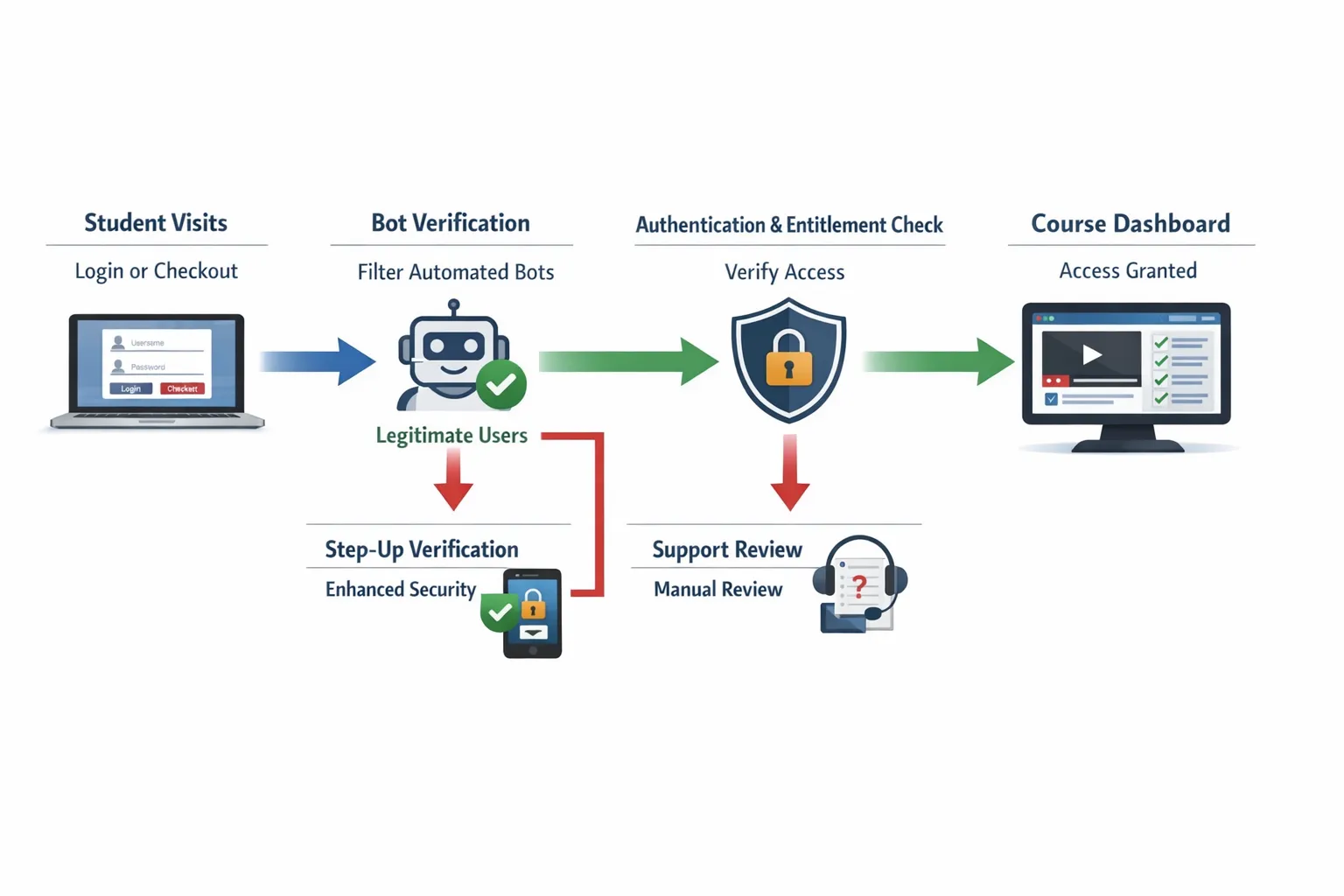
Bringing it together: a practical stack for most course creators
If your goal is faster access checks (not building a bank), a solid starting point is:
- A lightweight verification gate (to reduce bot-driven noise)
- One source of truth for authentication and access rules
- Automation to route signals and standardise responses
- Support tooling that reduces back-and-forth
Bot Verification exists specifically for that first layer: confirming users are not robots before granting access. If you want to reduce spam signups and access abuse without turning your course into an obstacle course, start by adding verification to one high-risk endpoint, then measure the impact.
You can explore more implementation patterns across course sites in AI optimisation for smoother student login flows and related guides on AI Tool Shed.






