
Best New AI Tools For Course Fraud Prevention

Course fraud is no longer just “a few spam signups”. For course creators in 2026, the real revenue killers are automated coupon abuse, stolen-card checkouts that later turn into chargebacks, credential stuffing against member portals, and content scraping that quietly cannibalises sales.
The good news is that the newest generation of AI-driven fraud tooling is also much more creator-friendly: lower friction for real learners, better bot detection without endless puzzles, and risk-based “step up only when needed” security.
Below is a practical, review-style shortlist of best new AI tools for course fraud prevention, organised around what course businesses actually need: protecting the funnel, protecting access, and protecting payments.
What “course fraud prevention” actually includes (beyond bots)
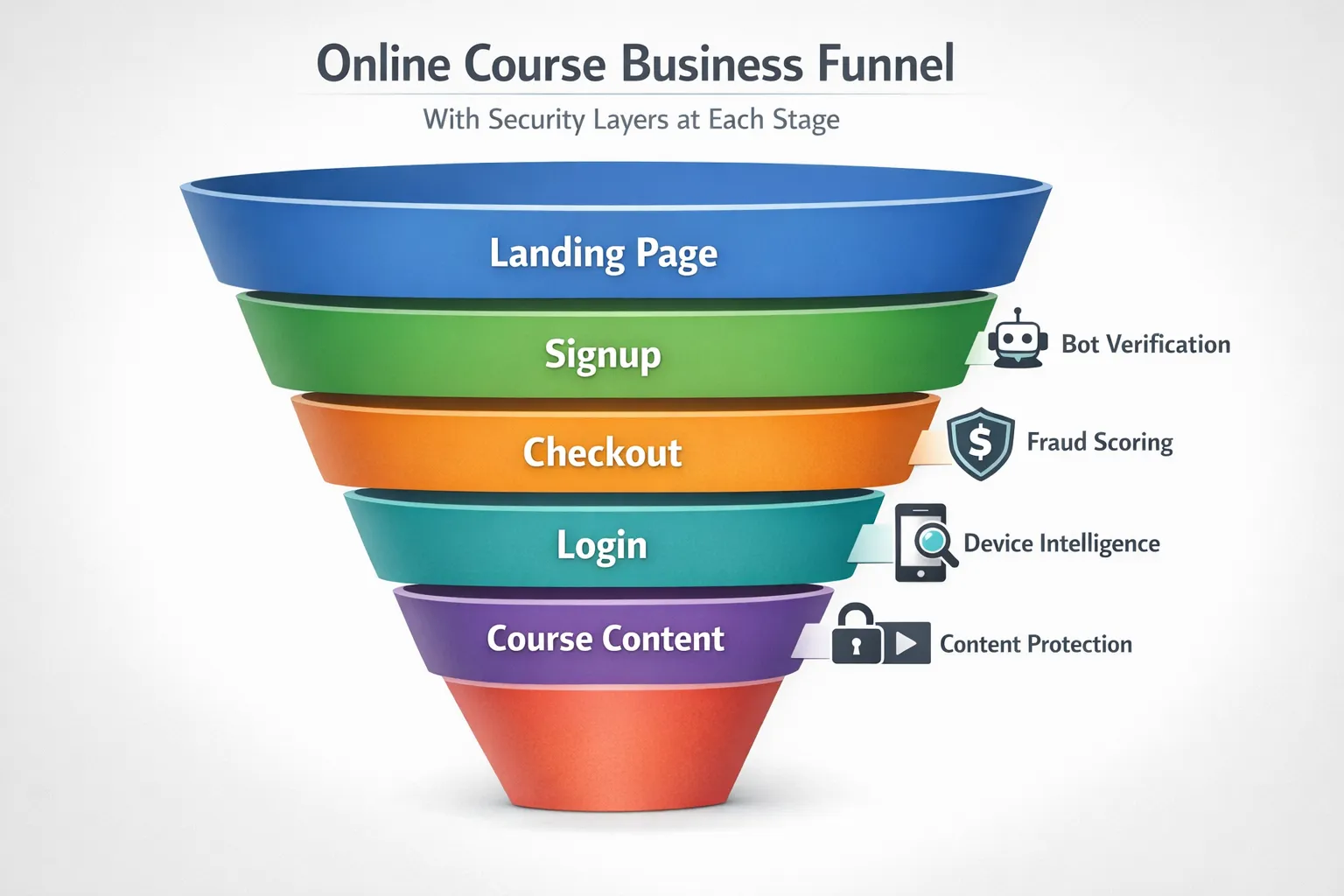
Most creators first notice fraud as “weird signups”. In practice, you typically have multiple threats across the learner journey:
- Top of funnel abuse: fake leads, bot form fills, scraped free downloads, promo code brute forcing
- Checkout fraud: stolen cards, high-risk transactions, refund abuse patterns, reseller rings
- Account takeover and sharing: credential stuffing, session hijacking, shared logins across many devices
- Content theft: automated scraping of lesson pages, ripping of video streams, bulk downloads of PDFs
The best results come from a layered approach: start with low-friction verification at the edges, then add stronger identity and payment controls only where your risk and pricing justify it.
If you want a deeper architecture view, this pairs well with the site’s broader playbook on AI-driven access control.
Quick comparison: which tool solves which fraud problem?
Use this table to shortlist quickly, then jump to the mini-reviews.
| Tool | Best at stopping | Best for | Learner friction | Typical setup effort |
|---|---|---|---|---|
| Bot Verification | Bot signups, automated access attempts | Creators who want a simple “human check” gate | Low | Low |
| Cloudflare Turnstile | Commodity bots and scripted abuse | High-traffic landing pages and signups | Very low | Low to medium |
| Fingerprint | Account takeover signals, repeated abusers, multi-account patterns | Memberships, cohorts, communities | Low | Medium |
| SEON | Checkout fraud signals, coupon abuse patterns, user risk scoring | Creators selling courses direct (Stripe, Paddle, etc.) | Low | Medium |
| Stripe Radar | Card testing, payment fraud, chargeback risk | Anyone using Stripe Checkout or Payment Links | None (behind the scenes) | Low |
| Sift | End-to-end fraud decisioning at scale | Larger academies and marketplaces | Low to medium (adaptive) | High |
| Persona | Identity verification and liveness checks | High-ticket programmes, certifications | Medium (only when triggered) | Medium |
Note: “Friction” depends on how you configure step-up checks. The goal is not “more verification”, it’s verification only when the risk is high.
Tool reviews (new-generation AI for course fraud)
1) Bot Verification (simple human verification for access control)
What it is: Bot Verification provides a straightforward verification step designed to confirm a visitor is not a robot before you grant access.
Why it’s useful for course creators: If you run lead magnets, free previews, cohort applications, or member portals, you often need a fast way to reduce automated abuse without turning your site into a CAPTCHA obstacle course.
Where it fits best in your funnel:
- Signup and login endpoints
- Free download gates (PDFs, templates, “free lesson” pages)
- High-abuse actions (password reset, coupon application, repeated failed logins)
What to watch out for: Bot checks reduce automated abuse, but they do not replace full authentication, payment fraud controls, or content protection.
If you want a broader “safe access” checklist, see AI tools every course creator needs for safe access.
2) Cloudflare Turnstile (low-friction, modern bot detection)
What it is: Cloudflare Turnstile is a newer style of human verification that aims to reduce or remove visual puzzles, relying more on browser signals and risk analysis.
Why it’s useful for course creators: Turnstile is popular because it can be highly effective against basic automated abuse while keeping mobile UX clean. For course funnels, that typically means fewer fake leads and fewer scripted login attempts.
Best use cases for courses:
- Public landing pages with high spam volume
- Newsletter opt-ins and “free training” registrations
- Checkout “pre-gates” for suspicious behaviour (for example, lots of rapid retries)
What to watch out for: Any bot tool can create accessibility issues if it falls back to challenges. Always test with keyboard navigation and screen readers, and document your lawful basis and data minimisation approach under UK GDPR.
If you are comparing human verification options specifically for course sites, the dedicated breakdown in CAPTCHA vs hCaptcha for course sites is a useful companion.
3) Fingerprint (device intelligence for repeat-abuser and account-sharing patterns)
What it is: Fingerprint provides device intelligence that helps you recognise patterns across sessions and accounts, even when attackers rotate emails, IPs, or identities.
Why it’s useful for course creators: A lot of “course fraud” is not stolen-card crime, it’s low-grade abuse that adds up:
- One person creating 20 accounts to reuse “new student” discounts
- Shared credentials across many devices and locations
- Bots testing logins against your member portal
Device intelligence is often the missing layer between bot checks and full identity verification.
Best use cases for courses:
- Membership sites and communities (account sharing)
- Cohort-based programmes (where seat limits matter)
- Flagging repeat refund abuse or repeated policy violations
What to watch out for: Device intelligence can be sensitive under privacy rules. Treat it as a security control, apply strict retention, and make sure your privacy policy clearly explains what you collect and why.
4) SEON (risk scoring for coupon abuse, checkout patterns, and account signals)
What it is: SEON is a fraud prevention platform that pulls together signals (email, IP, device, behaviour, transaction context) to produce risk insights and automate decisions.
Why it’s useful for course creators: Course businesses often sit in an awkward middle ground: you are not a huge e-commerce brand, but you still get e-commerce fraud problems. SEON is useful when you want to reduce:
- Coupon abuse at checkout
- Suspicious new accounts before issuing credentials
- Risky orders that later become chargebacks
Best use cases for courses:
- Direct-to-consumer courses sold on your own site
- Offers with aggressive discounts (where abuse is common)
- Businesses seeing measurable chargeback or refund abuse
What to watch out for: You will get the most value when you connect SEON decisions to actions (block, step up verification, hold for manual review). If you only “view a score”, you will not materially reduce fraud.
5) Stripe Radar (machine learning fraud detection built into Stripe)
What it is: Stripe Radar is Stripe’s fraud detection layer that uses machine learning trained across Stripe’s network to help detect and prevent fraudulent card payments.
Why it’s useful for course creators: If you already sell via Stripe, Radar is one of the quickest wins because it is integrated into the payment flow. It can help with:
- Card testing and stolen-card transactions
- Elevated chargeback risk transactions
- Suspicious payment patterns that correlate with fraud
Best use cases for courses:
- Any creator using Stripe Checkout, Payment Links, or a custom Stripe integration
- Launches that create spikes in traffic (fraudsters love high-volume moments)
What to watch out for: Payment fraud tools reduce payment risk, but they do not stop account sharing or content scraping. Treat them as one layer.
6) Sift (enterprise-grade fraud decisioning for larger course businesses)
What it is: Sift is a widely used fraud decisioning platform that helps businesses detect and prevent fraud across account creation, account takeover, payment fraud, and abuse.
Why it’s useful for course creators: If you run a larger academy, multi-instructor platform, or marketplace, you often need more than point solutions. Sift becomes relevant when you want a single place to:
- Combine signals from multiple systems
- Build policies (approve, reject, review, step up)
- Standardise fraud operations as you scale
Best use cases for courses:
- Marketplaces selling many instructors’ courses
- High-volume subscriptions
- Teams with support staff who can run “review queues”
What to watch out for: This is not a weekend plugin. Expect implementation work, policy tuning, and ongoing monitoring.
7) Persona (ID verification for high-trust programmes and certifications)
What it is: Persona provides identity verification workflows including document checks and liveness.
Why it’s useful for course creators: Most courses do not need ID checks. But if you sell:
- High-ticket coaching
- Certification programmes
- Courses linked to professional outcomes
…then identity assurance can reduce fraud, improve trust, and protect your learners.
Best use cases for courses:
- “Verified certificate” offerings
- Revenue-share programmes where identity matters
- Regulated training contexts
What to watch out for: ID verification adds friction and requires strong privacy handling. Use it selectively, usually as a step-up check when risk is high (for example, mismatched billing signals, repeated failed logins, unusual device patterns).
How to choose the right stack (without overbuying)
Most course creators do best with a simple rule:
- Start with bot protection on signups and high-abuse endpoints
- Add device intelligence if you see account sharing, repeated abusers, or weird login spikes
- Add payment fraud controls if chargebacks or stolen-card attempts are measurable
- Reserve ID verification for high-ticket or credentialed programmes
If you want a structured vendor selection method (RFP questions, scoring, pilot plan), see how to choose an AI company for verification.
A lightweight rollout plan (7 days)
You do not need a 3-month “security project” to see results. A realistic first week looks like this:
- Day 1-2: Implement a bot verification step on your highest-abuse forms
- Day 3-4: Add rate limits and basic anomaly alerts (spikes in signup attempts, repeated login failures)
- Day 5: Review failures and friction (challenge rate, completion rate, support tickets)
- Day 6-7: Add one step-up rule (for example, suspicious sessions get an extra check)
For more optimisation tactics focused specifically on reducing friction, AI optimisation for smoother student login flows goes deeper.
Common mistakes that make fraud tools backfire
Fraud prevention can reduce conversions if implemented carelessly. The most common pitfalls:
- Gating everything: verify the risky actions, not every page view
- No accessibility testing: some learners will be blocked unfairly without a fallback path
- No measurement: track challenge rate, abandonments, chargebacks, refunds, and support load
- No escalation path: give legitimate learners a way to recover (support, alternate verification)
For threat modelling references, OWASP’s guidance on Automated Threats to Web Applications is a strong starting point.
Frequently Asked Questions
What is the best AI tool to stop fake course signups? A modern bot verification layer is usually the fastest win. Tools like Bot Verification or Cloudflare Turnstile can reduce automated signups with low learner friction.
Do I need ID verification for my online course? Usually not. ID verification is best reserved for high-ticket programmes, certifications, or cases where you have evidence of identity abuse.
How do I reduce chargebacks for online courses? Start with payment-layer tooling (for example, Stripe Radar if you use Stripe), then add behavioural risk scoring (such as SEON) when you need more control over who gets approved, challenged, or reviewed.
Will bot protection hurt conversions? It can, if you apply it everywhere or use high-friction challenges. The best setups are adaptive: invisible checks for most learners, step-up verification only when risk is high.
Is device fingerprinting legal in the UK? It depends on how it’s implemented and disclosed. Treat device intelligence as a security control, minimise data, document your lawful basis, and ensure your privacy and cookie disclosures are aligned with UK GDPR and PECR requirements.
Try a simple first layer: Bot Verification
If you want a quick, low-overhead way to cut down automated abuse before it becomes refund requests, chargebacks, and support chaos, start with a lightweight human verification step.
Explore Bot Verification and deploy it on the exact points fraudsters target first, like signups, logins, and free resource gates.






