
Content Creation Using AI: Protect Your Course Library

AI makes it faster than ever to plan, script and publish lessons, but the same speed can turn your course library into an easy target for bots. The fix is not to add friction everywhere. It is to put one simple verification step in front of the actions that matter, so your best students glide through while automated abuse hits a closed door.

Why content creation using AI needs protection by design
When you scale production, you ship more landing pages, previews, downloads and member areas. That larger footprint gives automated scripts more places to probe. The most common issues for course creators include:
- Fake signups that pollute your email list and trigger deliverability problems.
- Credential stuffing against login endpoints that leads to account sharing or lockouts.
- Coupon abuse and card testing at checkout that creates chargebacks and support load.
- Asset scraping of lesson pages, videos and PDFs that ends up on piracy sites.
Security teams have tracked these automated patterns for years. The OWASP Automated Threats project documents scraping, credential stuffing and carding among others, and they show up daily on education and membership sites. At the same time, the W3C’s guidance on CAPTCHA accessibility reminds us that heavy visual puzzles can block real users, especially on mobile or with assistive tech. The goal is not more hurdles, it is smarter ones.
The secure-by-design AI content workflow for course creators
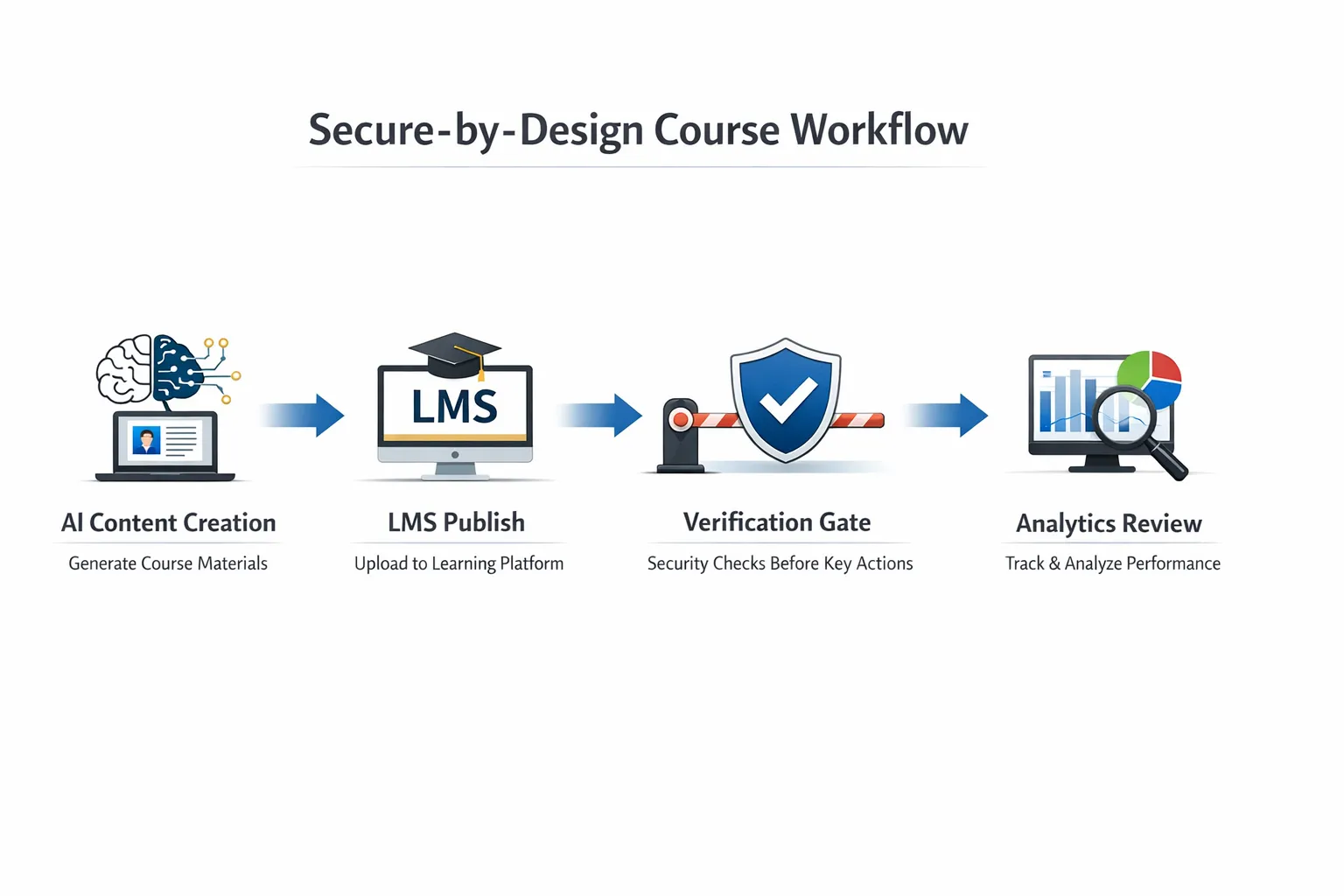
Content creation using AI can be both fast and safe if you add protection where it matters most. Use this pragmatic workflow.
1) Draft with AI, keep your data clean
- Use AI to ideate, outline and produce first drafts of lessons, slides and scripts.
- Avoid pasting sensitive student data or unreleased course IP into third-party prompts.
- Keep human-in-the-loop for fact-checking, tone and pedagogy.
Deep dive: see our Complete Guide to AI Content Creation Workflow for 2025.
2) Publish inside an LMS with access control
- Host premium modules behind authentication and role-based access.
- Let search engines index your public landing pages, not your paid assets.
- Use signed or expiring URLs for file delivery where your platform supports it.
Practical setup tips: Content Creation with AI, Securely Shared with Students.
3) Add a human check at the gates that bots target
This is the smallest change with the biggest impact. Insert a lightweight human verification step before access to sensitive actions like signups, logins after multiple failures, downloads and coupon use. A simple gate blocks automated scripts without punishing genuine learners.
- Bot Verification provides this exact control, a simple verification step that confirms a user is not a robot before granting access. It complements your existing authentication and access control without redesigning your site.
- Start where the risk is highest, then expand if needed. For many course businesses, that means free downloads, membership signup and password reset flows.
Related playbooks: AI Assistant Strategies for Frictionless Verification and Best AI Tools to Stop Spam Signups.
4) Monitor and iterate without adding friction
- Track conversion before and after each gate, not just spam reduction.
- Add per-endpoint gating based on behaviour, for example, only after several failed login attempts.
- Keep accessibility in mind and offer an alternative verification path where appropriate.
For a broader strategy that pairs growth with safety, read Using AI for Content Creation Without Inviting Bots.
Where to guard your library, and how
| Endpoint or Action | Common Automated Abuse | Low‑Friction Control | Notes |
|---|---|---|---|
| Newsletter or lead magnet signup | Spam signups, list pollution | Human verification gate before form submit | Improves list quality and sender reputation |
| Login | Credential stuffing, account takeovers | Gate after 2 to 3 failed attempts | Avoid gating every login to protect UX |
| Password reset | Enumeration, account takeover | Gate reset request | Pair with rate limiting |
| Checkout and coupon apply | Card testing, coupon abuse | Gate when coupon is applied or at payment step | A/B test to confirm no conversion drop |
| Free file or resource download | Scraping, hotlinking | Gate prior to download, use expiring links | Gate the first download per session |
| Premium lesson playback | Automated scraping | Authentication and access control | Consider watermarking via your video host |
If you need a full stack of controls beyond verification, we compare options in Top AI Tools for Gated Course Protection. Verification does not replace DRM or your LMS, it complements them.
Mini product review: Bot Verification for course libraries
If you only add one layer today, make it a human verification gate.
- What it is: a simple verification step that confirms users are not robots before granting access.
- Core fit for course creators: protect high-target endpoints like signups, logins after failures, free downloads and coupon use without redesigning your LMS.
- Strengths: minimal setup, blocks automated abuse early, works alongside existing user authentication and access control.
- Trade‑offs: does not prevent manual leaks or piracy by determined individuals, and it is not a substitute for identity checks in proctoring or high-stakes exams.
- Verdict: a high‑leverage, low‑friction control for most course businesses. Start here, then layer additional protections only if your risk profile demands them.
A simple 30‑minute rollout plan
- Map your funnel endpoints: signup, login, reset, checkout, download, lesson view.
- Pick two gates to start, usually signup and free download.
- Insert a verification step before those actions. Keep copy friendly and concise.
- Add a clear privacy notice about what is checked and why.
- Test on mobile, low‑bandwidth connections and screen readers.
- Monitor conversion and spam metrics for two weeks, then decide where to add a third gate or relax triggers.
Measuring the impact without harming growth
Track these metrics to verify the change is working for both safety and sales:
- Reduction in spam signups and bounced welcome emails.
- Change in successful logins and password‑reset volume.
- Checkout completion rate and chargebacks over 30 days.
- Number of attempted downloads per unique session or user.
- Support tickets related to access issues.
- Page load time and mobile completion rate on gated steps.
Common mistakes to avoid
- Gating everything. Only protect the few actions that draw abuse, then expand if data supports it.
- Ignoring accessibility. Some users cannot pass visual puzzles. Offer an alternative path and follow W3C guidance on CAPTCHA accessibility.
- Adding verification after payment but not before. Stopping card testing earlier saves fees and chargebacks.
- Forgetting privacy messaging. State clearly that you run a lightweight human check to protect students and content.
- No iteration plan. Review conversion and bot activity weekly for the first month, then monthly.
Frequently Asked Questions
Will a verification step hurt my SEO? Gating sensitive actions does not affect SEO because search engines do not need to submit forms or access paid content. Keep public pages crawlable and only gate interactive steps.
Does verification replace authentication? No. Use verification to block automated abuse, then authentication and access control to ensure only enrolled students access premium modules.
What about accessibility and mobile users? Choose a lightweight approach and offer an alternative path for users who cannot complete the default check. Test on mobile devices and assistive tech before launch.
Can a human still steal my content after passing verification? Verification stops bots, not determined individuals. Use your LMS permissions, expiring links and watermarking via your video or document host to discourage leaks.
Where should I place the first gate? Start with signup and free downloads, then add login gating after several failed attempts and verification on coupon apply if you see abuse.
How quickly will I see results? Most creators see instant drops in spam signups and automated download attempts. Review impact after two weeks to fine‑tune triggers and copy.
Is this enough for high‑stakes exams? Probably not on its own. Pair verification with identity checks or proctoring if you run formal assessments.
Keep creating with AI, while your library stays protected
You do not need to choose between speed and safety. Pair your AI content workflow with one smart gate at the moments that matter. It keeps bots out and real students in, without weighing down the experience.
Add a simple, student‑friendly verification step to your course today with Bot Verification. If you want help deciding exactly where to place your first gate, browse our guides above or get in touch for a quick walkthrough.






